☰
Current Page
Main Menu
Home
Home
Editing 6.0-Summary-Tab
Edit
Preview
H1
H2
H3
default
Set your preferred keybinding
default
vim
emacs
markdown
Set this page's format to
AsciiDoc
Creole
Markdown
MediaWiki
Org-mode
Plain Text
RDoc
Textile
Rendering unavailable for
BibTeX
Pod
reStructuredText
Help 1
Help 1
Help 1
Help 2
Help 3
Help 4
Help 5
Help 6
Help 7
Help 8
Autosaved text is available. Click the button to restore it.
Restore Text
#6.0 Summary Tab [[_TOC_]] ##About In the Summary tab (shown below), a table can be created that summarizes the chosen fields using different functions (Ex: Average, Count, Maximum, and so on). You can also make a group of fields by choosing the Group option from the Function dropdown menu. Most actions and properties available in the Summary Tab are available in the Fields Tab. The only difference is the removal of the Quick Add and Pivot capabilities, and addition of the **Add Deltas** checkbox For more information on performing a Summary, refer to the [[Fields section|/Guides/ReportDesign/3.0-fields-tab]]. ##6.1 Deltas The word delta means "a change in". Any time there is a change in a quantity, that change is calculated by taking the latter value of that quantity and subtracting from it the prior value of that quantity. This can be used in a summary report by checking "Add Deltas" checkbox. 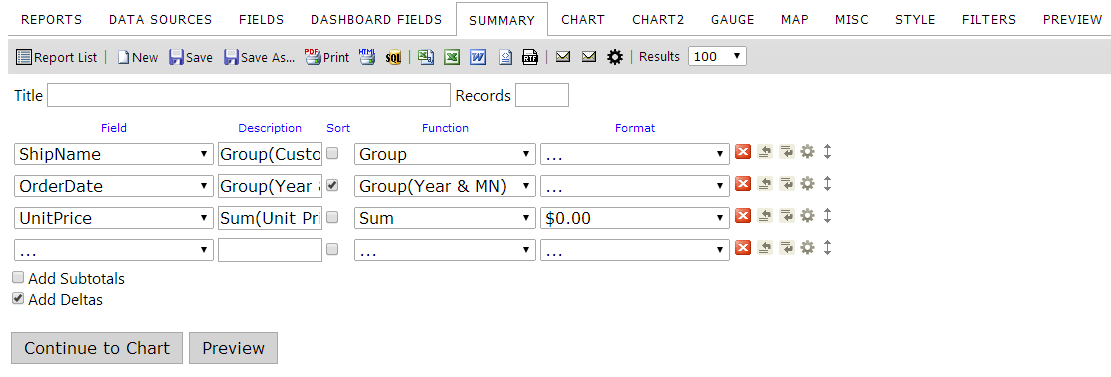 **Result:** The Deltas, denoted with parenthesis, show the change in the Unit Price over a period of time. 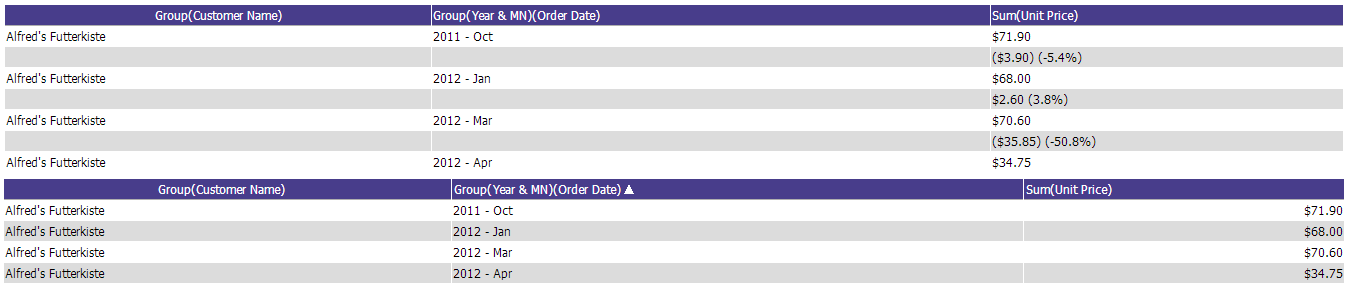
Uploading file...
Header
 **This documentation is for the legacy Izenda 6 product. Documentation for the new Izenda 7 product can be found at [[https://www.izenda.com/docs/|https://www.izenda.com/docs/]]**
Sidebar
 --- * [[Izenda 7 Series Documentation|https://www.izenda.com/docs/]] * [[Release Notes]] * [[Upgrade Best Practices|FAQ/Izenda-Update-Best-Practices]] * [[FAQ]] * [[Tutorials]] * [[The Izenda API|/API/AdHocConfig]] * [[The AdHocSettings class|/API/AdHocSettings]] * [Developer Links and Guides](/Guides/Developer-Links-and-Guides) * [[Known Issues]] --- * <a href="http://www.izenda.com" rel="nofollow" target="_blank">Izenda Website</a> * [Product Video](https://www.youtube.com/watch?v=X3-yWFq0w5A) * <a href="http://www.izenda.com/blog" rel="nofollow" target="_blank">Izenda Blog</a> * <a href="http://www.izenda.com/company/" rel="nofollow" target="_blank">About Us</a> * <a href="http://www.izenda.com/contact-us/" rel="nofollow" target="_blank">Contact Us</a> --- * [Guide To Report Design](/Guides/ReportDesign) * [Making Custom Forms Video](http://www.youtube.com/watch?v=5b2axJlgdFs) --- * [[Acknowledgements]]
Edit message:
Cancel