☰
Current Page
Main Menu
Home
Home
Editing MVC-Integration
Edit
Preview
H1
H2
H3
default
Set your preferred keybinding
default
vim
emacs
markdown
Set this page's format to
AsciiDoc
Creole
Markdown
MediaWiki
Org-mode
Plain Text
RDoc
Textile
Rendering unavailable for
BibTeX
Pod
reStructuredText
Help 1
Help 1
Help 1
Help 2
Help 3
Help 4
Help 5
Help 6
Help 7
Help 8
Autosaved text is available. Click the button to restore it.
Restore Text
#Izenda MVC Kit Integration Guide Phase I [[_TOC_]] ##About **IF UPGRADING:** Please be sure to follow our upgrade best practices: **http://wiki.izenda.com/FAQ/Izenda-Update-Best-Practices** **ALSO PLEASE NOTE:** Developers will want to use caution when implementing customizations to the standard MVC kit involving asynchronous methods. Due to the way asynchronous methods are handled in ASP.NET MVC, constructs such as SessionState and HttpContext are not available due to the process running in a parallel thread to the main thread. When these are unavailable then the call could result in an HttpException reading "Cannot redirect after HTTP headers have been sent" or something similar. Therefore, it is inadvisable to use asynchronous calls to process MVC actions involving the Izenda product code. For more information on asynchronous calls in ASP.NET MVC, there is a tutorial on it here This guide is designed to instruct first-time users how to integrate Izenda with simple MVC application. This guide will use Izenda mvc5r3 kit, a simple MVC application, which is downloadable at [http://wiki.izenda.com/Guides/MVC-Integration/Sample_MVCApp.zip](http://wiki.izenda.com/Guides/MVC-Integration/Sample_MVCApp.zip), and Visual Studio Express 2013 for Web. **PLEASE NOTE** This guide is not universal, nor does it describe a complete integration. There are many nuanced elements of an integration, including, but not limited to, Visual Studio versions, existing code in your application(s), and server environments. This guide is intended to be a starting point in integrating Izenda, with the understanding that some deviations will likely be necessary. [mvc5r3 download link](http://archives.izenda.com/ri/mvc/mvc5r3/) ##Instructions ###Step 1. Open the simple MVC application in Visual Studio 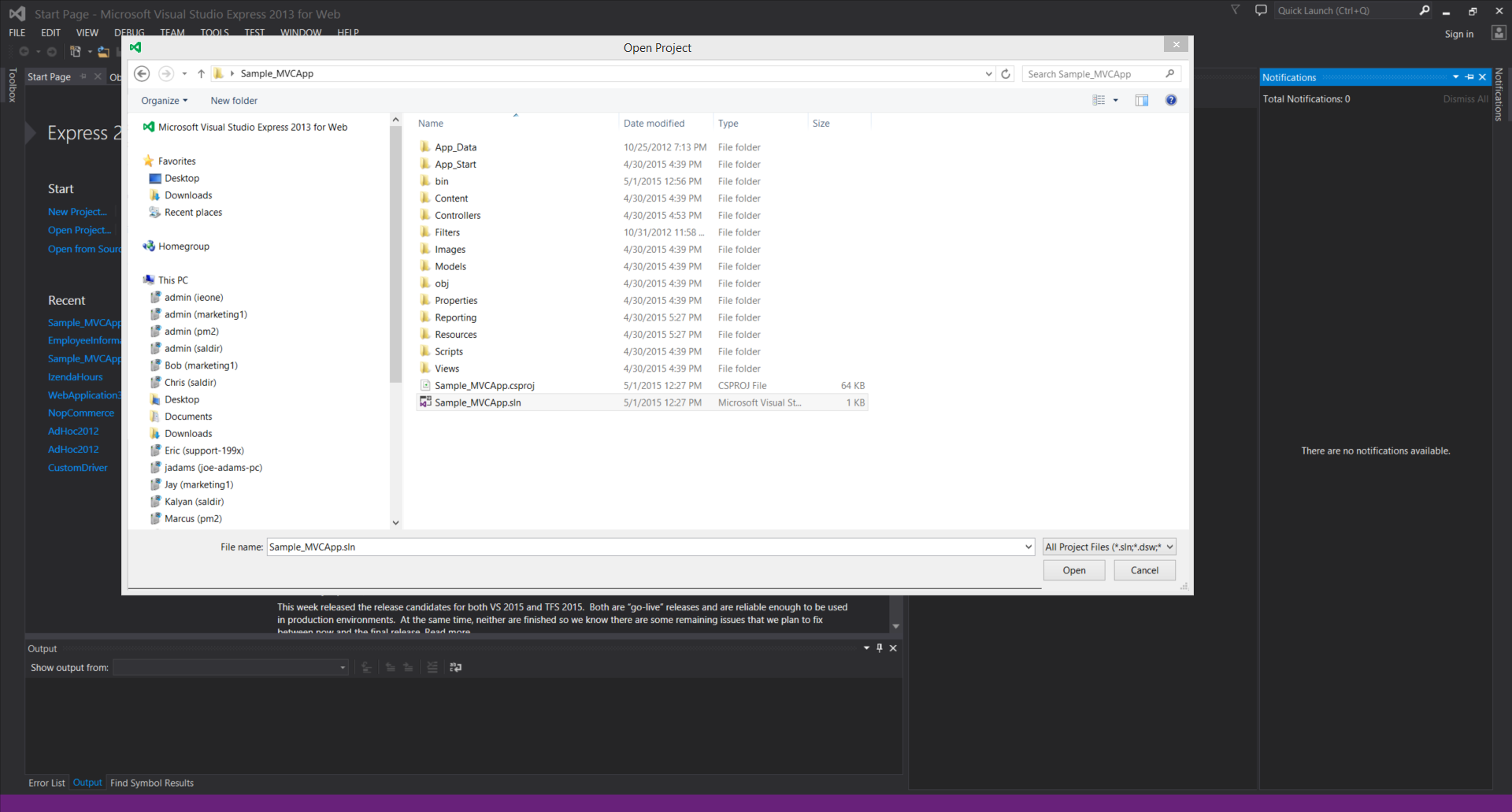 ###Step 2. Add Izenda.AdHoc.dll and log4net.dll to the project’s reference Right click on 'References' under project name in Solution Explorer window, then click 'Add Reference'. Click the 'Browse' button and browse to \mvc5r3\bin, where Izenda.AdHoc.dll is. Add it to reference. ###Step 3. Add IzendaReportingController.cs to the project IzendaReportingController.cs is in mvc5r3\Controllers. Add it under Controllers as below (You can add by either 'drag and drop' or 'right click->Add->Existing Item) Note: 6.9 integrations also include IzendaStaticResourcesController.cs. This is not necessary in 6.10 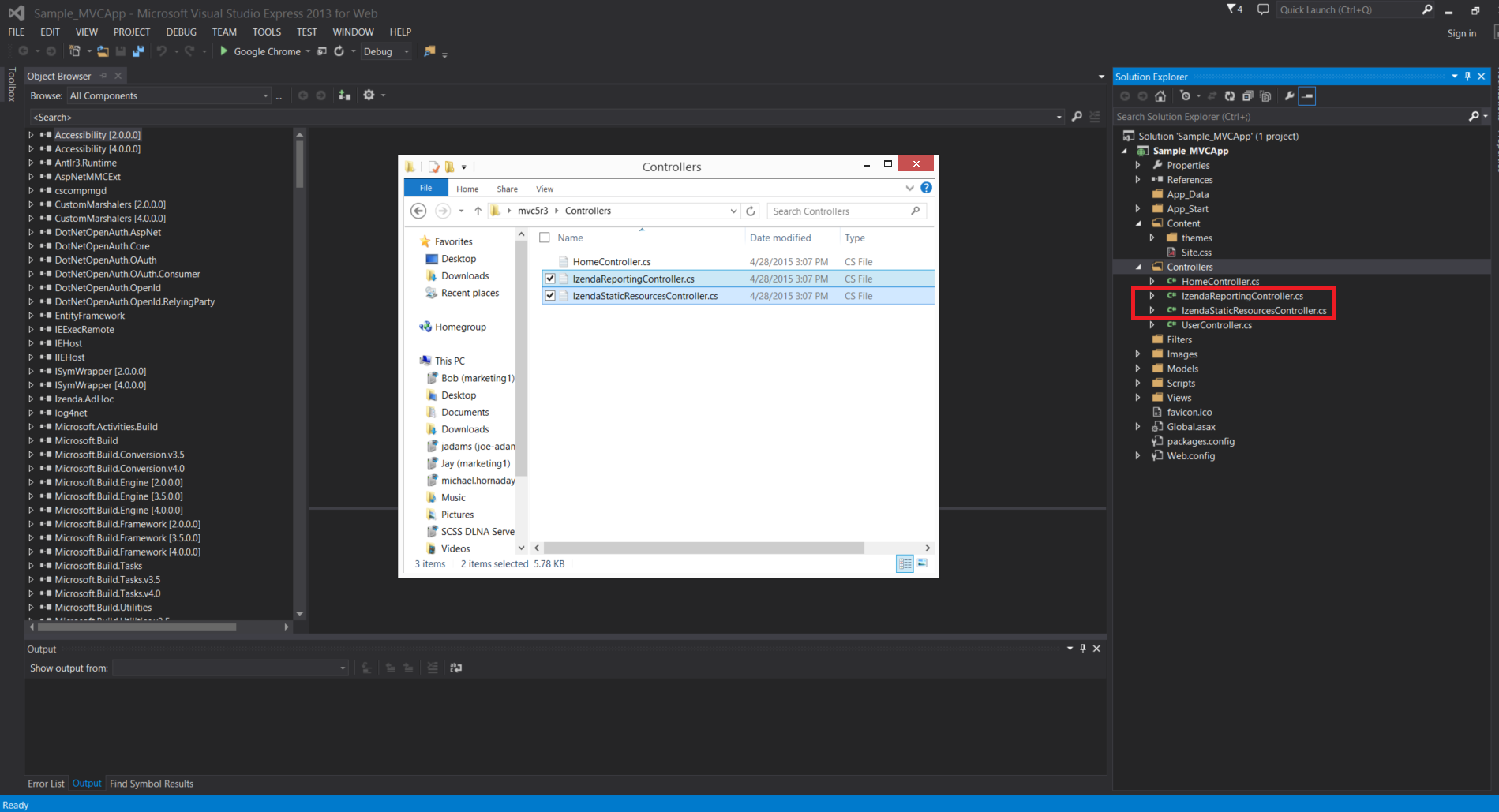 ###Step 4. Change Namespaces of Controllers Change namespace of IzendaReportingController.cs to match all other controllers in the application. Ex) if the namespace is in other controller file is ABC.Controllers, then MVC3SK.Controllers -> ABC.Controllers Note: 6.9 integrations also include IzendaStaticResourcesController.cs. This is not necessary in 6.10 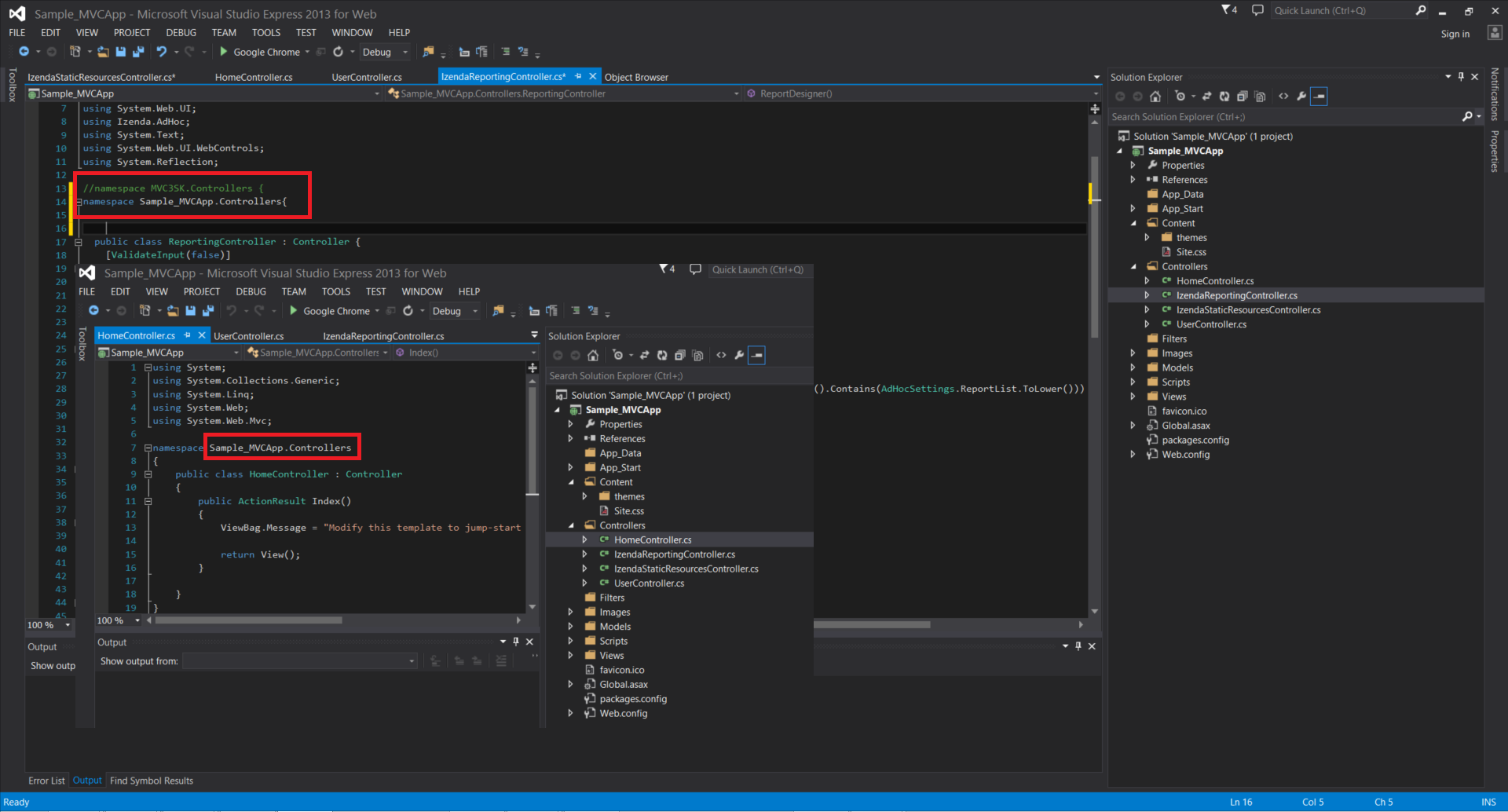 ###Step 5. Add Reporting and Resources folders to the project **a.** Add the folders 'Reporting' and 'Resources' from \mvc5r3 to project by dragging and dropping them in Solution Explorer as below. You should also copy or create a 'Reports' folder. 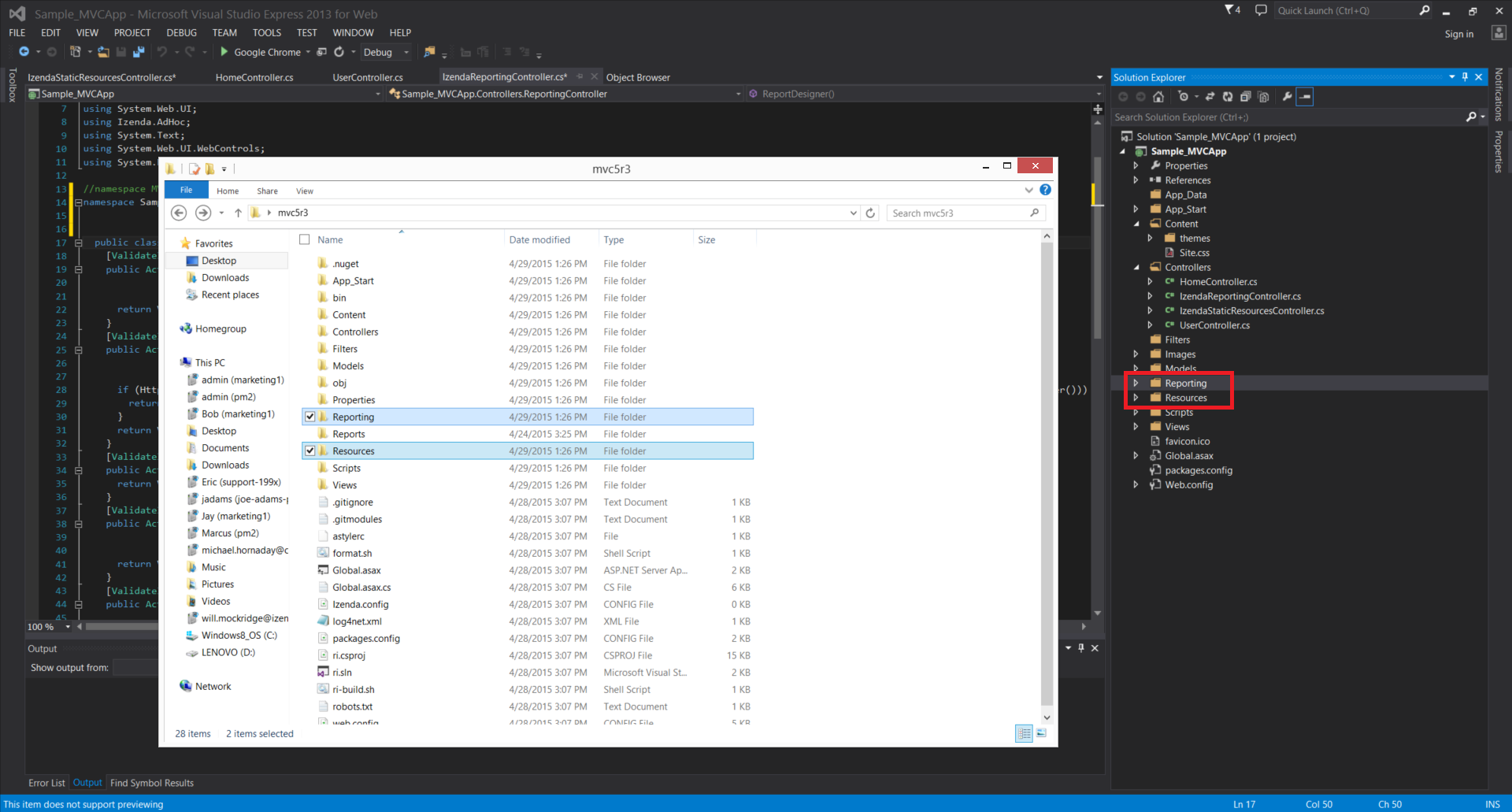 **b.** In Solution Explorer, exclude Dashboards-Body.ascx and Dashboards-Head.ascx from \Resources\html by right click on them and click 'Exclude From Project' 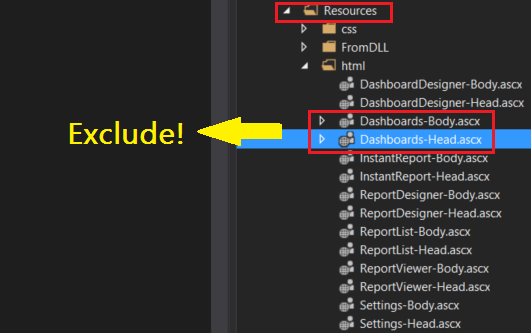 **** If Izenda toolbar icons don't appear, check if Reporting folder contains rs.aspx and Resources folder **** ###Step 6. Add mvc5r3\Views\Reporting folder Add the Reporting folder in mvc5r3\Views to the project's Views 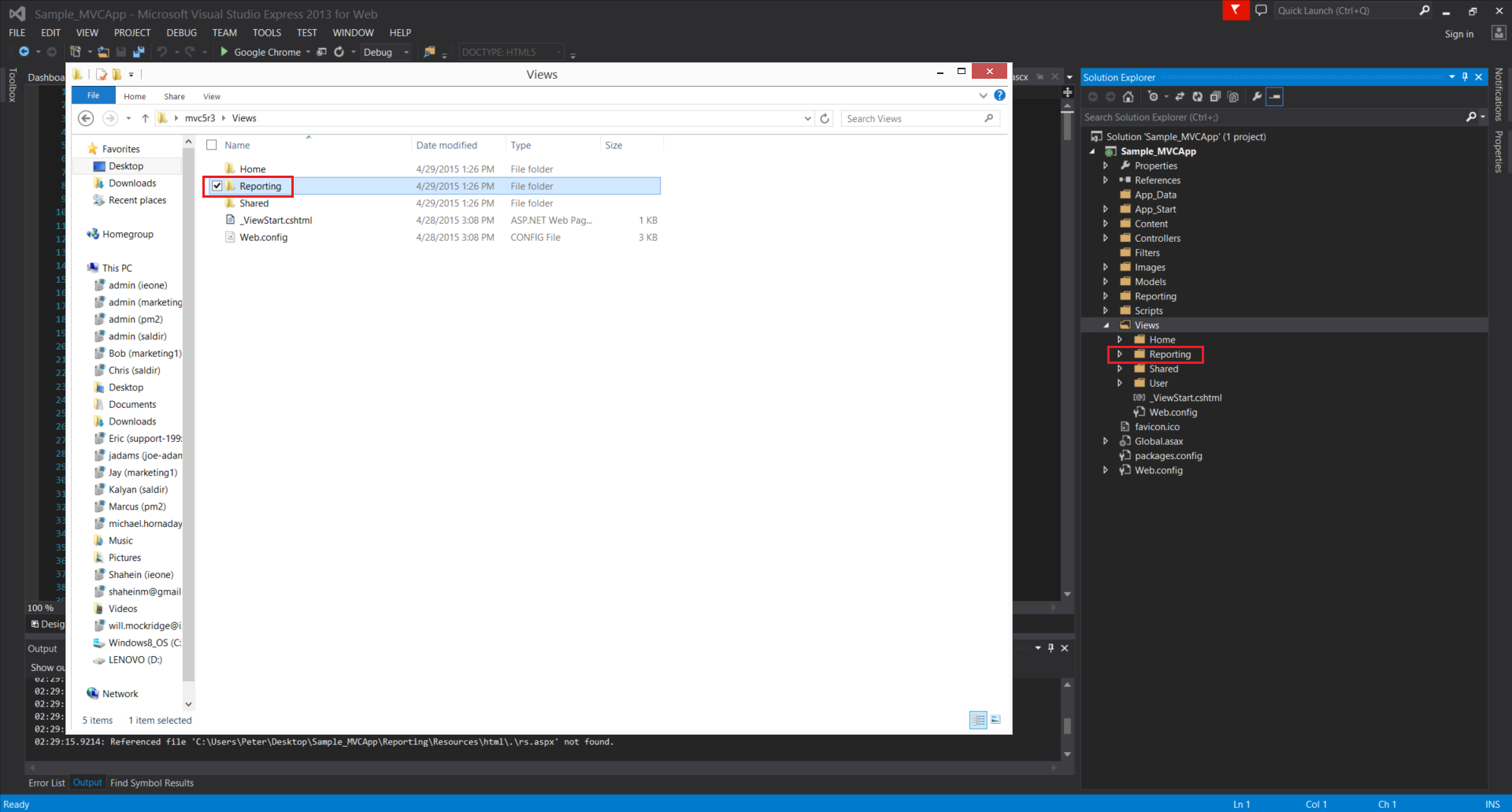 ###Step 7. Add _sitelayout to project’s Views\Shared Add _sitelayout from mvc5r3\Views\Shared to project’s Views\Shared 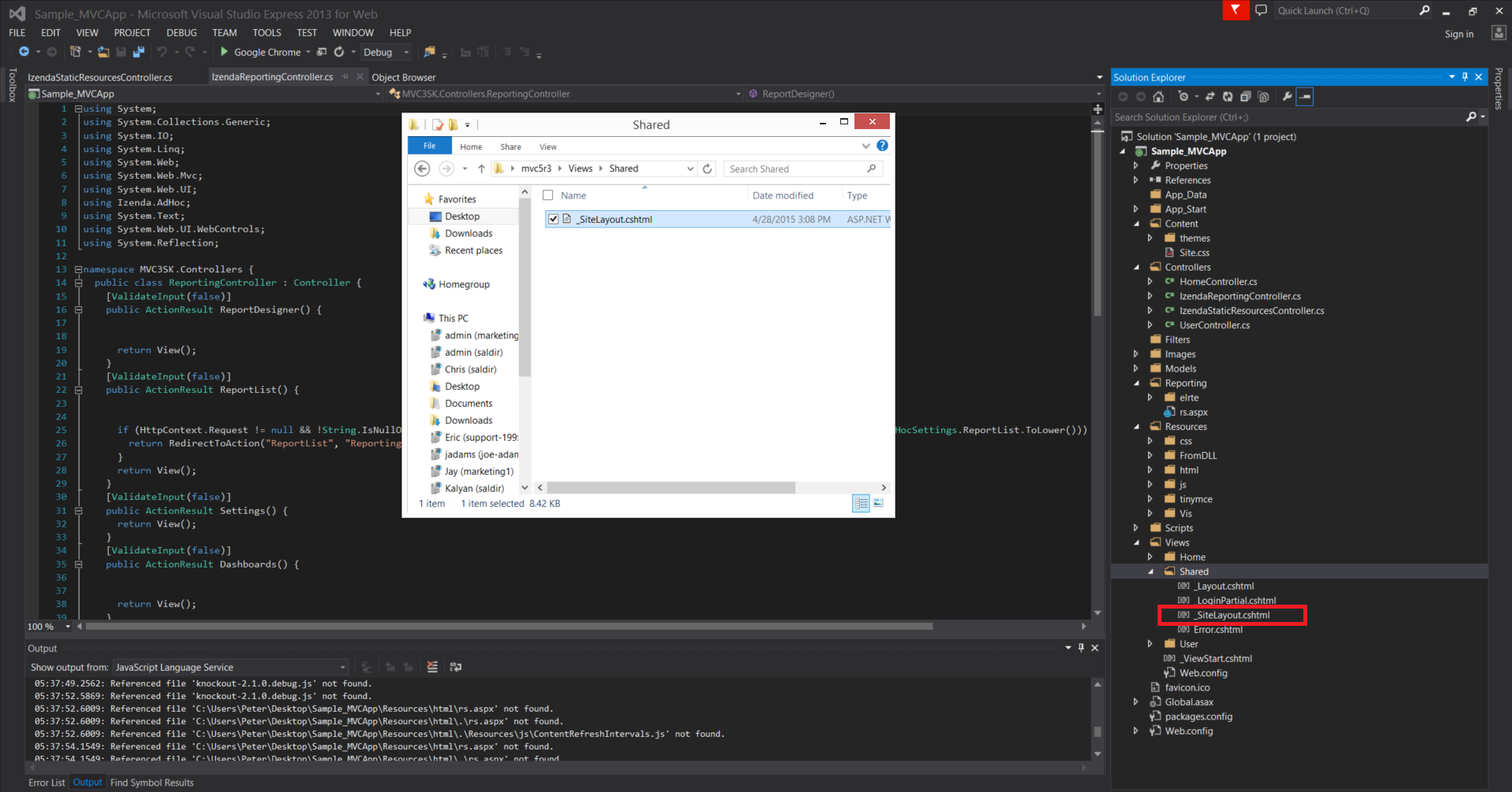 ###Step 8. Copy code from Global.asax except the first line **a.** Copy code from Global.asax except the first line ###Global.asax from mvc5r3(C♯) ```csharp <%@ Application Codebehind="Global.asax.cs" Inherits="MVC4Razor2.MvcApplication" Language="C#" %> //Copy except this line <%@ Import Namespace="Izenda.AdHoc"%> <%@ Import Namespace="System.IO"%> <script runat="server"> void Application_AcquireRequestState(object sender, EventArgs e) { CustomAdHocConfig.InitializeReporting(); } [Serializable] public class CustomAdHocConfig : FileSystemAdHocConfig { public static void InitializeReporting() { if (HttpContext.Current.Session == null || HttpContext.Current.Session["ReportingInitialized"] != null) return; AdHocSettings.LicenseKey = "INSERT_LICENSE_KEY_HERE"; AdHocSettings.SqlServerConnectionString = @"INSERT_CONNECTION_STRING_HERE"; AdHocSettings.GenerateThumbnails = true; AdHocSettings.ShowSimpleModeViewer = true; AdHocSettings.IdentifiersRegex = "^.*[iI][Dd]$"; AdHocSettings.TabsCssUrl = "/Resources/css/tabs.css"; AdHocSettings.ReportCssUrl = "../Resources/css/Report.css"; AdHocSettings.ShowBetweenDateCalendar = true; AdHocSettings.DashboardViewer = "Dashboards"; AdHocSettings.ReportViewer = "ReportViewer"; AdHocSettings.InstantReport = "InstantReport"; AdHocSettings.ReportDesignerUrl = "ReportDesigner"; AdHocSettings.DashboardDesignerUrl = "DashboardDesigner"; AdHocSettings.ReportList = "ReportList"; AdHocSettings.SettingsPageUrl = "Settings"; AdHocSettings.ParentSettingsUrl = "Settings"; AdHocSettings.ResponseServer = "rs.aspx"; AdHocSettings.ReportsPath = Path.Combine(HttpContext.Current.Server.MapPath("~/"), "Reports"); AdHocSettings.PrintMode = PrintMode.Html2PdfAndHtml; AdHocSettings.ChartingEngine = ChartingEngine.HtmlChart; AdHocSettings.AdHocConfig = new CustomAdHocConfig(); HttpContext.Current.Session["ReportingInitialized"] = true; } } </script> ``` **b.** Paste it in project’s Global.asax ###Global.asax from Sample_MVCApp(C♯) ```csharp <%@ Application Codebehind="Global.asax.cs" Inherits="Sample_MVCApp.MvcApplication" Language="C#" %> //THE BELOW IS PASTED CODE <%@ Import Namespace="Izenda.AdHoc"%> <%@ Import Namespace="System.IO"%> <script runat="server"> void Application_AcquireRequestState(object sender, EventArgs e) { CustomAdHocConfig.InitializeReporting(); } [Serializable] public class CustomAdHocConfig : FileSystemAdHocConfig { public static void InitializeReporting() { if (HttpContext.Current.Session == null || HttpContext.Current.Session["ReportingInitialized"] != null) return; AdHocSettings.LicenseKey = "INSERT_LICENSE_KEY_HERE"; AdHocSettings.SqlServerConnectionString = @"INSERT_CONNECTION_STRING_HERE"; AdHocSettings.GenerateThumbnails = true; AdHocSettings.ShowSimpleModeViewer = true; AdHocSettings.IdentifiersRegex = "^.*[iI][Dd]$"; AdHocSettings.TabsCssUrl = "/Resources/css/tabs.css"; AdHocSettings.ReportCssUrl = "../Resources/css/Report.css"; AdHocSettings.ShowBetweenDateCalendar = true; AdHocSettings.DashboardViewer = "Dashboards"; AdHocSettings.ReportViewer = "ReportViewer"; AdHocSettings.InstantReport = "InstantReport"; AdHocSettings.ReportDesignerUrl = "ReportDesigner"; AdHocSettings.DashboardDesignerUrl = "DashboardDesigner"; AdHocSettings.ReportList = "ReportList"; AdHocSettings.SettingsPageUrl = "Settings"; AdHocSettings.ParentSettingsUrl = "Settings"; AdHocSettings.ResponseServer = "rs.aspx"; AdHocSettings.ReportsPath = Path.Combine(HttpContext.Current.Server.MapPath("~/"), "Reports"); AdHocSettings.PrintMode = PrintMode.Html2PdfAndHtml; AdHocSettings.ChartingEngine = ChartingEngine.HtmlChart; AdHocSettings.AdHocConfig = new CustomAdHocConfig(); HttpContext.Current.Session["ReportingInitialized"] = true; } } </script> ``` ###Step 9. Change the LicenseKey and ConnnectionString in Global.asax of project To get a new trial key, you may contact [sales@izenda.com](mailto:sales@izenda.com). ```csharp AdHocSettings.LicenseKey = "INSERT_LICENSE_KEY_HERE"; AdHocSettings.SqlServerConnectionString = @"INSERT_CONNECTION_STRING_HERE"; ``` ###Step 10. Run it! After Step#9, the Sample_MVCApp should build and work without a problem. To see if Izenda is integrated with this web application, **a.** Open _Layout.cshtml in Views\Shared\ in Solution Explorer **b.** Add an ActionLink which leads to Izenda as below ```html <li>@Html.ActionLink("Home", "Index", "Home")</li> <li>@Html.ActionLink("About", "About", "Home")</li> <li>@Html.ActionLink("Contact", "Contact", "Home")</li> <li>@Html.ActionLink("Izenda", "ReportList", "Reporting")</li> //Add this line ``` **c.** Notice 'Izenda' item added to the menu as below. Click it and see if it leads to Izenda ReportList page. 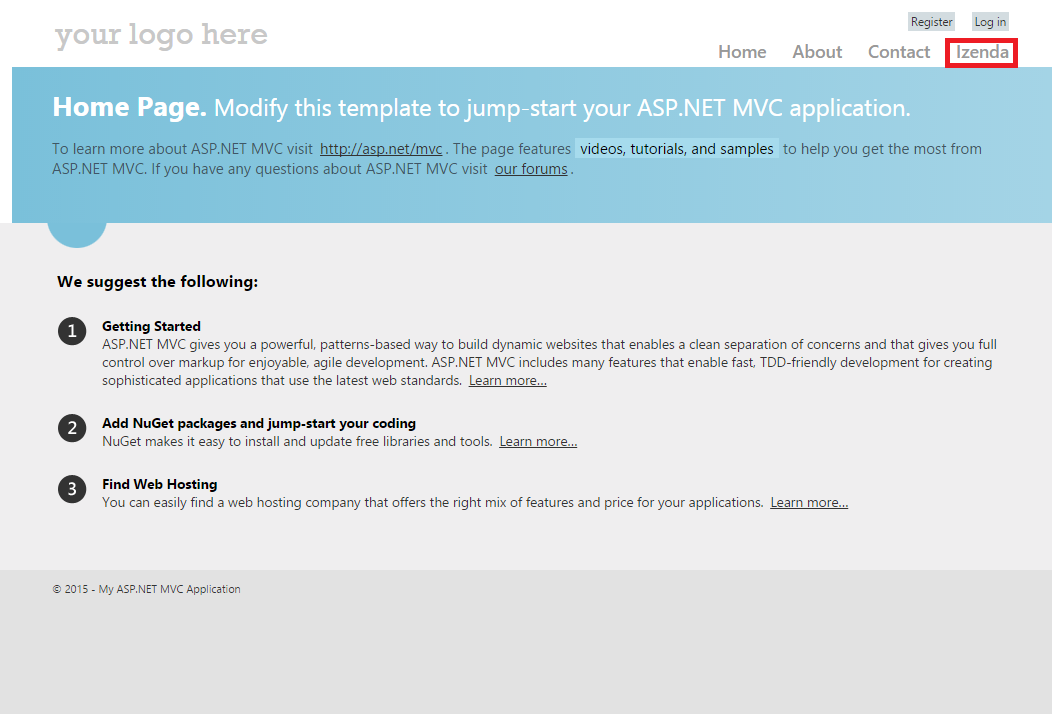 ###Step 11. Change the Logo **a.** Open _SiteLayout.cshtml in Views\Shared\ in Solution Explorer **b.** Find below two lines in the body of the html and edit the source image directory, alt, and the link address for top-right image ```html <img src="~/Resources/FromDLL/Resources/ModernImages/bi-logo.png" alt="Business intelligence" /> //top-left image <a href="http://izenda.com" style="position: relative; top: 4px;"><img class="right-logo" src="~/Resources/FromDLL/Resources/ModernImages/IzendaNewLogoBlue.png" alt="Izenda Reports" /></a> //top-right image ``` **c.** Run the application and check if the images appear as edited. In this guide, two images, Logo.png and SeaEagle.png, were put in the project folder, /Sample_MVCApp, and the above two lines were edited as below ```html <img src="~/Logo.png" alt="Angry Sea Eagle" /> //top-left image <a href="http://SeaEagle.com" style="position: relative; top: 4px;"><img class="right-logo" src="~/SeaEagle.png" alt="SeaEagle.Com" /></a> //top-right image ``` Two top logos have changed as below 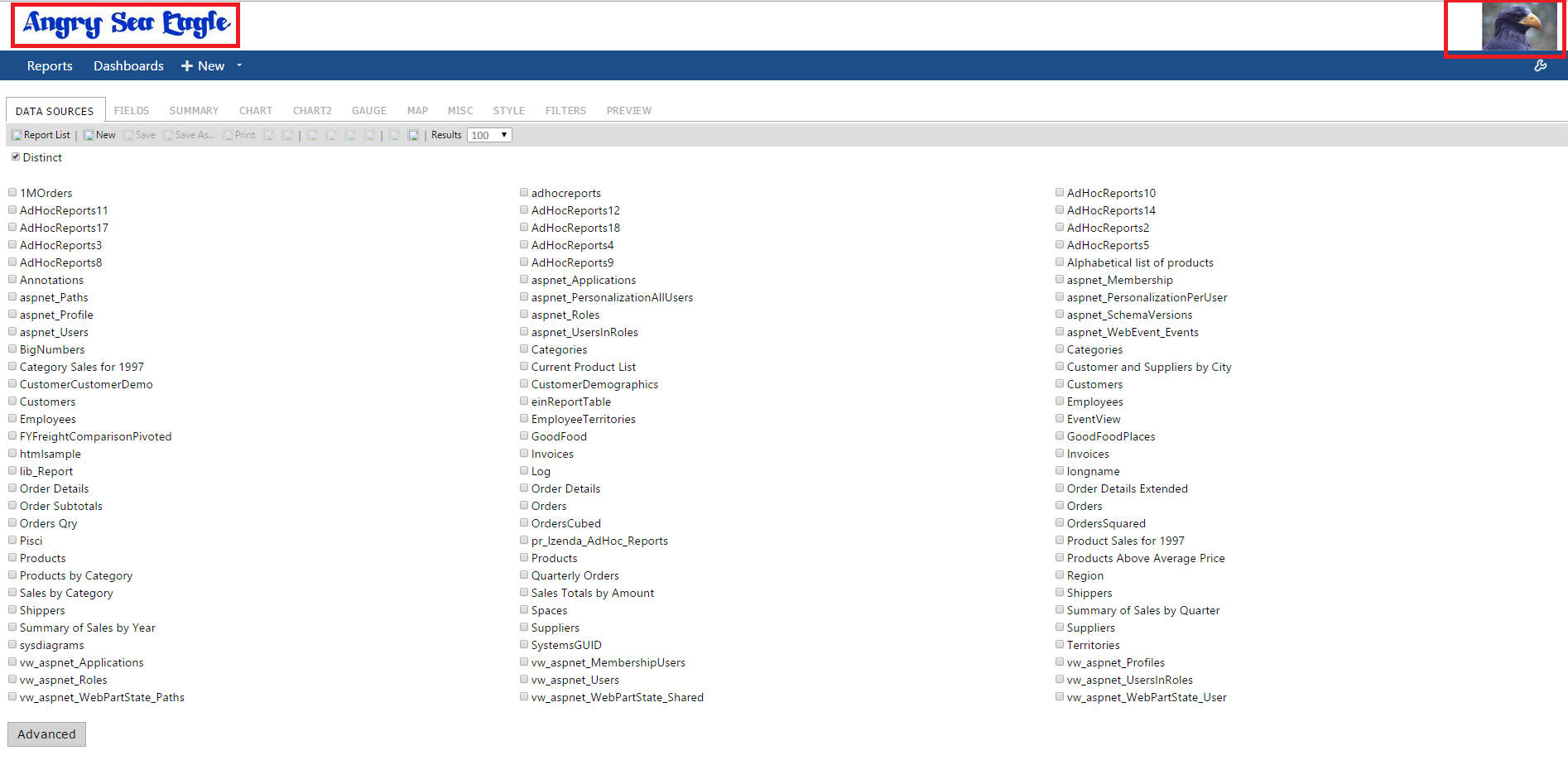 ##Developers notes Developers will want to use caution when implementing customizations to the standard MVC kit involving asynchronous methods. Due to the way asynchronous methods are handled in ASP.NET MVC, constructs such as SessionState and HttpContext are not available due to the process running in a parallel thread to the main thread. When these are unavailable then the call could result in an HttpException reading "Cannot redirect after HTTP headers have been sent" or something similar. Therefore, it is inadvisable to use asynchronous calls to process MVC actions involving the Izenda product code. For more information on asynchronous calls in ASP.NET MVC, there is a tutorial on it [[here|https://docs.microsoft.com/en-us/aspnet/mvc/overview/performance/using-asynchronous-methods-in-aspnet-mvc-4]] <!-- [Izenda MVC Kit Integration Guide Phase II](http://wiki.izenda.com/Guides/MVC-Integration/Phase-II-Draft) -->
Uploading file...
Header
 **This documentation is for the legacy Izenda 6 product. Documentation for the new Izenda 7 product can be found at [[https://www.izenda.com/docs/|https://www.izenda.com/docs/]]**
Sidebar
 --- * [[Izenda 7 Series Documentation|https://www.izenda.com/docs/]] * [[Release Notes]] * [[Upgrade Best Practices|FAQ/Izenda-Update-Best-Practices]] * [[FAQ]] * [[Tutorials]] * [[The Izenda API|/API/AdHocConfig]] * [[The AdHocSettings class|/API/AdHocSettings]] * [Developer Links and Guides](/Guides/Developer-Links-and-Guides) * [[Known Issues]] --- * <a href="http://www.izenda.com" rel="nofollow" target="_blank">Izenda Website</a> * [Product Video](https://www.youtube.com/watch?v=X3-yWFq0w5A) * <a href="http://www.izenda.com/blog" rel="nofollow" target="_blank">Izenda Blog</a> * <a href="http://www.izenda.com/company/" rel="nofollow" target="_blank">About Us</a> * <a href="http://www.izenda.com/contact-us/" rel="nofollow" target="_blank">Contact Us</a> --- * [Guide To Report Design](/Guides/ReportDesign) * [Making Custom Forms Video](http://www.youtube.com/watch?v=5b2axJlgdFs) --- * [[Acknowledgements]]
Edit message:
Cancel