☰
Current Page
Main Menu
Home
Home
Editing Forms-Feature
Edit
Preview
H1
H2
H3
default
Set your preferred keybinding
default
vim
emacs
markdown
Set this page's format to
AsciiDoc
Creole
Markdown
MediaWiki
Org-mode
Plain Text
RDoc
Textile
Rendering unavailable for
BibTeX
Pod
reStructuredText
Help 1
Help 1
Help 1
Help 2
Help 3
Help 4
Help 5
Help 6
Help 7
Help 8
Autosaved text is available. Click the button to restore it.
Restore Text
#Izenda FORMS [[_TOC_]] ##14.1 Introduction To FORMS Izenda FORMS is an add-on to Izenda REPORTS. It allows the user to input HTML5 into a browser-based HTML designer and then use that code to build an Izenda form report. Izenda’s point-and-click interface is designed for the standard business user, with advanced options available for those with greater access and skill. Izenda FORMS is one of these advanced options. **FORMS Design NOTE1:** Though a basic user can easily make changes to existing forms, designing new forms does require a user who is comfortable with HTML5. Many users will never design FORMS, but simply make modifications to current core FORMS. **FORMS Design NOTE2:** Izenda FORMS will override the normal reporting behavior within Izenda when a FORM is attached to a report; the FORM is what the engine renders. To use a standard Izenda report in tandem with a FORM, you must call the report into the HTML FORM itself. ##Features - Create WYSIWYG forms using HTML. - Import existing HTML forms and push data from your database into specific form locations. - Utilize our high quality HTML->PDF rendering engine. - Create, and easily customize, pixel perfect, printer-friendly, dynamic web forms to deliver to your end users. - Create Master Detail Reports. - Embed Sub-Reports and use smart tags. - Employ flexible filters and high performance repeaters. - Customize the product through our rich API. 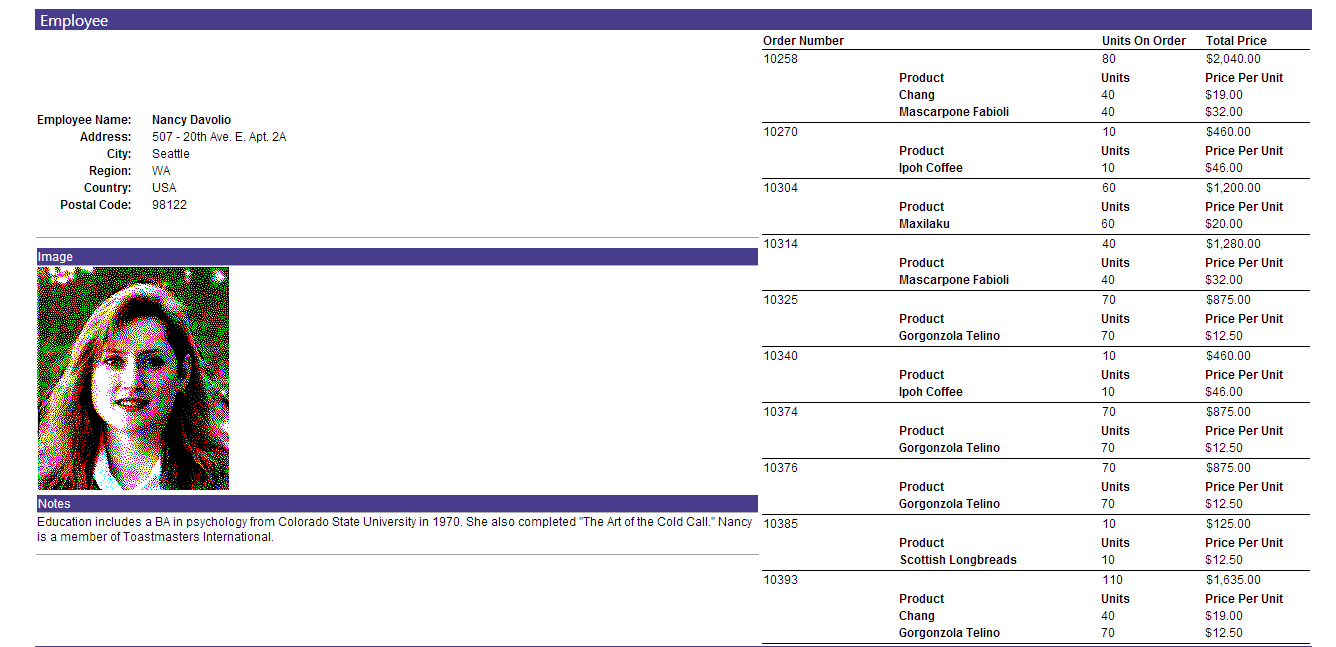 ##Forms Tutorials [Basic FORMS Creation](http://wiki.izenda.com/Guides/ReportDesign/14.0-Izenda-FORMS#14.2-Basic-FORMS-Reports) [Advanced FORMS Creation](http://wiki.izenda.com/Guides/ReportDesign/14.0-Izenda-FORMS#14.3-Advanced-FORMS-Concepts) [Video Tutorials](http://wiki.izenda.com/Guides/ReportDesign/14.0-Izenda-FORMS#Video-Tutorials) ## Special Note on Fonts You can add a font selector if you open the file RichEditorPopup.js in Resources\js, locate the line which starts with: toolbar: "save cancel insertfile undo redo | style.......... and add to it " | fontselect | fontsizeselect"
Uploading file...
Header
 **This documentation is for the legacy Izenda 6 product. Documentation for the new Izenda 7 product can be found at [[https://www.izenda.com/docs/|https://www.izenda.com/docs/]]**
Sidebar
 --- * [[Izenda 7 Series Documentation|https://www.izenda.com/docs/]] * [[Release Notes]] * [[Upgrade Best Practices|FAQ/Izenda-Update-Best-Practices]] * [[FAQ]] * [[Tutorials]] * [[The Izenda API|/API/AdHocConfig]] * [[The AdHocSettings class|/API/AdHocSettings]] * [Developer Links and Guides](/Guides/Developer-Links-and-Guides) * [[Known Issues]] --- * <a href="http://www.izenda.com" rel="nofollow" target="_blank">Izenda Website</a> * [Product Video](https://www.youtube.com/watch?v=X3-yWFq0w5A) * <a href="http://www.izenda.com/blog" rel="nofollow" target="_blank">Izenda Blog</a> * <a href="http://www.izenda.com/company/" rel="nofollow" target="_blank">About Us</a> * <a href="http://www.izenda.com/contact-us/" rel="nofollow" target="_blank">Contact Us</a> --- * [Guide To Report Design](/Guides/ReportDesign) * [Making Custom Forms Video](http://www.youtube.com/watch?v=5b2axJlgdFs) --- * [[Acknowledgements]]
Edit message:
Cancel