☰
Current Page
Main Menu
Home
Home
Editing 15.1-Expressions-Basics
Edit
Preview
H1
H2
H3
default
Set your preferred keybinding
default
vim
emacs
markdown
Set this page's format to
AsciiDoc
Creole
Markdown
MediaWiki
Org-mode
Plain Text
RDoc
Textile
Rendering unavailable for
BibTeX
Pod
reStructuredText
Help 1
Help 1
Help 1
Help 2
Help 3
Help 4
Help 5
Help 6
Help 7
Help 8
Autosaved text is available. Click the button to restore it.
Restore Text
#15.0 Expressions in Izenda ##Introducing Izenda Expressions In the Advanced Settings popup menu (accessed by clicking the gear icon on the right hand side of each field dialog in the Fields tab) we can see a text box called Expressions. 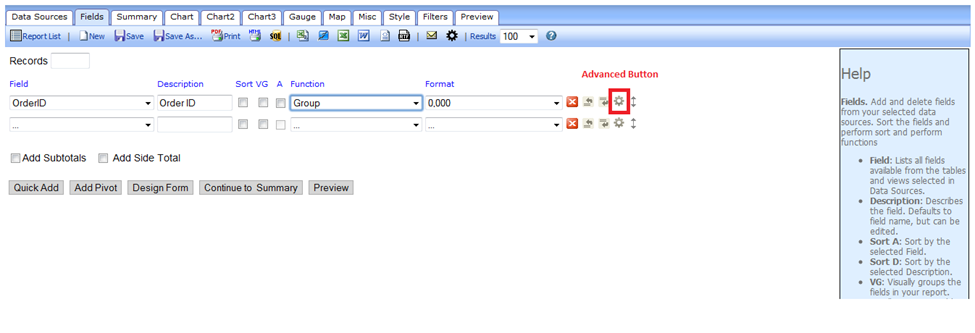  This box accepts simple code which allows us to perform calculations on fields provided by the connection string or view. An expression cannot be run on another expression. Since there can only be one layer of expressions, to process complex multipart equations some amount of calculation must be done by using a computed column from within a view. **Expressions can:** - Add, multiply, subtract, or divide two or more existing fields; - Convert integers into ratios based on other numerator/denominator fields; - Concatenate or add text to field output; **Expressions cannot:** - Create new ad-hoc fields ### Three Ways to Apply an Expression to a Field Each of these expressions operates independently of the specified field, which is ‘Freight’ in this example. Let’s say we want to get half of the freight value. We can specify the field in the expression in different ways – naming the field directly, using the ``{0}`` operator. The Expressions text box overrides the values of the field selected- so any field can be used to create calculated columns. In the Expressions text box in the Advanced Settings popup for the Freight field, we could write these expressions in different syntaxes to compute ``(½ * Freight) = x: `` ``.5 * {0} => Result is .5 * Freight`` ``.5 * Freight => Result is .5 * Freight`` Either of these examples will work to compute ``(Freight/2)``. The first example will work when applied to the Freight field only. If we enter the second variant in the Expressions box for another field (such as 'UnitPrice'), then the expressed value: ``.5 * [Freight] => Result is .5 * Freight`` The expression box overrides any unit price data with the entered formula, displaying ``(½ * Freight)``. It is not necessary to use square brackets, or parentheses, but using them is best practice to organize expressions and prevent syntax issues. --- [[15.0 Expressions in Izenda]] [[User Guides|http://wiki.izenda.com/FAQ/UserGuides]]
Uploading file...
Header
 **This documentation is for the legacy Izenda 6 product. Documentation for the new Izenda 7 product can be found at [[https://www.izenda.com/docs/|https://www.izenda.com/docs/]]**
Sidebar
 --- * [[Izenda 7 Series Documentation|https://www.izenda.com/docs/]] * [[Release Notes]] * [[Upgrade Best Practices|FAQ/Izenda-Update-Best-Practices]] * [[FAQ]] * [[Tutorials]] * [[The Izenda API|/API/AdHocConfig]] * [[The AdHocSettings class|/API/AdHocSettings]] * [Developer Links and Guides](/Guides/Developer-Links-and-Guides) * [[Known Issues]] --- * <a href="http://www.izenda.com" rel="nofollow" target="_blank">Izenda Website</a> * [Product Video](https://www.youtube.com/watch?v=X3-yWFq0w5A) * <a href="http://www.izenda.com/blog" rel="nofollow" target="_blank">Izenda Blog</a> * <a href="http://www.izenda.com/company/" rel="nofollow" target="_blank">About Us</a> * <a href="http://www.izenda.com/contact-us/" rel="nofollow" target="_blank">Contact Us</a> --- * [Guide To Report Design](/Guides/ReportDesign) * [Making Custom Forms Video](http://www.youtube.com/watch?v=5b2axJlgdFs) --- * [[Acknowledgements]]
Edit message:
Cancel