☰
Current Page
Main Menu
Home
Home
Editing reusing-filter-values-for-stored-procedures
Edit
Preview
H1
H2
H3
default
Set your preferred keybinding
default
vim
emacs
markdown
Set this page's format to
AsciiDoc
Creole
Markdown
MediaWiki
Org-mode
Plain Text
RDoc
Textile
Rendering unavailable for
BibTeX
Pod
reStructuredText
Help 1
Help 1
Help 1
Help 2
Help 3
Help 4
Help 5
Help 6
Help 7
Help 8
Autosaved text is available. Click the button to restore it.
Restore Text
#Reusing filter values for stored procedures [[_TOC_]] ##Question How can I use the same value for multiple filters using the same field when using stored procedure parameters? ##Answer Izenda does not natively support the ability to re-use filter values for multiple filters using the same stored procedure parameter. In order to emulate this behavior, custom code will be required in your Global.asax file where your CustomAdHocConfig class exists. Below is a code sample that demonstrates how to implement this behavior at a basic level. The sample may need to be modified for individual use-cases so be sure to test the code before publishing. ###C♯ example ```csharp public override void PreExecuteReportSet(ReportSet reportSet) { // ----- // Copy filter value form the filled SP parameter to the hidden parameters with the same column name // ----- // Only process SP parameters // Collect values from the visible filters var filtersToCopy = new Dictionary<string, object>(); foreach (Filter filter in reportSet.Filters) { if (filter.Parameter && filter.dbColumn != null && filter.dbColumn.Table.Type == TableType.StoredProcedure && filter.dbColumn.Name.StartsWith("PARAM_") && !filtersToCopy.ContainsKey(filter.dbColumn.Name)) filtersToCopy.Add(filter.dbColumn.Name, filter.Value); } // Pass values from the visible filters to hidden filters foreach (Filter filter in reportSet.Filters) { if (!filter.Parameter && filter.dbColumn != null && filter.dbColumn.Table.Type == TableType.StoredProcedure && filtersToCopy.ContainsKey(filter.dbColumn.Name)) filter.Value = filtersToCopy[filter.dbColumn.Name]; } } ``` ###VB.NET example ```visualbasic Public Overrides Sub PreExecuteReportSet(ByVal reportSet As ReportSet) ' ----- ' Copy filter value form the filled SP parameter to the hidden parameters with the same column name ' ----- ' Only process SP parameters ' Collect values from the visible filters Dim filtersToCopy As New Dictionary(Of String, Object)() For Each filter As Filter In reportSet.Filters If filter.Parameter _ And filter.dbColumn IsNot Nothing _ And filter.dbColumn.Table.Type = TableType.StoredProcedure _ And filter.dbColumn.Name.StartsWith("PARAM_") _ And Not filtersToCopy.ContainsKey(filter.dbColumn.Name) Then filtersToCopy.Add(filter.dbColumn.Name, filter.Value) End If Next ' Pass values from the visible filters to hidden filters For Each filter As Filter In reportSet.Filters If Not filter.Parameter _ And filter.dbColumn IsNot Nothing _ And filter.dbColumn.Table.Type = TableType.StoredProcedure _ And filtersToCopy.ContainsKey(filter.dbColumn.Name) Then filter.Value = filtersToCopy(filter.dbColumn.Name) End If Next End Sub ``` ###Screenshots Here is a screenshot of the expected setup for the filters in a report using two stored procedures with the same parameter(CustomerID) required to enable the report to execute successfully. 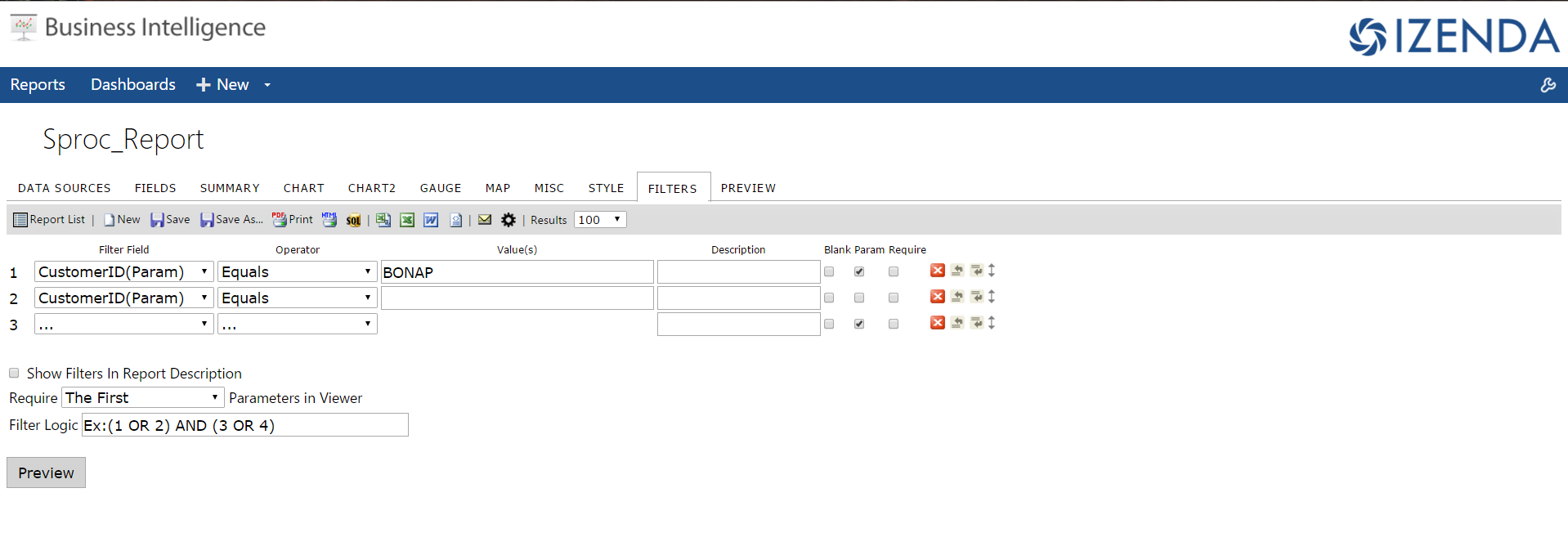 The key attributes to take into account are that both filters are for the CustomerID parameter and that the parameter with the value is marked with a checkmark in the box labeled "Param" denoting that the filter will be visible in the report viewer. The other filter will not be visible in the viewer. --- On the report viewer, the report will only display a single filter but both filters will pass the validation check to ensure that all stored procedure parameter filters have a value. Keep in mind that this will only work if the columns are named the same. Therefore, attempting to filter on the CustomerID parameter and pass the filter value to another parameter named Customer_ID will not work, even if the parameters are synonymous. 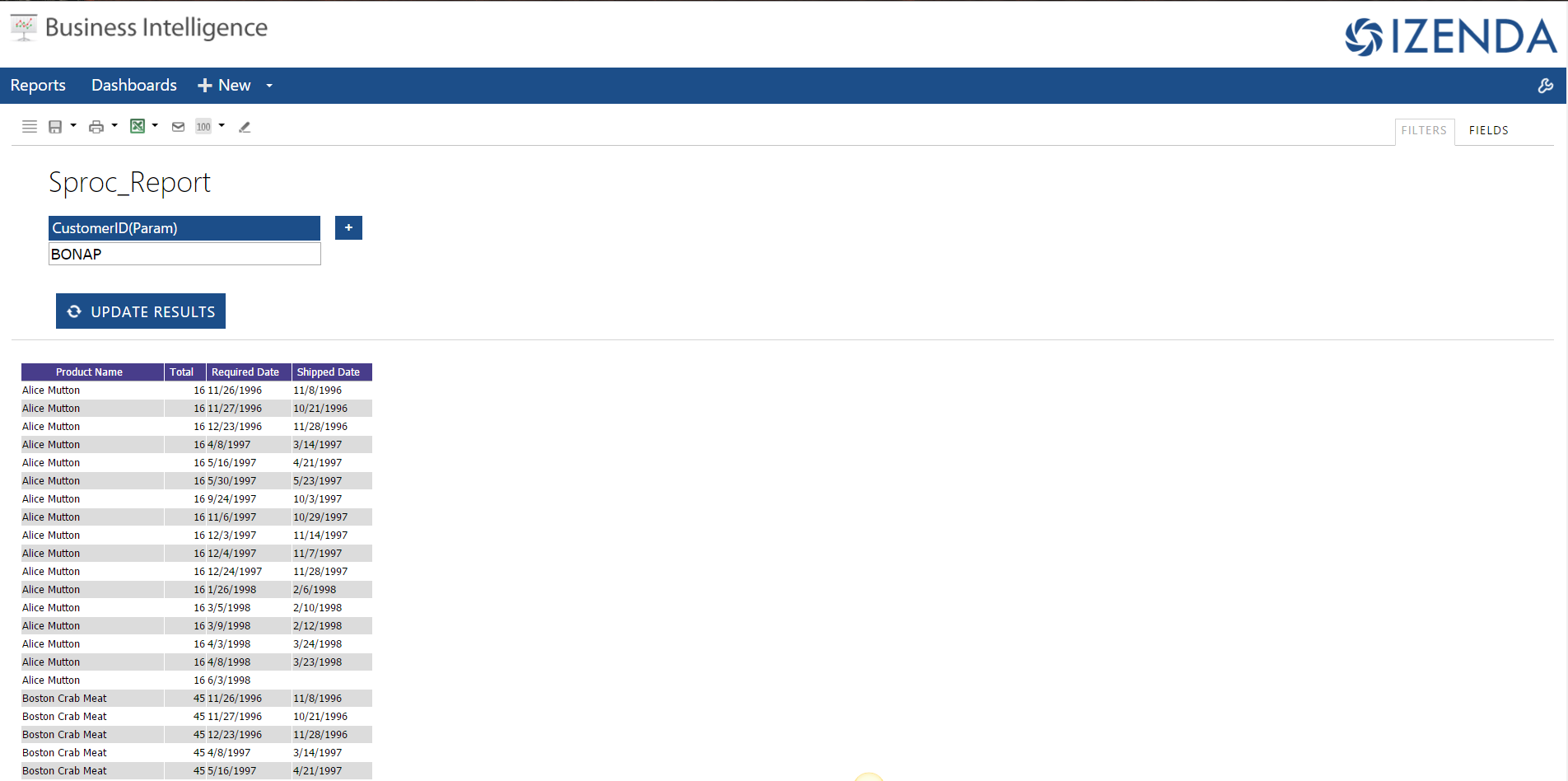
Uploading file...
Header
 **This documentation is for the legacy Izenda 6 product. Documentation for the new Izenda 7 product can be found at [[https://www.izenda.com/docs/|https://www.izenda.com/docs/]]**
Sidebar
 --- * [[Izenda 7 Series Documentation|https://www.izenda.com/docs/]] * [[Release Notes]] * [[Upgrade Best Practices|FAQ/Izenda-Update-Best-Practices]] * [[FAQ]] * [[Tutorials]] * [[The Izenda API|/API/AdHocConfig]] * [[The AdHocSettings class|/API/AdHocSettings]] * [Developer Links and Guides](/Guides/Developer-Links-and-Guides) * [[Known Issues]] --- * <a href="http://www.izenda.com" rel="nofollow" target="_blank">Izenda Website</a> * [Product Video](https://www.youtube.com/watch?v=X3-yWFq0w5A) * <a href="http://www.izenda.com/blog" rel="nofollow" target="_blank">Izenda Blog</a> * <a href="http://www.izenda.com/company/" rel="nofollow" target="_blank">About Us</a> * <a href="http://www.izenda.com/contact-us/" rel="nofollow" target="_blank">Contact Us</a> --- * [Guide To Report Design](/Guides/ReportDesign) * [Making Custom Forms Video](http://www.youtube.com/watch?v=5b2axJlgdFs) --- * [[Acknowledgements]]
Edit message:
Cancel