☰
Current Page
Main Menu
Home
Home
Editing reports-and-tenants
Edit
Preview
H1
H2
H3
default
Set your preferred keybinding
default
vim
emacs
markdown
Set this page's format to
AsciiDoc
Creole
Markdown
MediaWiki
Org-mode
Plain Text
RDoc
Textile
Rendering unavailable for
BibTeX
Pod
reStructuredText
Help 1
Help 1
Help 1
Help 2
Help 3
Help 4
Help 5
Help 6
Help 7
Help 8
Autosaved text is available. Click the button to restore it.
Restore Text
#Reports and Tenants [[_TOC_]] ##Question How does Izenda support multi-tenant and cloud computing systems? ##Answer Izenda supports these systems with several properties designed specifically for multi-tenant systems. Here is a basic overview of these properties and their functionality. ###Tenant system overview Here are the basic principles behind how tenants integrate with reports: * Every ReportSet has an **OwnerTenantID**. * Every user session is associated with one [[CurrentUserTenantId|/API/CodeSamples/CurrentUserTenantId]] that is empty by default. * When a ReportSet is being saved, its **OwnerTenantID** gets the value of whatever is in [[CurrentUserTenantId|/API/CodeSamples/CurrentUserTenantId]]. This means that a ReportSet will not be accessible to the user if their [[CurrentUserTenantId|/API/CodeSamples/CurrentUserTenantId]] doesn’t match the ReportSet's OwnerTenantID. Here is a chart demonstrating accessibility between a user's CurrentUserTenantId and the ReportSet's OwnerTenantId: 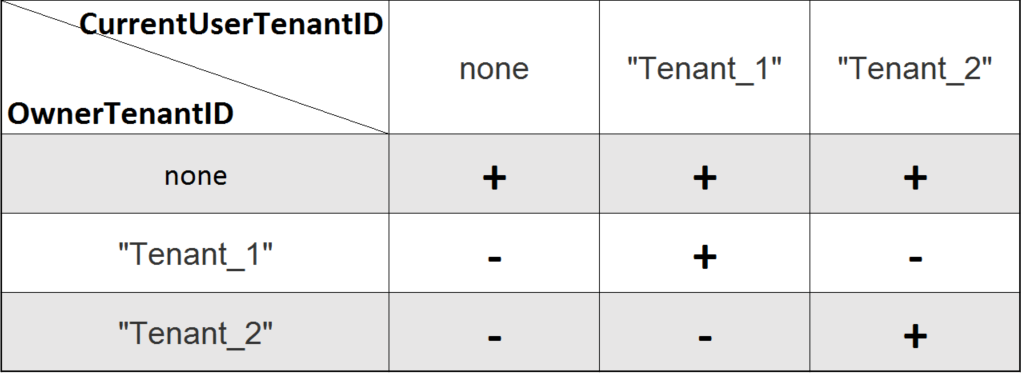 **Legend:** (+) Accessible (-) Not Accessible ###Tenant Field The [[TenantField|/API/CodeSamples/TenantField]] setting allows per-report filtering based on the value of the user's [[CurrentUserTenantId|/API/CodeSamples/CurrentUserTenantId]]. Here are the rules about **ReportSets**. * Every **ReportSet** contains a list of the **DataSources** used with it. * Every **DataSource** has a list of **Fields** associated with it. * Every **Field** can have a set of applied **Filters**. This creates a high level of control over what is filtered. Essentially, the system will look at the ReportSet's DataSources, find the Field specified by [[TenantField|/API/CodeSamples/TenantField]] and apply a hidden filter to that field using the value of the user's [[CurrentUserTenantId|/API/CodeSamples/CurrentUserTenantId]]. So, if the [[TenantField|/API/CodeSamples/TenantField]] property is specified, the hidden filter of the user's [[CurrentUserTenantId|/API/CodeSamples/CurrentUserTenantId]] will be added every time report is populated. So, the generated SQL will look like the following: ```sql SELECT [TenantField] FROM [DataSource] WHERE ... AND [TenantField] = 'CurrentUserTenantId' ``` **For example:** Let’s create a report with information about customers' orders: ![Customer order report]() If [[TenantField|/API/CodeSamples/TenantField]] is NOT specified we will see the following report: ![Customer order report output]() Now let’s specify [[TenantField|/API/CodeSamples/TenantField]] and [[CurrentUserTenantId|/API/CodeSamples/CurrentUserTenantId]]: ```csharp public class CustomAdHocConfig : DatabaseAdHocConfig { public static void InitializeReporting() { AdHocSettings.TenantField = "CustomerID"; AdHocSettings.CurrentUserTenantId = "ALFKI"; } } ``` With these properties set, we will see a completely different report: ![customer order report filtered]() As you can see the results are filtered by the “Customer ID” field now. And only those matching “ALFKI” will be populated. _**Note:** You must always specify [[CurrentUserTenantId|/API/CodeSamples/CurrentUserTenantId]] to use [[TenantField|/API/CodeSamples/TenantField]]. The only exception is reports scheduler (details in the below section)._
Uploading file...
Header
 **This documentation is for the legacy Izenda 6 product. Documentation for the new Izenda 7 product can be found at [[https://www.izenda.com/docs/|https://www.izenda.com/docs/]]**
Sidebar
 --- * [[Izenda 7 Series Documentation|https://www.izenda.com/docs/]] * [[Release Notes]] * [[Upgrade Best Practices|FAQ/Izenda-Update-Best-Practices]] * [[FAQ]] * [[Tutorials]] * [[The Izenda API|/API/AdHocConfig]] * [[The AdHocSettings class|/API/AdHocSettings]] * [Developer Links and Guides](/Guides/Developer-Links-and-Guides) * [[Known Issues]] --- * <a href="http://www.izenda.com" rel="nofollow" target="_blank">Izenda Website</a> * [Product Video](https://www.youtube.com/watch?v=X3-yWFq0w5A) * <a href="http://www.izenda.com/blog" rel="nofollow" target="_blank">Izenda Blog</a> * <a href="http://www.izenda.com/company/" rel="nofollow" target="_blank">About Us</a> * <a href="http://www.izenda.com/contact-us/" rel="nofollow" target="_blank">Contact Us</a> --- * [Guide To Report Design](/Guides/ReportDesign) * [Making Custom Forms Video](http://www.youtube.com/watch?v=5b2axJlgdFs) --- * [[Acknowledgements]]
Edit message:
Cancel