☰
Current Page
Main Menu
Home
Home
Editing What-does-Repeat-Types-and-Send-Email-As-mean
Edit
Preview
H1
H2
H3
default
Set your preferred keybinding
default
vim
emacs
markdown
Set this page's format to
AsciiDoc
Creole
Markdown
MediaWiki
Org-mode
Plain Text
RDoc
Textile
Rendering unavailable for
BibTeX
Pod
reStructuredText
Help 1
Help 1
Help 1
Help 2
Help 3
Help 4
Help 5
Help 6
Help 7
Help 8
Autosaved text is available. Click the button to restore it.
Restore Text
#What does Repeat Types and Send Email As mean [[_TOC_]] ###When are scheduled reports executed? Reports are executed when the scheduler runs, if the report is set to a time at or before the moment of scheduler execution. If a report is set to run at 10:25 AM, and the scheduler executes at 10:30 AM, then all reports scheduled before this time of execution, including our report at 10:25 AM, will be executed. ###What are "Repeat Types"? Repeat Types exist in the "Misc" section of ReportDesigner.aspx and are simply expressions that reflect how often the email should be sent. 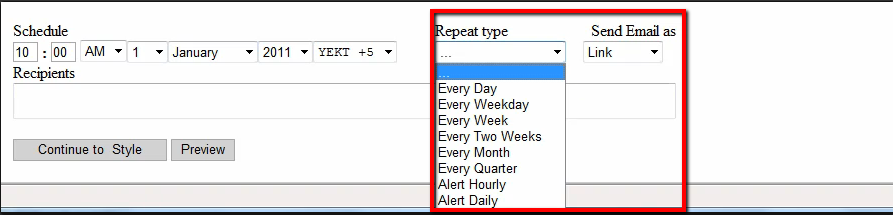 |Type|Effect| |-------------|-------------| |...|No schedule will be used for this report.| |Every Day|This report will be scheduled and sent to its recipients daily.| |Every Weekday|This report will be scheduled and sent to its recipients Monday through Friday.| |Every Week|This report will be scheduled and sent to its recipients once a week starting from the date specified on the report.| |Every Two Weeks|This report will be scheduled and sent to its recipients once every other week starting from the date specified on the report.| |Every Month|This report will be scheduled and sent to its recipients once a month starting from the date specified on the report. This is sensitive to the variant number of days in each month and will remain consistent throughout the year.| |Every Quarter|This report will be scheduled and sent to its recipients quarterly (every three months) starting from the date specified on the report.| |Alert Hourly|This report will be scheduled and sent to its recipients every hour only if the report has more than zero results in it.| |Alert Daily|This report will be scheduled and sent to its recipients every day only if the report has more than zero results in it.| ###What is "Send Email As"? This dropdown determines how the email will be sent out. There are a number of different formats that email can be sent with. |Type|Effect| | ------------- |:-------------:| |Link|Email body will contain a HTTP link to the report (Report Viewer). Report body will not be included in the Email.| |Embedded|Report will be embedded in the Email body. Please note that client's Email client must support HTML in the body of the Email. This style includes images and other resources from the HTML page.| |HTML|Report's HTML output only will be embedded in the Email body. Please note that client's Email client must support HTML in the body of the Email. Images and other resources will *not* be included, as they would using the Embedded style.| |PDF|Report file in "*.pdf" format will be attached to the Email.| |CSV|Report file in "*.csv" format will be attached to the Email.| |Excel(XLS)|Report file in "*.xls" format will be attached to the Email.| |Word(RTF)|Report file in "*.rtf" format will be attached to the Email.| ###Repeat types and export formats customization Please note that if you want to customize export formats, you will have to use the Izenda Custom Scheduler. #To Section 3 - [Scheduler Security](http://wiki.izenda.com/FAQ/Implementing-Scheduler-Security)
Uploading file...
Header
 **This documentation is for the legacy Izenda 6 product. Documentation for the new Izenda 7 product can be found at [[https://www.izenda.com/docs/|https://www.izenda.com/docs/]]**
Sidebar
 --- * [[Izenda 7 Series Documentation|https://www.izenda.com/docs/]] * [[Release Notes]] * [[Upgrade Best Practices|FAQ/Izenda-Update-Best-Practices]] * [[FAQ]] * [[Tutorials]] * [[The Izenda API|/API/AdHocConfig]] * [[The AdHocSettings class|/API/AdHocSettings]] * [Developer Links and Guides](/Guides/Developer-Links-and-Guides) * [[Known Issues]] --- * <a href="http://www.izenda.com" rel="nofollow" target="_blank">Izenda Website</a> * [Product Video](https://www.youtube.com/watch?v=X3-yWFq0w5A) * <a href="http://www.izenda.com/blog" rel="nofollow" target="_blank">Izenda Blog</a> * <a href="http://www.izenda.com/company/" rel="nofollow" target="_blank">About Us</a> * <a href="http://www.izenda.com/contact-us/" rel="nofollow" target="_blank">Contact Us</a> --- * [Guide To Report Design](/Guides/ReportDesign) * [Making Custom Forms Video](http://www.youtube.com/watch?v=5b2axJlgdFs) --- * [[Acknowledgements]]
Edit message:
Cancel