☰
Current Page
Main Menu
Home
Home
Editing How-to-calculate-difference-between-dates
Edit
Preview
H1
H2
H3
default
Set your preferred keybinding
default
vim
emacs
markdown
Set this page's format to
AsciiDoc
Creole
Markdown
MediaWiki
Org-mode
Plain Text
RDoc
Textile
Rendering unavailable for
BibTeX
Pod
reStructuredText
Help 1
Help 1
Help 1
Help 2
Help 3
Help 4
Help 5
Help 6
Help 7
Help 8
Autosaved text is available. Click the button to restore it.
Restore Text
#How to calculate difference between dates? [[_TOC_]] ###Find the difference between two dates The difference between two dates can be calculated using the simple Arithmetic feature in the Report Designer. Select the two dates you want to use. In our sample below we use ShippedDate and OrderDate. Then select the "minus" sign ([-]) in the arithmetic column (labeled "A") for the second date. The result of this expression will be the difference between the two dates in days. *Note: By default the result is an integer, number of days, but you can also set specified decimal places. Use [[DateArithmeticDecimalPlaces|/API/CodeSamples/DateArithmeticDecimalPlaces]] to do this.* ```c# AdHocSettings.DateArithmeticDecimalPlaces = 3; ``` Please see the following simple example of date arithmetic use: 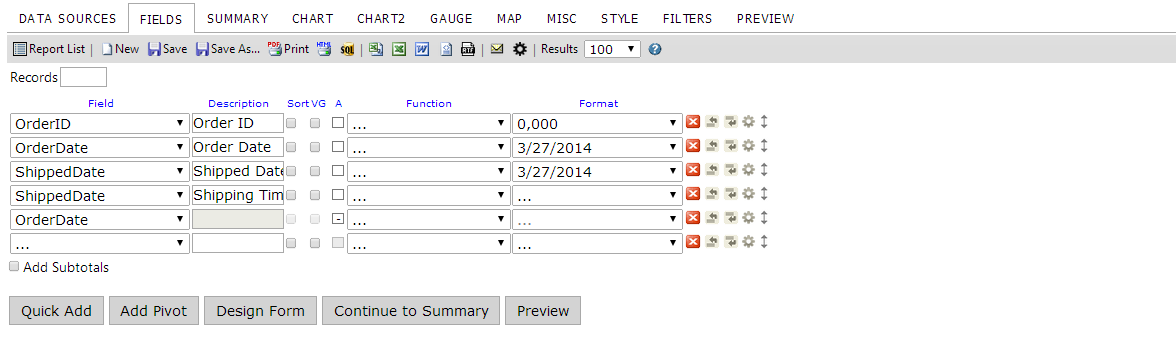 Here we establish our report fields. Note how the (-) operator is selected on the last "OrderDate" field and the field preceeding it will be named "Shipping Time(Days)". 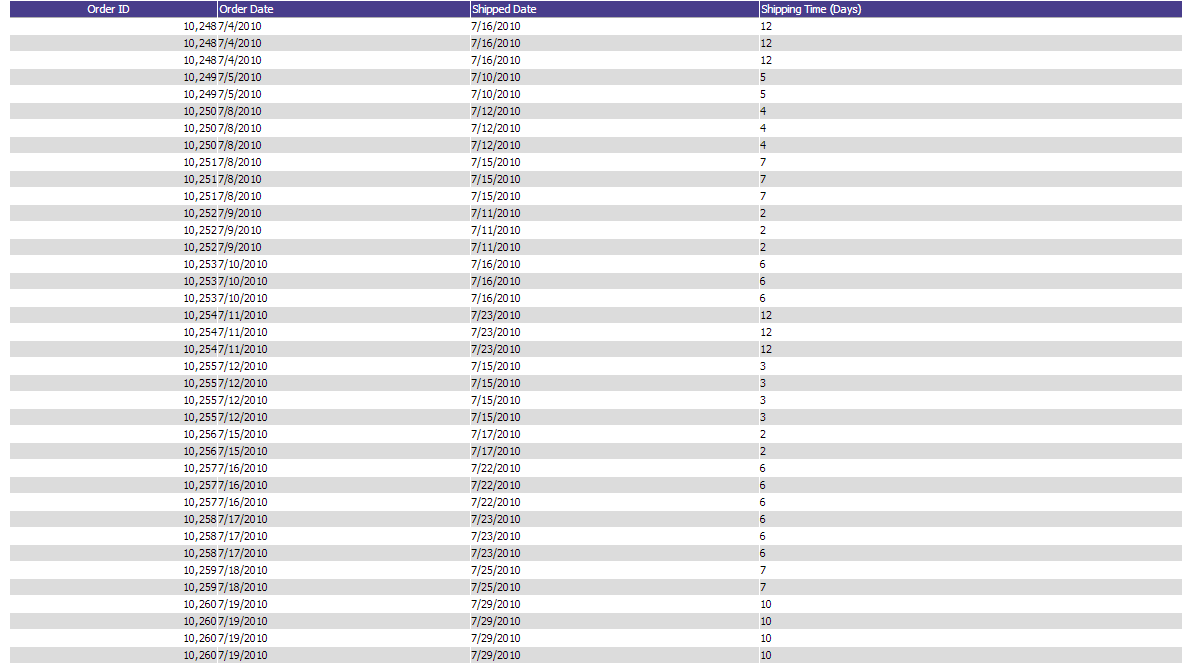 We can see that our data has appeared as we wanted it in our preview. ###Find the difference between two datetimes The difference between two datetimes can be determined by implementing an [[Expression|http://wiki.izenda.com/Guides/ReportDesign/15.0-Expressions-in-Izenda]] in the Report Designer that is similar to the following: ``[ShippedDate] - [OrderDate]`` This will, however, format the date as an expression of time from the beginning of the epoch and not as an actual difference in times. (E.g. if your first date is **9/2/2010 3:13:48 AM** and your second date is **8/5/2010 11:18:46 AM**, the result will be **1/28/1900 3:55:02 PM** and not **28 Days 15 Hours 55 Minutes 2 Seconds** or something similar) For the formatting, you will need to implement a [[Custom Formatter|http://wiki.izenda.com/FAQ/Questions/Add-Formatting-Options#Example-4---Custom-Formatters]].
Uploading file...
Header
 **This documentation is for the legacy Izenda 6 product. Documentation for the new Izenda 7 product can be found at [[https://www.izenda.com/docs/|https://www.izenda.com/docs/]]**
Sidebar
 --- * [[Izenda 7 Series Documentation|https://www.izenda.com/docs/]] * [[Release Notes]] * [[Upgrade Best Practices|FAQ/Izenda-Update-Best-Practices]] * [[FAQ]] * [[Tutorials]] * [[The Izenda API|/API/AdHocConfig]] * [[The AdHocSettings class|/API/AdHocSettings]] * [Developer Links and Guides](/Guides/Developer-Links-and-Guides) * [[Known Issues]] --- * <a href="http://www.izenda.com" rel="nofollow" target="_blank">Izenda Website</a> * [Product Video](https://www.youtube.com/watch?v=X3-yWFq0w5A) * <a href="http://www.izenda.com/blog" rel="nofollow" target="_blank">Izenda Blog</a> * <a href="http://www.izenda.com/company/" rel="nofollow" target="_blank">About Us</a> * <a href="http://www.izenda.com/contact-us/" rel="nofollow" target="_blank">Contact Us</a> --- * [Guide To Report Design](/Guides/ReportDesign) * [Making Custom Forms Video](http://www.youtube.com/watch?v=5b2axJlgdFs) --- * [[Acknowledgements]]
Edit message:
Cancel