☰
Current Page
Main Menu
Home
Home
Editing How-is-Use-Previous-OR-used-in-Filters
Edit
Preview
H1
H2
H3
default
Set your preferred keybinding
default
vim
emacs
markdown
Set this page's format to
AsciiDoc
Creole
Markdown
MediaWiki
Org-mode
Plain Text
RDoc
Textile
Rendering unavailable for
BibTeX
Pod
reStructuredText
Help 1
Help 1
Help 1
Help 2
Help 3
Help 4
Help 5
Help 6
Help 7
Help 8
Autosaved text is available. Click the button to restore it.
Restore Text
#How is "Use Previous OR" used in Filters? [[_TOC_]] ##About The filter operator "Use Previous OR" will use the previous field's filter as its own filter. Using this technique, you can require two or more fields to be filtered with only one filter. This is helpful when your database uses composite keys or when you just want to show results filtered by field A OR field B but with only exposing one filter to the users viewing the reports. ##Example Here we are using a filter on RequiredDate and specifying that it should fall between 2/27/2012 and 5/13/2012. We then specify a filter on ShippedDate and use the operator "Use Previous OR" to force an OR condition on the two filters using the same values for each. 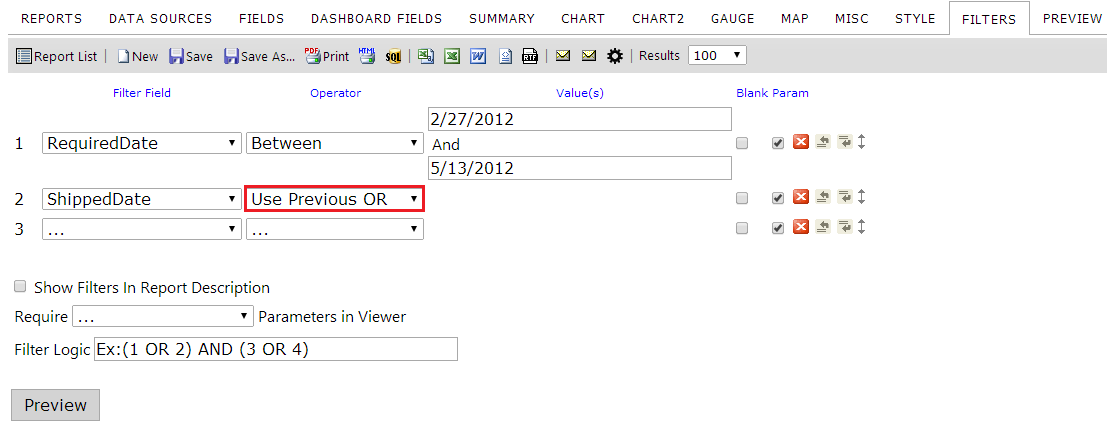 ##Results The data returned would show all data with a RequiredDate between the two values OR with a ShippedDate that falls between those same values. The results can be seen below. Notice the values outlined in red. These values do not fall within the date ranges specified, but the other value on the same row does fall within the range. Therefore, we are using an OR operation rather than an AND which would be the case if we defined both filters with their own Between operator. 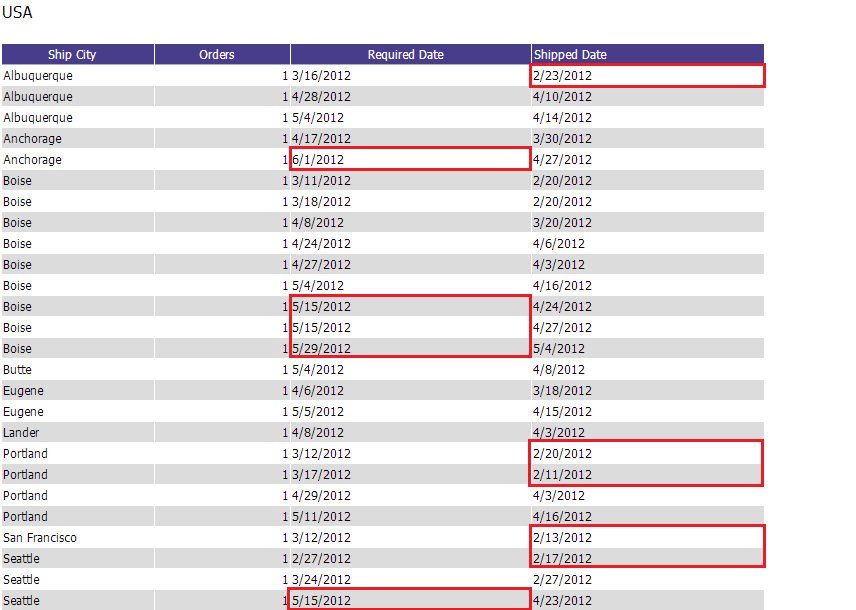
Uploading file...
Header
 **This documentation is for the legacy Izenda 6 product. Documentation for the new Izenda 7 product can be found at [[https://www.izenda.com/docs/|https://www.izenda.com/docs/]]**
Sidebar
 --- * [[Izenda 7 Series Documentation|https://www.izenda.com/docs/]] * [[Release Notes]] * [[Upgrade Best Practices|FAQ/Izenda-Update-Best-Practices]] * [[FAQ]] * [[Tutorials]] * [[The Izenda API|/API/AdHocConfig]] * [[The AdHocSettings class|/API/AdHocSettings]] * [Developer Links and Guides](/Guides/Developer-Links-and-Guides) * [[Known Issues]] --- * <a href="http://www.izenda.com" rel="nofollow" target="_blank">Izenda Website</a> * [Product Video](https://www.youtube.com/watch?v=X3-yWFq0w5A) * <a href="http://www.izenda.com/blog" rel="nofollow" target="_blank">Izenda Blog</a> * <a href="http://www.izenda.com/company/" rel="nofollow" target="_blank">About Us</a> * <a href="http://www.izenda.com/contact-us/" rel="nofollow" target="_blank">Contact Us</a> --- * [Guide To Report Design](/Guides/ReportDesign) * [Making Custom Forms Video](http://www.youtube.com/watch?v=5b2axJlgdFs) --- * [[Acknowledgements]]
Edit message:
Cancel