☰
Current Page
Main Menu
Home
Home
Editing How-To-Preset-Values-In-Filter
Edit
Preview
H1
H2
H3
default
Set your preferred keybinding
default
vim
emacs
markdown
Set this page's format to
AsciiDoc
Creole
Markdown
MediaWiki
Org-mode
Plain Text
RDoc
Textile
Rendering unavailable for
BibTeX
Pod
reStructuredText
Help 1
Help 1
Help 1
Help 2
Help 3
Help 4
Help 5
Help 6
Help 7
Help 8
Autosaved text is available. Click the button to restore it.
Restore Text
#How to preset values in filter [[_TOC_]] ##Question How can I preset date values in time period filter? ##Answer You can use hidden filter to make reports pre-filtered whenever they are opened so that viewers only see the filtered results. However, hidden filter is not available when the filter operator is something else other than 'Equals'. Still, you can preset values in filter using PreExecuteReportSet method as below ###Example: Presetting a time period (From a year ago to Today) ###Global.asax (C♯) ```csharp public override void PreExecuteReportSet(ReportSet reportSet) { base.PreExecuteReportSet(reportSet); // if (reportSet.ReportName != "MyReport" || reportSet.ReportName != "MyReport2") // You can choose to which report this overriding to be applied // return; foreach (Izenda.AdHoc.Filter filter in reportSet.Filters) { if (filter.Operator == OperatorTypes.BetweenTwoDates) { // can choose filter as well based on its operator if (filter.dbColumn.Name.Equals("OrderDate")) { // To be applied to "OrderDate" filter DateTime baseDate = DateTime.Today; filter.Values.SetValue(baseDate.AddYears(-1), 0); //the'Between' operator takes two parameters. the first one's indexed as 0. '-1' for a year ago filter.Values.SetValue(DateTime.Today, 1); // reportSet.Filters[count].Values.SetValue("01/01/2010", 1); // reportSet.Filters[count].Values.SetValue("01/01/2016", 1); // the date value could be a specific date } } } } ``` ###Global.asax (VB.Net) ```visualbasic Public Overrides Sub PreExecuteReportSet(reportSet As ReportSet) MyBase.PreExecuteReportSet(reportSet) ' if (reportSet.ReportName != "MyReport" || reportSet.ReportName != "MyReport2") // You can choose to which report this overriding to be applied ' return; For Each filter As Izenda.AdHoc.Filter In reportSet.Filters If filter.[Operator] = OperatorTypes.BetweenTwoDates Then ' can choose filter as well based on its operator If filter.dbColumn.Name.Equals("OrderDate") Then ' To be applied to "OrderDate" filter Dim baseDate As DateTime = DateTime.Today filter.Values.SetValue(baseDate.AddYears(-1), 0) 'the'Between' operator takes two parameters. the first one's indexed as 0. '-1' for a year ago ' reportSet.Filters[count].Values.SetValue("01/01/2010", 1); ' reportSet.Filters[count].Values.SetValue("01/01/2016", 1); // the date value could be a specific date filter.Values.SetValue(DateTime.Today, 1) End If End If Next End Sub ``` ###Screenshots 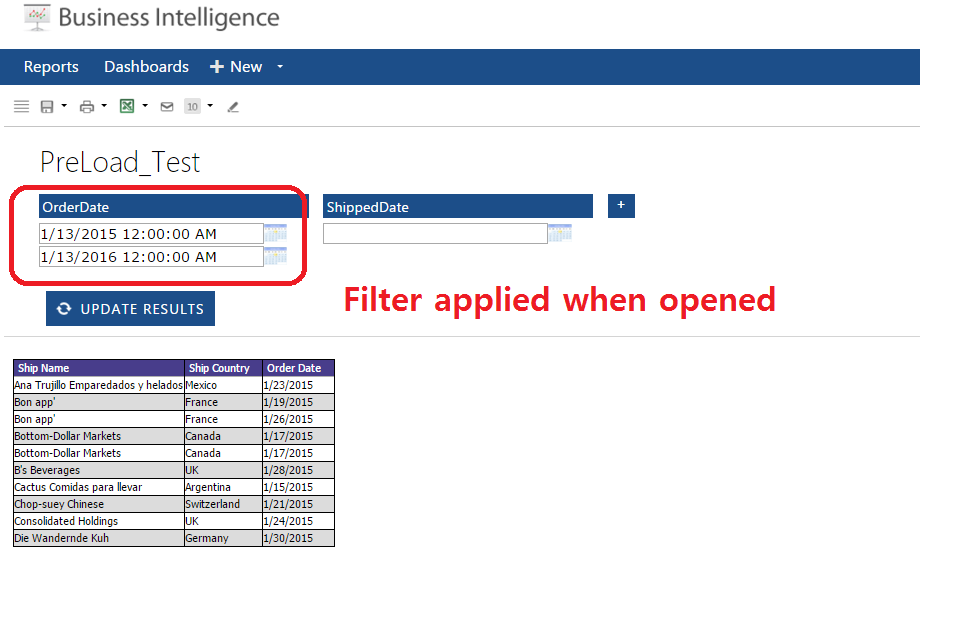 ***Note: The filter is displayed here for demonstration purposes. In this scenario, the filter would be hidden from user input*** ##Example: Allowing the user to modify the filter value The above example does not allow the user to change the filter value as the filter is hidden. In order to allow a preset value that responds to user input, a different approach is required. First, we have to know when the report is first being accessed by a user. This can be tricky since Izenda does not track when a report is first being accessed versus subsequent requests to render the report with different filter values. Since the CustomAdHocConfig usually exists in the global.asax, checking if the request is a postback is not possible, so we have to use some other method. For the following example, imagine we have a report with the following: * A filter on OrderDate with a "Between (Calendar)" operator We are going to leave the filter values blank in the report definition so that we are able to have a baseline from which to determine if we need to set the filter values to their default or not. ###Global.asax (C♯) ```csharp public override void PreExecuteReportSet(ReportSet reportSet) { base.PreExecuteReportSet(reportSet); // if (reportSet.ReportName != "MyReport" || reportSet.ReportName != "MyReport2") // You can choose to which report this overriding to be applied // return; foreach (Izenda.AdHoc.Filter filter in reportSet.Filters) { if (filter.Operator == OperatorTypes.BetweenTwoDates) { // can choose filter as well based on its operator if (filter.dbColumn.Name.Equals("OrderDate")) { // To be applied to "OrderDate" filter if (filter.Values.GetValue(0).ToString().Equals("") && filter.Values.GetValue(1).ToString().Equals("")) //check whether the filter values are the default { DateTime baseDate = DateTime.Today; filter.Values.SetValue(baseDate.AddYears(-1), 0); //the'Between' operator takes two parameters. the first one's indexed as 0. '-1' for a year ago filter.Values.SetValue(DateTime.Today, 1); // reportSet.Filters[count].Values.SetValue("01/01/2010", 1); // reportSet.Filters[count].Values.SetValue("01/01/2016", 1); // the date value could be a specific date } } } } } ```
Uploading file...
Header
 **This documentation is for the legacy Izenda 6 product. Documentation for the new Izenda 7 product can be found at [[https://www.izenda.com/docs/|https://www.izenda.com/docs/]]**
Sidebar
 --- * [[Izenda 7 Series Documentation|https://www.izenda.com/docs/]] * [[Release Notes]] * [[Upgrade Best Practices|FAQ/Izenda-Update-Best-Practices]] * [[FAQ]] * [[Tutorials]] * [[The Izenda API|/API/AdHocConfig]] * [[The AdHocSettings class|/API/AdHocSettings]] * [Developer Links and Guides](/Guides/Developer-Links-and-Guides) * [[Known Issues]] --- * <a href="http://www.izenda.com" rel="nofollow" target="_blank">Izenda Website</a> * [Product Video](https://www.youtube.com/watch?v=X3-yWFq0w5A) * <a href="http://www.izenda.com/blog" rel="nofollow" target="_blank">Izenda Blog</a> * <a href="http://www.izenda.com/company/" rel="nofollow" target="_blank">About Us</a> * <a href="http://www.izenda.com/contact-us/" rel="nofollow" target="_blank">Contact Us</a> --- * [Guide To Report Design](/Guides/ReportDesign) * [Making Custom Forms Video](http://www.youtube.com/watch?v=5b2axJlgdFs) --- * [[Acknowledgements]]
Edit message:
Cancel