☰
Current Page
Main Menu
Home
Home
Editing How-To-Apply-Advanced-Logic-Filters
Edit
Preview
H1
H2
H3
default
Set your preferred keybinding
default
vim
emacs
markdown
Set this page's format to
AsciiDoc
Creole
Markdown
MediaWiki
Org-mode
Plain Text
RDoc
Textile
Rendering unavailable for
BibTeX
Pod
reStructuredText
Help 1
Help 1
Help 1
Help 2
Help 3
Help 4
Help 5
Help 6
Help 7
Help 8
Autosaved text is available. Click the button to restore it.
Restore Text
#How To Apply Advanced Logic Filters [[_TOC_]] ##Question How can I create filters that get applied conditionally when designing a report? ##Answer Izenda Reports allows you to have an arbitrary number of filters on a new report. These filters can even be applied with custom logic that you define. This is done with the advanced logic filter. 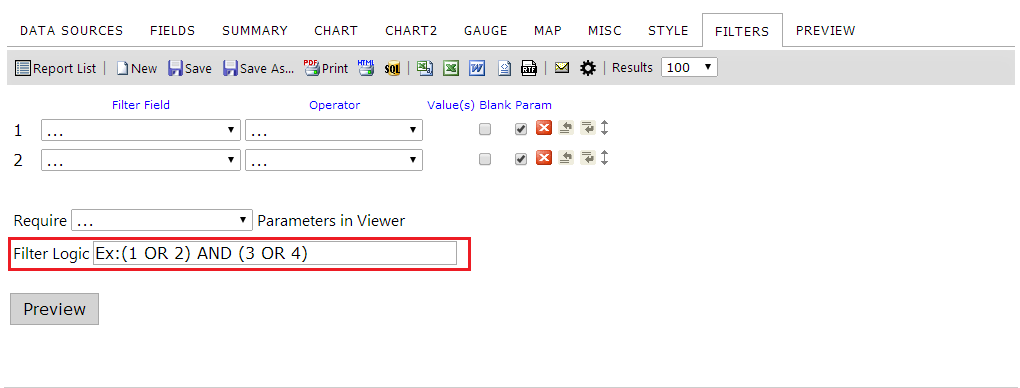 The text box on the [[Filters tab|http://wiki.izenda.com/Guides/ReportDesign/5.0-Filters-tab]] labeled "Filter Logic" is where you configure this logic. By default, there is an example filter already populated into the box to guide users in the format they should use. Changing the contents of this box will cause Izenda to attempt to apply this logic to the filters on the report when "Preview" is clicked or when the Report Viewer is accessed for this report. Using the example, "(1 OR 2) AND (3 OR 4)", results will be filtered conditionally based on meeting either Filter 1 or Filter 2 in addition to meeting either Filter 3 or Filter 4. You can construct extremely simple to extremely complex logic using this control. If you have a mere two filters, a simple "1 OR 2" will force your results to meet either the first or the second filter condition. Alternatively, you can nest parenthesis and combine logical operators to form sophisticated advanced filters.
Uploading file...
Header
 **This documentation is for the legacy Izenda 6 product. Documentation for the new Izenda 7 product can be found at [[https://www.izenda.com/docs/|https://www.izenda.com/docs/]]**
Sidebar
 --- * [[Izenda 7 Series Documentation|https://www.izenda.com/docs/]] * [[Release Notes]] * [[Upgrade Best Practices|FAQ/Izenda-Update-Best-Practices]] * [[FAQ]] * [[Tutorials]] * [[The Izenda API|/API/AdHocConfig]] * [[The AdHocSettings class|/API/AdHocSettings]] * [Developer Links and Guides](/Guides/Developer-Links-and-Guides) * [[Known Issues]] --- * <a href="http://www.izenda.com" rel="nofollow" target="_blank">Izenda Website</a> * [Product Video](https://www.youtube.com/watch?v=X3-yWFq0w5A) * <a href="http://www.izenda.com/blog" rel="nofollow" target="_blank">Izenda Blog</a> * <a href="http://www.izenda.com/company/" rel="nofollow" target="_blank">About Us</a> * <a href="http://www.izenda.com/contact-us/" rel="nofollow" target="_blank">Contact Us</a> --- * [Guide To Report Design](/Guides/ReportDesign) * [Making Custom Forms Video](http://www.youtube.com/watch?v=5b2axJlgdFs) --- * [[Acknowledgements]]
Edit message:
Cancel