☰
Current Page
Main Menu
Home
Home
Editing Add-Formatting-Options
Edit
Preview
H1
H2
H3
default
Set your preferred keybinding
default
vim
emacs
markdown
Set this page's format to
AsciiDoc
Creole
Markdown
MediaWiki
Org-mode
Plain Text
RDoc
Textile
Rendering unavailable for
BibTeX
Pod
reStructuredText
Help 1
Help 1
Help 1
Help 2
Help 3
Help 4
Help 5
Help 6
Help 7
Help 8
Autosaved text is available. Click the button to restore it.
Restore Text
#Formatting Options [[_TOC_]] ##About Here we will show you how to easily add a new formatting option to the "Formats" dropdown menu on the Fields tab of the Report Designer. These should be handled in your ``InitializeReporting()`` method in your global.asax. ##Update since version 6.10.0.4 As of version 6.10.0.4, the best practice for custom formatters has changed: 1) Replace IFormatter with BaseFormatter 2) Replace all DataTable occurrences with AdHocDataTable 3) Add override key words to the methods, so: - "public Type GetOutputDataType" -> "public override Type GetOutputDataType" - "public object Format" -> "public override object Format" ##Exporting to Excel Excel uses internal formatting and attempts to 'guess' what the proper format for a value should be. This means that sometimes, Excel guesses incorrectly and while the correct value might be exported to Excel, the format will be wrong - for example, .623 instead of 62.3%. In this case, it is necessary to specify the data type group exactly using the full constructor to specify data type: ```csharp AdHocSettings.Formats.Add("{0:P2}", new SimpleFormat("Percent", "{0:P2}", new SqlTypeGroup[] { SqlTypeGroup.Numeric, SqlTypeGroup.Money, SqlTypeGroup.Real })); ``` ##Example 1 - Bold In this example, we will quickly add a new format option to the list called "Bold". New formats added this way will be available for every type of data and will not override the existing built-in formats for each type of data. The symbol {0} acts as a token to represent the data that is returned by the query. ```csharp AdHocSettings.Formats.Add("Bold", "<strong>{0}</strong>"); ``` ##Example 2 - Scientific We can also use an Izenda Format object as an argument. Below is the method of adding a formatting option called "Scientific" to the list of formats. Items added this way can be made available for specific **SqlTypeGroups** and will not override any of the existing formats. ```csharp SimpleFormat scientificFormat = new SimpleFormat("Scientific", "{0:E}", new SqlTypeGroup[] {SqlTypeGroup.Real, SqlTypeGroup.Numeric}); AdHocSettings.Formats.Add("Scientific", scientificFormat); ``` ###Results Below are screenshots of the results. The one directly below this text shows the OrderID field (a number field) with both of our new functions listed. 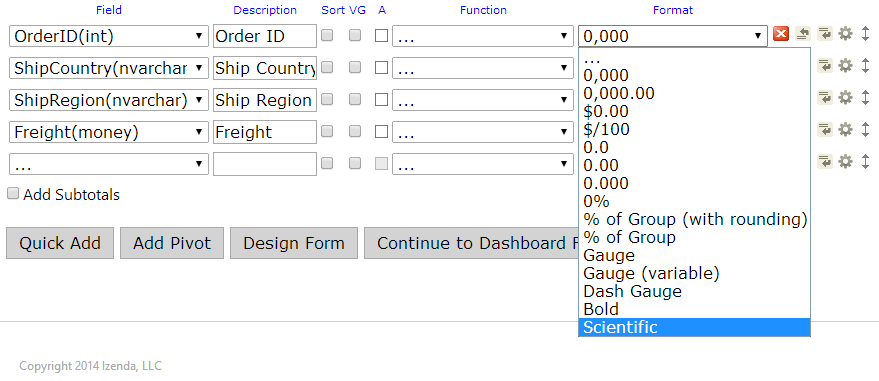 And here is the Freight field formatting options. Notice that we did not specify the "Money" type in our **SqlTypeGroups** for the Scientific format. Therefore, it is not listed in this dropdown but "Bold" still is. 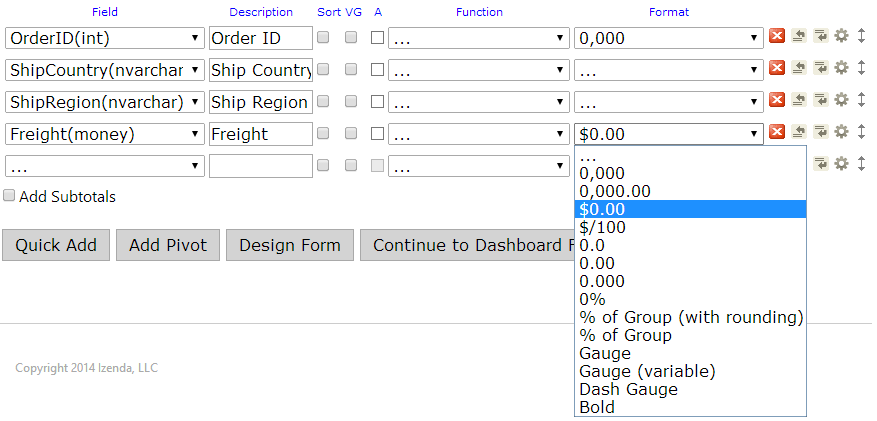 ##Example 3 - International Date Formats In this example, we show how to set the formats when using an International Date format. This example is for the European Date format. ```csharp AdHocSettings.Formats.Add("EuroDate", "{0:dd/MM/yyyy}"); ``` You can use this example as a template for other date formats as well. ##Example 4 - Custom Formatters In this example, we show how to create a custom formatter. This example is for formatting a time period. You may use the DatesCustomFormatFormatter below as a reference. This will get inserted into your global.asax below your [[CustomAdHocConfig|http://wiki.izenda.com/API/AdHocConfig]] class definition. You can implement this custom format in your [[InitializeReporting()|http://wiki.izenda.com/FAQ/InitializeReporting]] method by creating a new DatesCustomFormat in the AdHocSettings.[[Formats|http://wiki.izenda.com/API/CodeSamples/Formats]] collection. _**Note:** You can use this as a template and any other format that requires a bit more work than a simple format like in the above examples can be easily implemented by changing the **Format** method and what **allowedTypeGroups** are in the collection._ ```csharp [Serializable] public class DatesCustomFormatFormatter : BaseFormatter { public override Type GetOutputDataType(AdHocDataTable table, int columnNumber, ReportOutputOptions reportOutputOptions, Field field) { return typeof(string); } public override object Format(AdHocDataTable table, int rowNumber, int columnNumber, Field field, AdHocDataTable originalTable, Field nameField) { object value = table.Rows[rowNumber][columnNumber]; if (value == null || Convert.IsDBNull(value)) return null; DateTime dateValue; DateTime.TryParse(value.ToString(), out dateValue); return dateValue.Day + " Days " + dateValue.Hour + " Hours " + dateValue.Minute + " Minutes " + dateValue.Second + " Seconds"; } } public class DatesCustomFormat : IFormat { private SqlTypeGroupCollection allowedTypeGroups = new SqlTypeGroupCollection(); public SqlTypeGroupCollection AllowedTypeGroups { get { return allowedTypeGroups; } } public SqlTypeGroupCollection DisallowedTypeGroups { get { return null; } } public string Name { get; set; } public SqlTypeGroup DefaultFor { get { return SqlTypeGroup.None; } } public bool Visible { get { return true; } } public BaseFormatter[] CreateFormatters() { return new BaseFormatter[] { new DatesCustomFormatFormatter() }; } public DatesCustomFormat(string name) { allowedTypeGroups.Add(SqlTypeGroup.Date); allowedTypeGroups.Add(SqlTypeGroup.DateTime); Name = name; } } ``` You must also adhere to the following two rules: 1) Excel-exportable custom datetime formats must be added to AdHocSettings.Formats as an instance of the SimpleFormat class (or as an instance of custom format class), but NOT as just a string with pattern. 2) The same string pattern of custom datetime format must be passed to the format class constructor in "formatString" parameter, and to AdHocSettings.Formats.Add in "key" parameter. Please see this sample code: ```csharp DateTimeFormatInfo fmt = (new CultureInfo("en-gb")).DateTimeFormat; string formatStr = "{0:" + fmt.ShortDatePattern + "}"; string formatDesc = fmt.ShortDatePattern + "(ex." + DateTime.Today.ToString(fmt.ShortDatePattern) + ")"; SimpleFormat formatObj = new SimpleFormat(formatDesc, formatStr, new SqlTypeGroup[] { SqlTypeGroup.DateTime }); AdHocSettings.Formats.Add(formatStr, formatObj); ``` ##Example 5 - Incrementing Row Numbers ```csharp AdHocSettings.Formats.Add("RowNumber", new RowNumberFormat()); public class RowNumberFormat : IFormat { public SqlTypeGroupCollection AllowedTypeGroups { get { return null; } } public SqlTypeGroupCollection DisallowedTypeGroups { get { return null; } } public string Name { get { return "RowNumber"; } } public bool Visible { get { return true; } } public SqlTypeGroup DefaultFor { get { return SqlTypeGroup.None; } } public IFormatter[] CreateFormatters() { return new IFormatter[] { new RowNumberFormatter() }; } } public class RowNumberFormatter : BaseFormatter { public override Type GetOutputDataType(AdHocDataTable table, int columnNumber, ReportOutputOptions reportOutputOptions, Field field) { return table.Columns[columnNumber].DataType; } public override object Format(AdHocDataTable table, int rowNumber, int columnNumber, Field field, AdHocDataTable originalTable, Field nameField) { return rowNumber + 1; } } ``` ###Results The results of the above custom formatter are displayed here. The column "Ship Time" is the time difference between the Required Date and the Order Date. 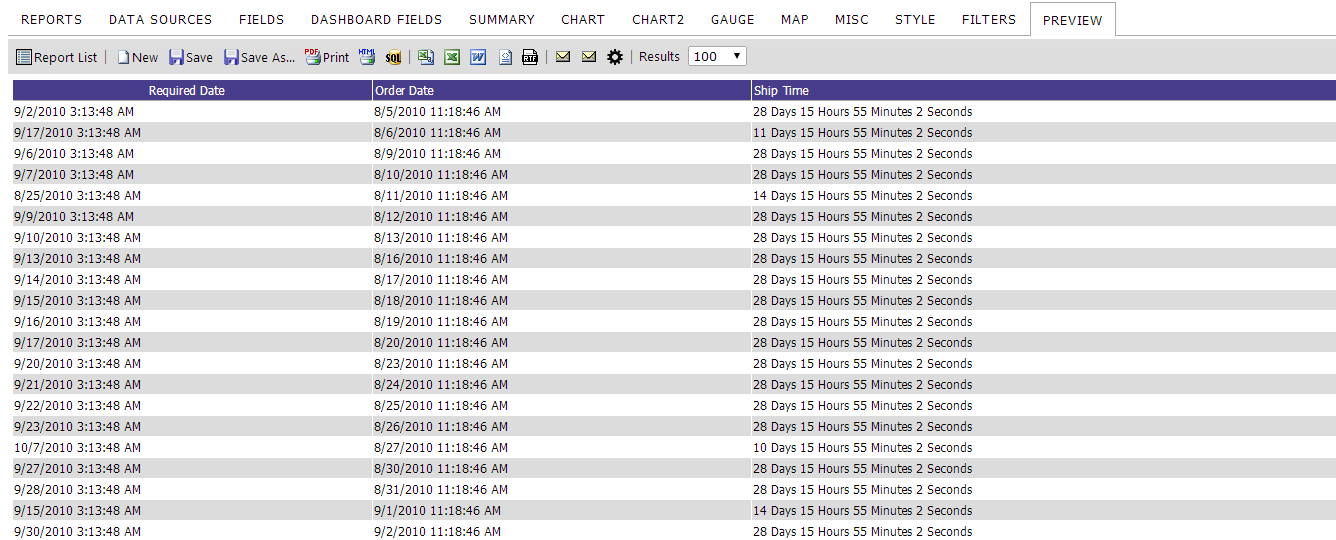 _**Note:** By default, custom format applied dates are treated as text. If you want to sort the column with custom date format applied as date, then make sure to check the 'Sort' check box in the fields tab which enables SQL level sorting. With 'Sort' check box checked, custom format dates can be sorted as date.
Uploading file...
Header
 **This documentation is for the legacy Izenda 6 product. Documentation for the new Izenda 7 product can be found at [[https://www.izenda.com/docs/|https://www.izenda.com/docs/]]**
Sidebar
 --- * [[Izenda 7 Series Documentation|https://www.izenda.com/docs/]] * [[Release Notes]] * [[Upgrade Best Practices|FAQ/Izenda-Update-Best-Practices]] * [[FAQ]] * [[Tutorials]] * [[The Izenda API|/API/AdHocConfig]] * [[The AdHocSettings class|/API/AdHocSettings]] * [Developer Links and Guides](/Guides/Developer-Links-and-Guides) * [[Known Issues]] --- * <a href="http://www.izenda.com" rel="nofollow" target="_blank">Izenda Website</a> * [Product Video](https://www.youtube.com/watch?v=X3-yWFq0w5A) * <a href="http://www.izenda.com/blog" rel="nofollow" target="_blank">Izenda Blog</a> * <a href="http://www.izenda.com/company/" rel="nofollow" target="_blank">About Us</a> * <a href="http://www.izenda.com/contact-us/" rel="nofollow" target="_blank">Contact Us</a> --- * [Guide To Report Design](/Guides/ReportDesign) * [Making Custom Forms Video](http://www.youtube.com/watch?v=5b2axJlgdFs) --- * [[Acknowledgements]]
Edit message:
Cancel