☰
Current Page
Main Menu
Home
Home
Editing Implementing-Scheduler-Security
Edit
Preview
H1
H2
H3
default
Set your preferred keybinding
default
vim
emacs
markdown
Set this page's format to
AsciiDoc
Creole
Markdown
MediaWiki
Org-mode
Plain Text
RDoc
Textile
Rendering unavailable for
BibTeX
Pod
reStructuredText
Help 1
Help 1
Help 1
Help 2
Help 3
Help 4
Help 5
Help 6
Help 7
Help 8
Autosaved text is available. Click the button to restore it.
Restore Text
#Implementing Scheduler Security [[_TOC_]] By default, the Izenda report scheduler queries the reporting site's response server (rs.aspx) page. Due to the response server calling the InitializeReporting method, this will result in any requests sent from the scheduler to run through the normal program flow, including any security measures to require users to login. Since the scheduler cannot interact with the webpage and click a button to securely login normally, it can be somewhat of a challenge to ensure that the scheduler has access to the site. For this reason, other security measures are required to ensure a secure report scheduler experience. ##The scheduler executable There are two optional parameters that are available to the scheduler program shipped with the default starter kit. These optional parameters are: * izu * izp These will be used to represent the username and password sent to the reporting site when the scheduler queries the site to initiate the scheduler. As an example of how to form a command line argument call to include these parameters, here is an example: `C:/> IzendaScheduler.exe http://[myreportingsite]/rs.aspx [interval] izu:[username] izp:[password]` Running that command will send the following request to your reporting site: `http://[myreportingsite]/rs.aspx?run_scheduled_reports=[interval]&izUser=[username]&izPassword=[password]` ##The reporting site The values for izUser and izPassword can then be handled in your InitializeReporting method accordingly, and AdHocSettings.CurrentUserName should be set to the value of [username]. Figure 1: The scheduler request and response model 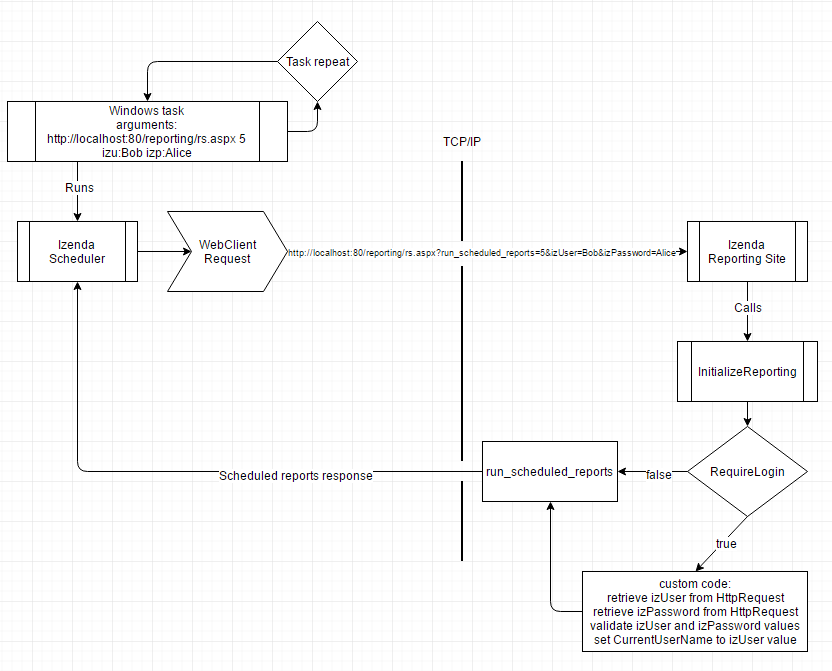 As demonstrated in the above graphic, custom code is required to handle the values passed into the site. Note: The logic for checking izUser and izPassword from the request MUST precede the assignment of AdHocSettings.AdHocConfig if AdHocSettings.RequireLogin is set before AdHocSettings.AdHocConfig, or else the application will redirect to the login page before the logic for checking izUser and izPassword is hit. ##Custom code An example of the logic used to validate izUser and izPassword might look something like the sample below: C♯ ```csharp public class CustomAdHocConfig : FileSystemAdHocConfig { public static void InitializeReporting() { if (AdHocContext.Initialized) return; AdHocSettings.LicenseKey = "SET_LICENSE_KEY_HERE"; string izUserName = string.Empty; string izPassword = string.Empty; if (!string.IsNullOrEmpty(HttpContext.Current.Request["izUser"])) izUserName = HttpContext.Current.Request["izUser"]; if (!string.IsNullOrEmpty(HttpContext.Current.Request["izPassword"])) izPassword = HttpContext.Current.Request["izPassword"]; if (!string.IsNullOrEmpty(izUserName) && !string.IsNullOrEmpty(izPassword)) { if (AuthenticateSchedulerUser(izUserName, izPassword)) //AuthenticateSchedulerUser is a method that will need to be created specially to handle this case and returns a boolean value. AdHocSettings.CurrentUserName = izUserName; } AdHocSettings.RequireLogin = true; AdHocSettings.AdHocConfig = new CustomAdHocConfig(); //setting this after RequireLogin will force a redirect if AdHocSettings.CurrentUserName has not been set. This assumes that different login logic handles a standard user login. //continue to initialize normally AdHocContext.Initialized = true; } } ``` Visual Basic: ```visualbasic <Serializable()> Public Class CustomAdHocConfig Inherits FileSystemAdHocConfig Public Shared Sub InitializeReporting() If AdHocContext.Initialized Then Return End If AdHocSettings.LicenseKey = "SET_LICENSE_KEY_HERE" Dim izUserName As String = String.Empty Dim izPassword As String = String.Empty If Not String.IsNullOrEmpty(HttpContext.Current.Request("izUser")) Then izUserName = HttpContext.Current.Request("izUser") End If If Not String.IsNullOrEmpty(HttpContext.Current.Request("izPassword")) Then izPassword = HttpContext.Current.Request("izPassword") End If If Not String.IsNullOrEmpty(izUserName) AndAlso Not String.IsNullOrEmpty(izPassword) Then If AuthenticateSchedulerUser(izUserName, izPassword) Then ' AuthenticateSchedulerUser Is a Then method that will need To be created specially To handle this Case And returns a Boolean value. AdHocSettings.CurrentUserName = izUserName End If End If AdHocSettings.RequireLogin = True AdHocSettings.AdHocConfig = New CustomAdHocConfig() ' setting this after RequireLogin will force a redirect If AdHocSettings.CurrentUserName has Not been Set. This assumes that different login logic Handles a standard user login. 'continue to initialize normally 'Check to see if we've already initialized. AdHocContext.Initialized = True End Sub End Class ``` The above snippet, in conjunction with the Izenda reports scheduler executable included in starter kits after version 6.10.0.12 (6.10.0.13 and above), will allow the scheduler to bypass the normal RequireLogin setting and schedule reports freely and securely while still requiring any other users to login using the standard mechanism. This example can be modified to meet individual business requirements.
Uploading file...
Header
 **This documentation is for the legacy Izenda 6 product. Documentation for the new Izenda 7 product can be found at [[https://www.izenda.com/docs/|https://www.izenda.com/docs/]]**
Sidebar
 --- * [[Izenda 7 Series Documentation|https://www.izenda.com/docs/]] * [[Release Notes]] * [[Upgrade Best Practices|FAQ/Izenda-Update-Best-Practices]] * [[FAQ]] * [[Tutorials]] * [[The Izenda API|/API/AdHocConfig]] * [[The AdHocSettings class|/API/AdHocSettings]] * [Developer Links and Guides](/Guides/Developer-Links-and-Guides) * [[Known Issues]] --- * <a href="http://www.izenda.com" rel="nofollow" target="_blank">Izenda Website</a> * [Product Video](https://www.youtube.com/watch?v=X3-yWFq0w5A) * <a href="http://www.izenda.com/blog" rel="nofollow" target="_blank">Izenda Blog</a> * <a href="http://www.izenda.com/company/" rel="nofollow" target="_blank">About Us</a> * <a href="http://www.izenda.com/contact-us/" rel="nofollow" target="_blank">Contact Us</a> --- * [Guide To Report Design](/Guides/ReportDesign) * [Making Custom Forms Video](http://www.youtube.com/watch?v=5b2axJlgdFs) --- * [[Acknowledgements]]
Edit message:
Cancel