☰
Current Page
Main Menu
Home
Home
Editing CustomizeGuage
Edit
Preview
H1
H2
H3
default
Set your preferred keybinding
default
vim
emacs
markdown
Set this page's format to
AsciiDoc
Creole
Markdown
MediaWiki
Org-mode
Plain Text
RDoc
Textile
Rendering unavailable for
BibTeX
Pod
reStructuredText
Help 1
Help 1
Help 1
Help 2
Help 3
Help 4
Help 5
Help 6
Help 7
Help 8
Autosaved text is available. Click the button to restore it.
Restore Text
#CustomizeGuage [[_TOC_]] ##About This method allows customization of the gauge that is rendered on reports. Since the gauge image returned is static, this override will not work for animated or interactive gauges. ##C# Example ```csharp public override System.Drawing.Image CustomizeGuage(double value, double min, double max, string name, System.Drawing.Image GuageImage) { int dashboardGaugeWidth = AdHocSettings.DashboardGaugeWidth; Dundas.Gauges.WebControl.GaugeContainer container = new Dundas.Gauges.WebControl.GaugeContainer(); container.RenderType = Dundas.Gauges.WebControl.RenderType.BinaryStreaming; container.Width = AdHocSettings.DashboardGaugeWidth; container.Height = AdHocSettings.DashboardGaugeWidth; Dundas.Gauges.WebControl.CircularGauge myCircularGauge = container.CircularGauges.Add("MyCircularGauge"); myCircularGauge.BackFrame.Image = "custom_gauge.png"; //The static image file for the back of the gauge. This needs to exist in the resources myCircularGauge.Size.Width = dashboardGaugeWidth / 2; myCircularGauge.Size.Height = dashboardGaugeWidth / 2; myCircularGauge.Scales["Default"].Maximum = max; myCircularGauge.Scales["Default"].Minimum = min < 2 ? 0 : min; myCircularGauge.Scales["Default"].StartAngle = 45; myCircularGauge.Scales["Default"].SweepAngle = 270; myCircularGauge.Pointers["Default"].Value = value; myCircularGauge.PivotPoint.Y = 50; myCircularGauge.Pointers[0].Type = Dundas.Gauges.WebControl.CircularPointerType.Needle; myCircularGauge.Pointers[0].Width = 4; myCircularGauge.Pointers[0].FillColor = System.Drawing.Color.Black; myCircularGauge.Pointers[0].FillGradientType = Dundas.Gauges.WebControl.GradientType.None; myCircularGauge.Pointers[0].NeedleStyle = Dundas.Gauges.WebControl.NeedleStyle.NeedleStyle4; myCircularGauge.Pointers[0].CapVisible = true; myCircularGauge.Pointers[0].CapOnTop = true; myCircularGauge.Pointers[0].CapWidth = 15; myCircularGauge.Pointers[0].CapStyle = Dundas.Gauges.WebControl.CapStyle.CustomCap1; myCircularGauge.Pointers[0].CapFillColor = System.Drawing.Color.White; myCircularGauge.Pointers[0].CapFillGradientEndColor = System.Drawing.Color.FromArgb(255, 106, 121, 131); myCircularGauge.Pointers[0].CapFillGradientType = Dundas.Gauges.WebControl.GradientType.DiagonalRight; myCircularGauge.Pointers[0].BorderWidth = 0; myCircularGauge.Pointers[0].BorderStyle = Dundas.Gauges.WebControl.GaugeDashStyle.NotSet; myCircularGauge.Pointers[0].ShadowOffset = 0; myCircularGauge.Pointers[0].Visible = true; myCircularGauge.BackFrame.FrameStyle = Dundas.Gauges.WebControl.BackFrameStyle.Simple; myCircularGauge.BackFrame.FrameWidth = 10; myCircularGauge.BackFrame.BackColor = System.Drawing.Color.White; myCircularGauge.BackFrame.FrameShape = Dundas.Gauges.WebControl.BackFrameShape.AutoShape; myCircularGauge.Scales["Default"].Width = 0; myCircularGauge.Scales["Default"].FillColor = System.Drawing.Color.Transparent; myCircularGauge.Scales["Default"].FillGradientType = Dundas.Gauges.WebControl.GradientType.None; myCircularGauge.Scales["Default"].BorderColor = System.Drawing.Color.Transparent; myCircularGauge.Scales["Default"].BorderStyle = Dundas.Gauges.WebControl.GaugeDashStyle.NotSet; myCircularGauge.Scales["Default"].MinorTickMark.Visible = false; myCircularGauge.Scales["Default"].MajorTickMark.Width = 1; myCircularGauge.Scales["Default"].MajorTickMark.Length = 8; myCircularGauge.Scales["Default"].MajorTickMark.DistanceFromScale = 4; myCircularGauge.Scales["Default"].MajorTickMark.Placement = Dundas.Gauges.WebControl.Placement.Outside; myCircularGauge.Scales["Default"].MajorTickMark.Interval = max / 5; myCircularGauge.Scales["Default"].MaximumPin.Visible = true; myCircularGauge.Scales["Default"].LabelStyle.AllowUpsideDown = false; myCircularGauge.Scales["Default"].LabelStyle.RotateLabels = false; myCircularGauge.Scales["Default"].LabelStyle.Placement = Dundas.Gauges.WebControl.Placement.Cross; myCircularGauge.Scales["Default"].LabelStyle.DistanceFromScale = 10; myCircularGauge.Scales["Default"].LabelStyle.ShowEndLabels = true; foreach (Dundas.Gauges.WebControl.CircularRange range in myCircularGauge.Ranges) range.Visible = false; MemoryStream ms = new MemoryStream(); container.SaveAsImage(ms); System.Drawing.Image result = new System.Drawing.Bitmap(ms); return result; } ``` ##VB.NET Example ```visualbasic Public Overrides Function CustomizeGuage(value As Double, min As Double, max As Double, name As String, guageImage As Drawing.Image) As Drawing.Image Dim dashboardGaugeWidth As Integer = AdHocSettings.DashboardGaugeWidth Dim container As New Dundas.Gauges.WebControl.GaugeContainer() container.RenderType = Dundas.Gauges.WebControl.RenderType.BinaryStreaming container.Width = AdHocSettings.DashboardGaugeWidth container.Height = AdHocSettings.DashboardGaugeWidth Dim myCircularGauge As Dundas.Gauges.WebControl.CircularGauge = container.CircularGauges.Add("MyCircularGauge") myCircularGauge.BackFrame.Image = "custom_gauge.png" ' The Static image file For the back Of the gauge. This needs To exist In the resources myCircularGauge.Size.Width = dashboardGaugeWidth / 2 myCircularGauge.Size.Height = dashboardGaugeWidth / 2 myCircularGauge.Scales("Default").Maximum = max myCircularGauge.Scales("Default").Minimum = If(min < 2, 0, min) myCircularGauge.Scales("Default").StartAngle = 45 myCircularGauge.Scales("Default").SweepAngle = 270 myCircularGauge.Pointers("Default").Value = value myCircularGauge.PivotPoint.Y = 50 myCircularGauge.Pointers(0).Type = Dundas.Gauges.WebControl.CircularPointerType.Needle myCircularGauge.Pointers(0).Width = 4 myCircularGauge.Pointers(0).FillColor = System.Drawing.Color.Black myCircularGauge.Pointers(0).FillGradientType = Dundas.Gauges.WebControl.GradientType.None myCircularGauge.Pointers(0).NeedleStyle = Dundas.Gauges.WebControl.NeedleStyle.NeedleStyle4 myCircularGauge.Pointers(0).CapVisible = True myCircularGauge.Pointers(0).CapOnTop = True myCircularGauge.Pointers(0).CapWidth = 15 myCircularGauge.Pointers(0).CapStyle = Dundas.Gauges.WebControl.CapStyle.CustomCap1 myCircularGauge.Pointers(0).CapFillColor = System.Drawing.Color.White myCircularGauge.Pointers(0).CapFillGradientEndColor = System.Drawing.Color.FromArgb(255, 106, 121, 131) myCircularGauge.Pointers(0).CapFillGradientType = Dundas.Gauges.WebControl.GradientType.DiagonalRight myCircularGauge.Pointers(0).BorderWidth = 0 myCircularGauge.Pointers(0).BorderStyle = Dundas.Gauges.WebControl.GaugeDashStyle.NotSet myCircularGauge.Pointers(0).ShadowOffset = 0 myCircularGauge.Pointers(0).Visible = True myCircularGauge.BackFrame.FrameStyle = Dundas.Gauges.WebControl.BackFrameStyle.Simple myCircularGauge.BackFrame.FrameWidth = 10 myCircularGauge.BackFrame.BackColor = System.Drawing.Color.White myCircularGauge.BackFrame.FrameShape = Dundas.Gauges.WebControl.BackFrameShape.AutoShape myCircularGauge.Scales("Default").Width = 0 myCircularGauge.Scales("Default").FillColor = System.Drawing.Color.Transparent myCircularGauge.Scales("Default").FillGradientType = Dundas.Gauges.WebControl.GradientType.None myCircularGauge.Scales("Default").BorderColor = System.Drawing.Color.Transparent myCircularGauge.Scales("Default").BorderStyle = Dundas.Gauges.WebControl.GaugeDashStyle.NotSet myCircularGauge.Scales("Default").MinorTickMark.Visible = False myCircularGauge.Scales("Default").MajorTickMark.Width = 1 myCircularGauge.Scales("Default").MajorTickMark.Length = 8 myCircularGauge.Scales("Default").MajorTickMark.DistanceFromScale = 4 myCircularGauge.Scales("Default").MajorTickMark.Placement = Dundas.Gauges.WebControl.Placement.Outside myCircularGauge.Scales("Default").MajorTickMark.Interval = max / 5 myCircularGauge.Scales("Default").MaximumPin.Visible = True myCircularGauge.Scales("Default").LabelStyle.AllowUpsideDown = False myCircularGauge.Scales("Default").LabelStyle.RotateLabels = False myCircularGauge.Scales("Default").LabelStyle.Placement = Dundas.Gauges.WebControl.Placement.Cross myCircularGauge.Scales("Default").LabelStyle.DistanceFromScale = 10 myCircularGauge.Scales("Default").LabelStyle.ShowEndLabels = True For Each range As Dundas.Gauges.WebControl.CircularRange In myCircularGauge.Ranges range.Visible = False Next Dim ms As New MemoryStream() container.SaveAsImage(ms) Dim result As New System.Drawing.Bitmap(ms) Return result End Function ``` ##Samples Here is the background image used for the above examples: 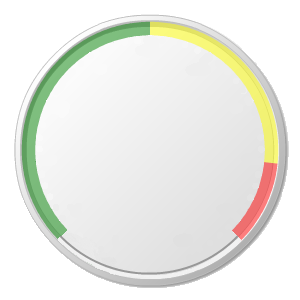 And here is the completely rendered gauge using some sample data: 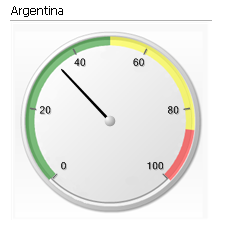
Uploading file...
Header
 **This documentation is for the legacy Izenda 6 product. Documentation for the new Izenda 7 product can be found at [[https://www.izenda.com/docs/|https://www.izenda.com/docs/]]**
Sidebar
 --- * [[Izenda 7 Series Documentation|https://www.izenda.com/docs/]] * [[Release Notes]] * [[Upgrade Best Practices|FAQ/Izenda-Update-Best-Practices]] * [[FAQ]] * [[Tutorials]] * [[The Izenda API|/API/AdHocConfig]] * [[The AdHocSettings class|/API/AdHocSettings]] * [Developer Links and Guides](/Guides/Developer-Links-and-Guides) * [[Known Issues]] --- * <a href="http://www.izenda.com" rel="nofollow" target="_blank">Izenda Website</a> * [Product Video](https://www.youtube.com/watch?v=X3-yWFq0w5A) * <a href="http://www.izenda.com/blog" rel="nofollow" target="_blank">Izenda Blog</a> * <a href="http://www.izenda.com/company/" rel="nofollow" target="_blank">About Us</a> * <a href="http://www.izenda.com/contact-us/" rel="nofollow" target="_blank">Contact Us</a> --- * [Guide To Report Design](/Guides/ReportDesign) * [Making Custom Forms Video](http://www.youtube.com/watch?v=5b2axJlgdFs) --- * [[Acknowledgements]]
Edit message:
Cancel