☰
Current Page
Main Menu
Home
Home
Editing Common-UI-Customizations
Edit
Preview
H1
H2
H3
default
Set your preferred keybinding
default
vim
emacs
markdown
Set this page's format to
AsciiDoc
Creole
Markdown
MediaWiki
Org-mode
Plain Text
RDoc
Textile
Rendering unavailable for
BibTeX
Pod
reStructuredText
Help 1
Help 1
Help 1
Help 2
Help 3
Help 4
Help 5
Help 6
Help 7
Help 8
Autosaved text is available. Click the button to restore it.
Restore Text
#Common UI Customizations [[_TOC_]] ## Note This page lists commonly used settings for UI customizations. AdHoc Settings are used in global.asax and CSS can be applied to report.css. (Refer to below example). ***For CSS, browser cache reset is required for the changes to be seen*** ## Non-Control UI Elements |Setting Name|Setting Description|Default Value| |:---|:---:|:---:| |AdHocSettings.ThumbnailWidth|Thumbnail Width|170| |AdHocSettings.ThumbnailHeight|Thumbnail Height|220| |AdHocSettings.DashboardGaugeWidth|Width of the Gauge in the Dashboard, height is changed proportionally|200| |AdHocSettings.GaugeWidth|Width of the Gauge for non-Dashboard rendering|250| |AdHocSettings.GaugeHeight|Height of the Gauge for non-Dashboard rendering|50| |AdHocSettings.HighChartLabelWidth|Label width in HTML Charts. By default width is calculated automatically|n/a| ## Rendering Settings (Style Tab AdhocSettings) Each adHoc setting corresponds to the below setting under Style Tab 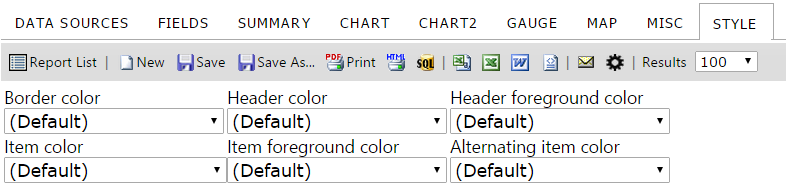 |Setting Name|Setting Description|Default Value| |:---|:---:|:---:| |AdHocSettings.DefaultAlternatingItemColor|Alternating Cell Background Color|"Gainsboro"| |AdHocSettings.DefaultHeaderForegroundColor|Header Value Color|"White"| |AdHocSettings.DefaultItemForegroundColor|Cell Value Color|"Black"| |AdHocSettings.DefaultReportBorderColor|Border Color|"White"| |AdHocSettings.DefaultReportHeaderColor|Header Color|"DarkSlateBlue"| |AdHocSettings.DefaultReportItemColor|Cell Background Color|"White| ## CSS Elements |Description|CSS Class| |:---|:---:|:---:| |Report Title|[id$="_ReportsDiv"].ReportTitle| |Report Description|[id$="_ReportsDiv"].Description| |Report Header|[id$="_ReportsDiv"].Header| |Report Footer|[id$="_ReportsDiv"].Footer| ## Examples ###Global.asax (C♯) - Thumbnail Height Change ```csharp public class CustomAdHocConfig : Izenda.AdHoc.DatabaseAdHocConfig { public static void InitializeReporting() { if (HttpContext.Current.Session == null || HttpContext.Current.Session["ReportingInitialized"] != null) return; AdHocSettings.LicenseKey = "INSERT_LICENSE_KEY_HERE"; AdHocSettings.SqlServerConnectionString = "INSERT_CONNECTION_STRING_HERE"; Izenda.AdHoc.AdHocSettings.AdHocConfig = new CustomAdHocConfig(); HttpContext.Current.Session["ReportingInitialized"] = true; AdHocSettings.ThumbnailHeight = 400; // ThumbnailHeight set to 400 } ``` 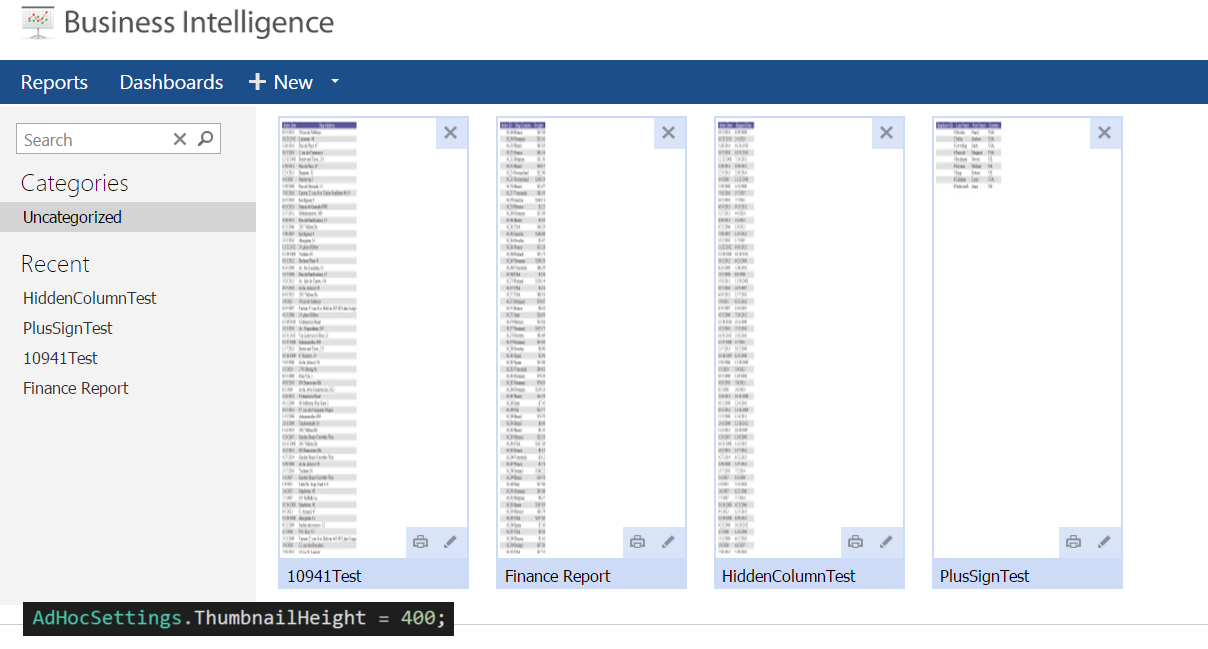 ###Global.asax (C♯) - Default Item Foreground Color Change ```csharp public class CustomAdHocConfig : Izenda.AdHoc.DatabaseAdHocConfig { public static void InitializeReporting() { if (HttpContext.Current.Session == null || HttpContext.Current.Session["ReportingInitialized"] != null) return; AdHocSettings.LicenseKey = "INSERT_LICENSE_KEY_HERE"; AdHocSettings.SqlServerConnectionString = "INSERT_CONNECTION_STRING_HERE"; Izenda.AdHoc.AdHocSettings.AdHocConfig = new CustomAdHocConfig(); HttpContext.Current.Session["ReportingInitialized"] = true; AdHocSettings.DefaultItemForegroundColor = "990000"; // set to 990000, which is 'RED' in hex } ``` 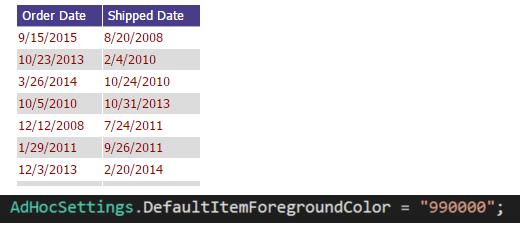 ### /Resources/css/Report.css - Report Title Font Size Change *** Make sure you delete all the cached files before applying any change *** 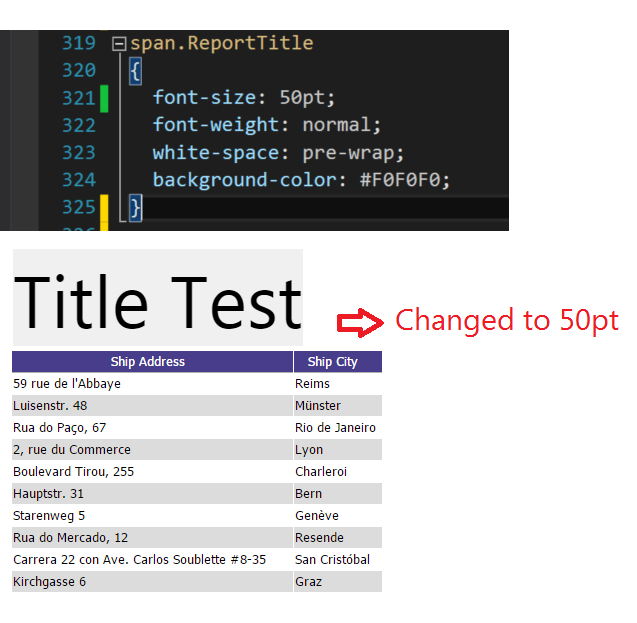
Uploading file...
Header
 **This documentation is for the legacy Izenda 6 product. Documentation for the new Izenda 7 product can be found at [[https://www.izenda.com/docs/|https://www.izenda.com/docs/]]**
Sidebar
 --- * [[Izenda 7 Series Documentation|https://www.izenda.com/docs/]] * [[Release Notes]] * [[Upgrade Best Practices|FAQ/Izenda-Update-Best-Practices]] * [[FAQ]] * [[Tutorials]] * [[The Izenda API|/API/AdHocConfig]] * [[The AdHocSettings class|/API/AdHocSettings]] * [Developer Links and Guides](/Guides/Developer-Links-and-Guides) * [[Known Issues]] --- * <a href="http://www.izenda.com" rel="nofollow" target="_blank">Izenda Website</a> * [Product Video](https://www.youtube.com/watch?v=X3-yWFq0w5A) * <a href="http://www.izenda.com/blog" rel="nofollow" target="_blank">Izenda Blog</a> * <a href="http://www.izenda.com/company/" rel="nofollow" target="_blank">About Us</a> * <a href="http://www.izenda.com/contact-us/" rel="nofollow" target="_blank">Contact Us</a> --- * [Guide To Report Design](/Guides/ReportDesign) * [Making Custom Forms Video](http://www.youtube.com/watch?v=5b2axJlgdFs) --- * [[Acknowledgements]]
Edit message:
Cancel