☰
Current Page
Main Menu
Home
Home
Editing DefaultItemsPerPage
Edit
Preview
H1
H2
H3
default
Set your preferred keybinding
default
vim
emacs
markdown
Set this page's format to
AsciiDoc
Creole
Markdown
MediaWiki
Org-mode
Plain Text
RDoc
Textile
Rendering unavailable for
BibTeX
Pod
reStructuredText
Help 1
Help 1
Help 1
Help 2
Help 3
Help 4
Help 5
Help 6
Help 7
Help 8
Autosaved text is available. Click the button to restore it.
Restore Text
#DefaultItemsPerPage [[_TOC_]] ##About Gets or sets the number of items per page. Lowering the number will decrease the number of results viewed per page. If this number is lower than the number of results, numbers indicating pagination will appear at the bottom of the report and the addition results will go to the next page. One row will be hyper links showing record ranges in denominations of whatever you set your DefaultItemsPerPage to. A second row will allow you to page forward, backward or enter a page number to jump to. These items will affect all rows in all tables on the report, in other words both the Summary and Fields tab. The Summary and the Fields tables will not be paginated independently. 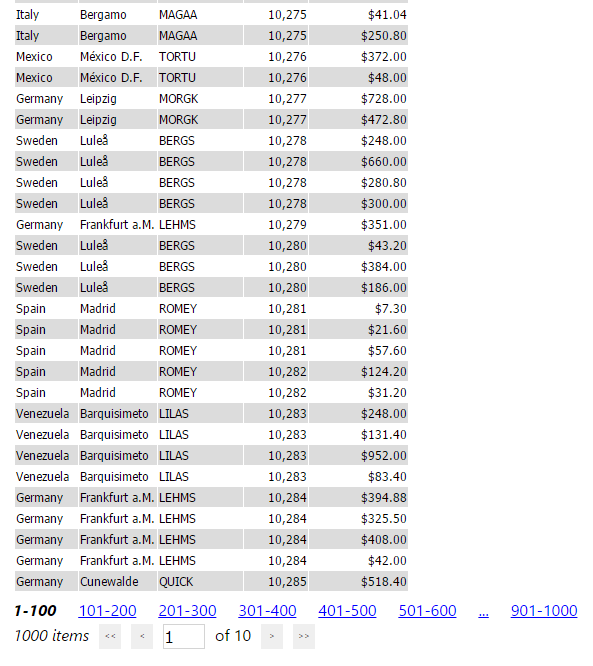 ##Global.asax (C♯) ```csharp //main class: inherits DatabaseAdHocConfig or FileSystemAdHocConfig public class CustomAdHocConfig : Izenda.AdHoc.DatabaseAdHocConfig { // Configure settings // Add custom settings after setting the license key and connection string by overriding the ConfigureSettings() method public static void InitializeReporting() { //Check to see if we've already initialized. if (HttpContext.Current.Session == null || HttpContext.Current.Session["ReportingInitialized"] != null) return; AdHocSettings.LicenseKey = "INSERT_LICENSE_KEY_HERE"; //Creates a connection to Microsoft SQL Server AdHocSettings.SqlServerConnectionString = "INSERT_CONNECTION_STRING_HERE"; AdHocSettings.AdHocConfig = new CustomAdHocConfig(); AdHocSettings.DefaultItemsPerPage = 100; //The relevant setting HttpContext.Current.Session["ReportingInitialized"] = true; } } ```
Uploading file...
Header
 **This documentation is for the legacy Izenda 6 product. Documentation for the new Izenda 7 product can be found at [[https://www.izenda.com/docs/|https://www.izenda.com/docs/]]**
Sidebar
 --- * [[Izenda 7 Series Documentation|https://www.izenda.com/docs/]] * [[Release Notes]] * [[Upgrade Best Practices|FAQ/Izenda-Update-Best-Practices]] * [[FAQ]] * [[Tutorials]] * [[The Izenda API|/API/AdHocConfig]] * [[The AdHocSettings class|/API/AdHocSettings]] * [Developer Links and Guides](/Guides/Developer-Links-and-Guides) * [[Known Issues]] --- * <a href="http://www.izenda.com" rel="nofollow" target="_blank">Izenda Website</a> * [Product Video](https://www.youtube.com/watch?v=X3-yWFq0w5A) * <a href="http://www.izenda.com/blog" rel="nofollow" target="_blank">Izenda Blog</a> * <a href="http://www.izenda.com/company/" rel="nofollow" target="_blank">About Us</a> * <a href="http://www.izenda.com/contact-us/" rel="nofollow" target="_blank">Contact Us</a> --- * [Guide To Report Design](/Guides/ReportDesign) * [Making Custom Forms Video](http://www.youtube.com/watch?v=5b2axJlgdFs) --- * [[Acknowledgements]]
Edit message:
Cancel