#Izenda Web Forms Kit Integration Guide
##About
IF UPGRADING: Please be sure to follow our upgrade best practices: http://wiki.izenda.us/FAQ/Izenda-Update-Best-Practices
This guide is designed to instruct first-time users how to integrate Izenda with simple Web Forms application. This guide will use Izenda Web Forms C# kit and a simple Web Forms application, and Visual Studio 2015.
Web Forms C# download link ##Instructions
###Step 1. Create a new Web Forms application in Visual Studio
a. In Visual Studio, select File -> New -> Website.
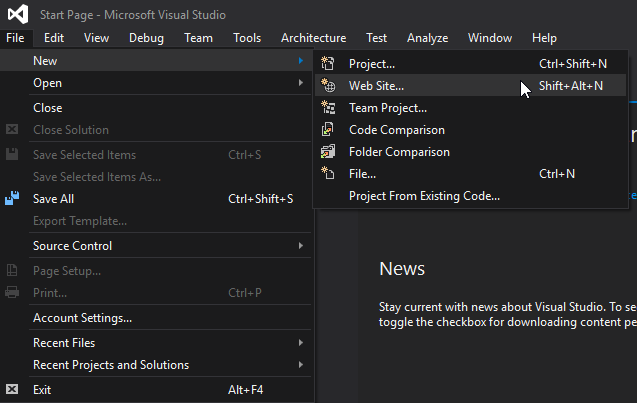
b. In the New Website pop-up choose ASP.NET Web Forms Site in Visual C#.
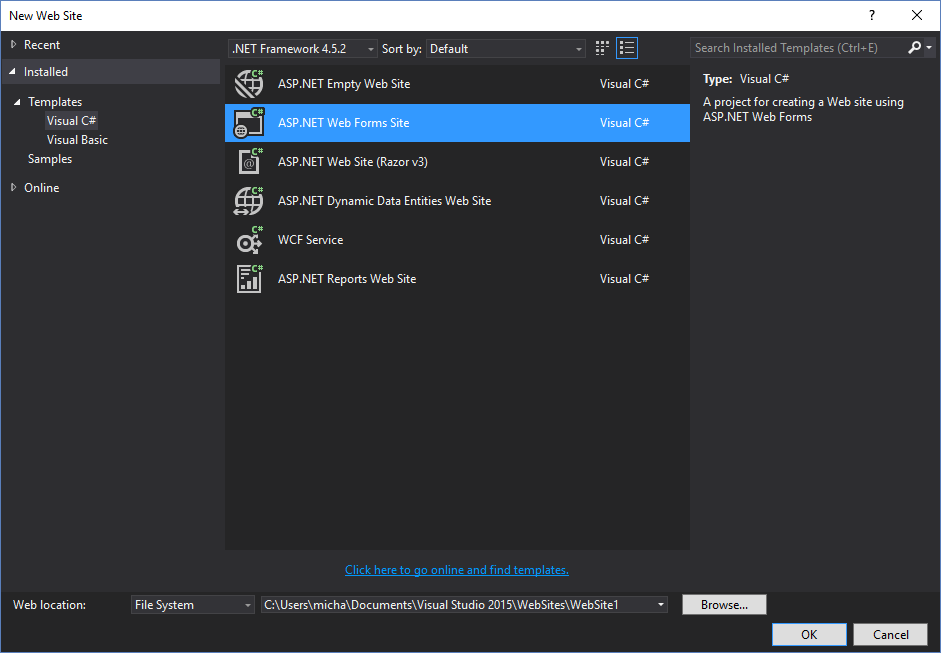
c. Make sure to set your new website's name and folder location. We're going to name our website NewWebsite.

d. Visual Studio will now open the application, and you should see this in your Solution Explorer.
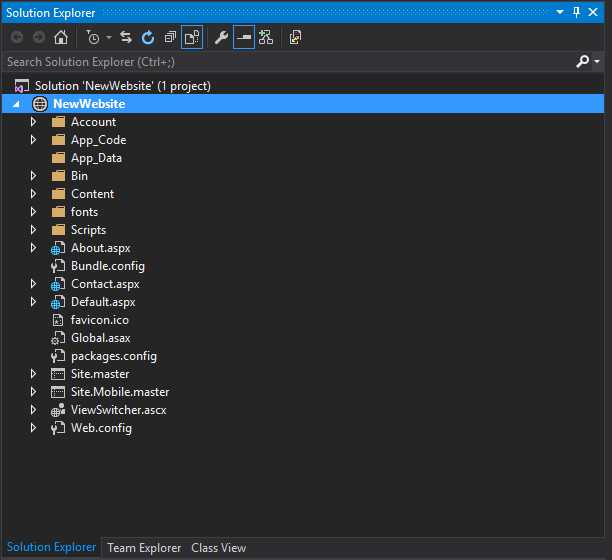
e. Alternatively, you can download the application directly from the following link, then open the folder as a Website in Visual Studio. Download NewWebsite
###Step 2. Merge Izenda and NewWebsite files and folders
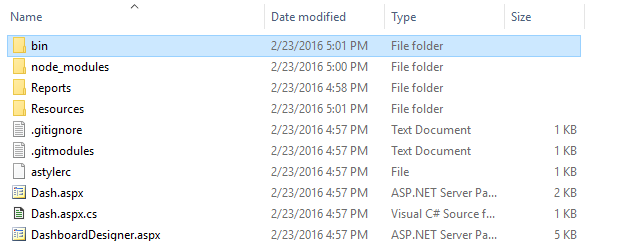
a. Unzip your Izenda webforms-cs folder, and open both the Izenda directory and the NewWebsite's directory.
Copy Izenda's bin directory into the NewWebsite's Bin directory.
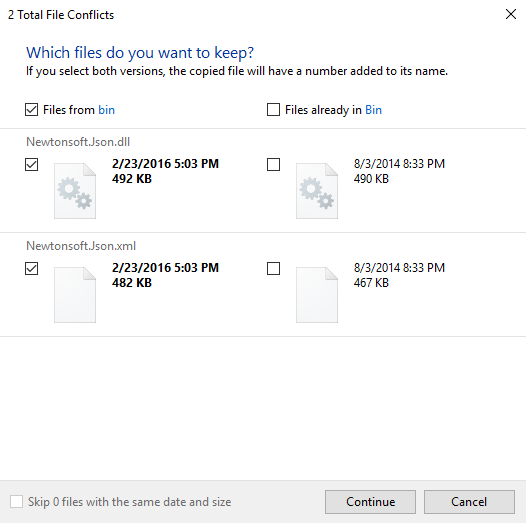
You will get a conflict around the NewtonJSON DLL and its' XML configuration file. Either use the Izenda NewtonJSON DLL and XML file or address the conflicting version issues by implement a strategy to use multiple versions of the same DLL.
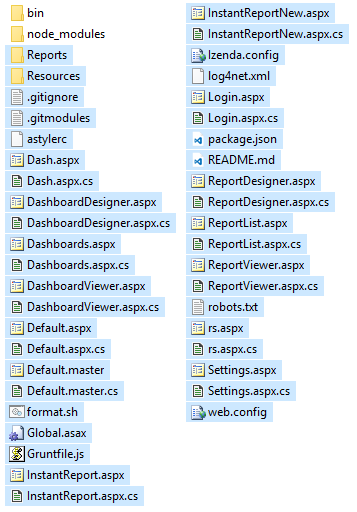
b. Copy Izenda's remaining folders and other miscellaneous files, except for the bin and node__modules.
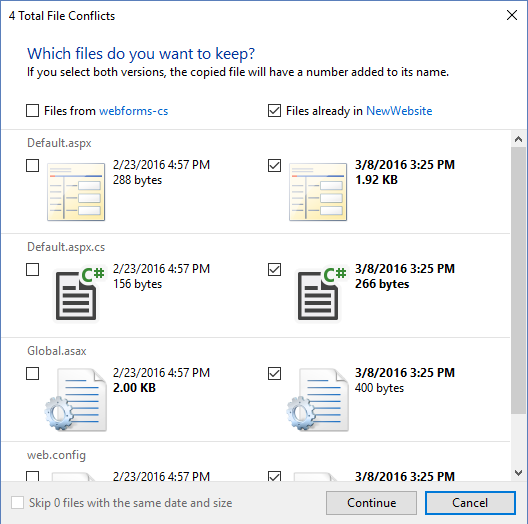
You'll see conflicts for four files:
- Web.Config - This will contain basic web application configuration settings.
- Global.asax -This crucial for InitializeReporting() method and AdHocConfig class.
- Default.aspx - This file is simply a placeholder in Izenda. It redirects users to the ReportList page.
- Default.aspx.cs - This is the code file for the above page. It redirects users to the ReportList page.
Keep NewWebsite's files, and discard the Izenda files.
We will walk through merging Izenda's Web.Config and Global.asax in the next step.
###Step 3. Add IzendaStaticResourcesController.cs and IzendaReportingController.cs to the project
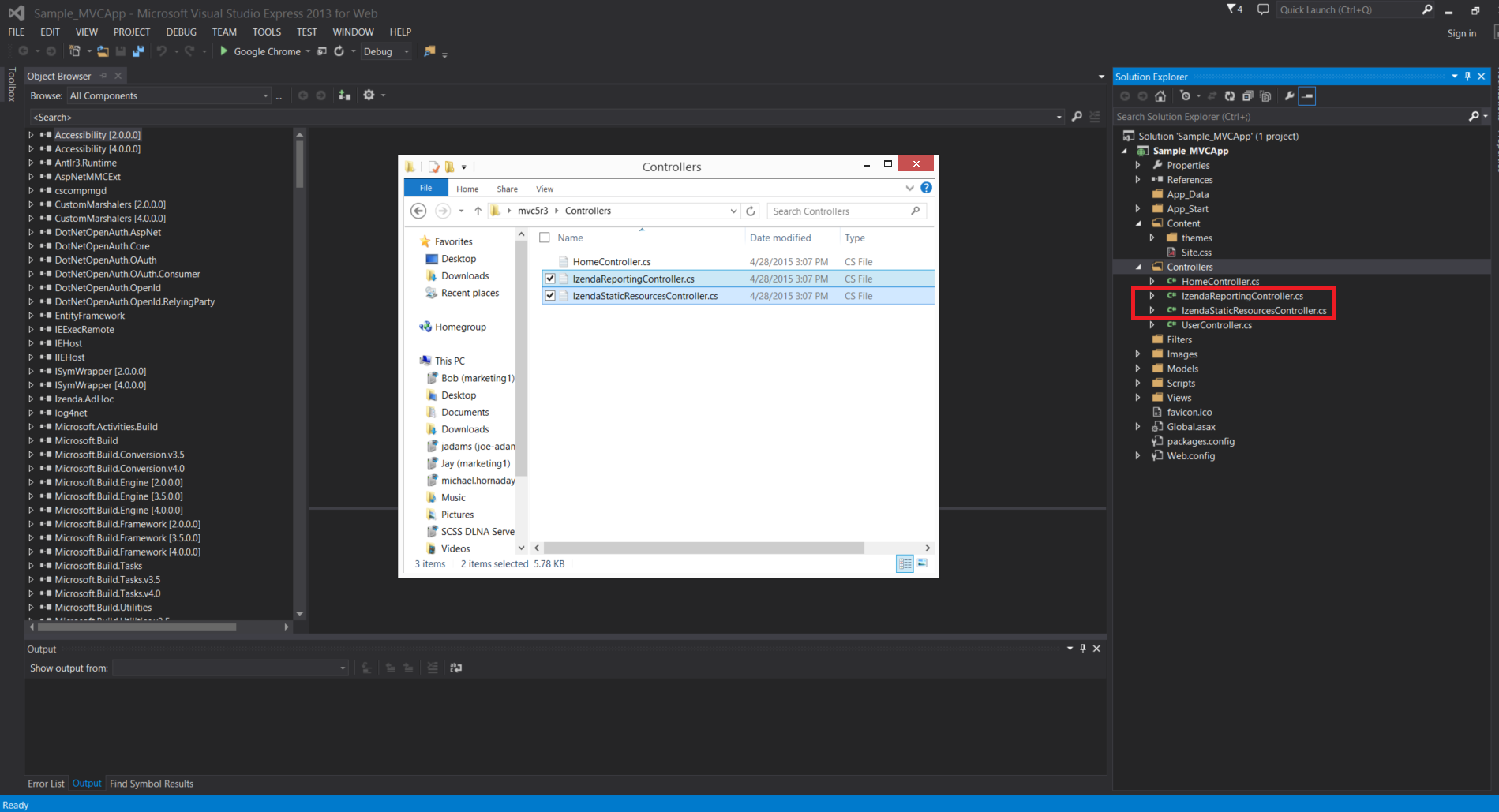
IzendaStaticResourcesController.cs and IzendaReportingController.cs are at mvc5r3\Controllers. Add them under Controllers as below (You can add by either 'drag and drop' or 'right click->Add->Existing Item)
###Step 4. Change Namespaces of Controllers
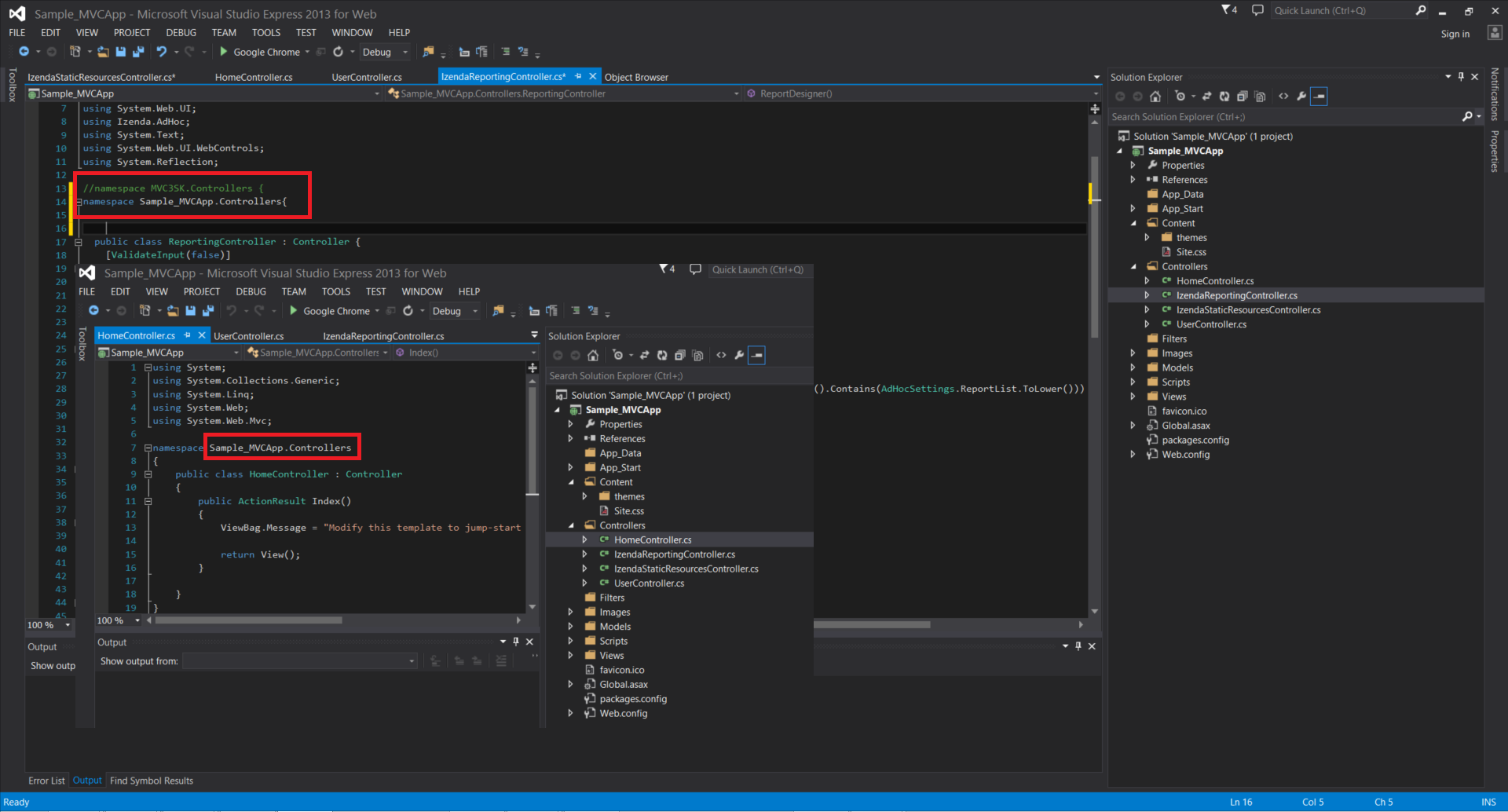
Change namespaces of IzendaStaticResourcesController.cs and IzendaReportingController.cs to match all other controllers in the application. Ex) if the namespace is in other controller file is ABC.Controllers, then MVC3SK.Controllers -> ABC.Controllers
###Step 5. Add Reporting and Resources folders to the project
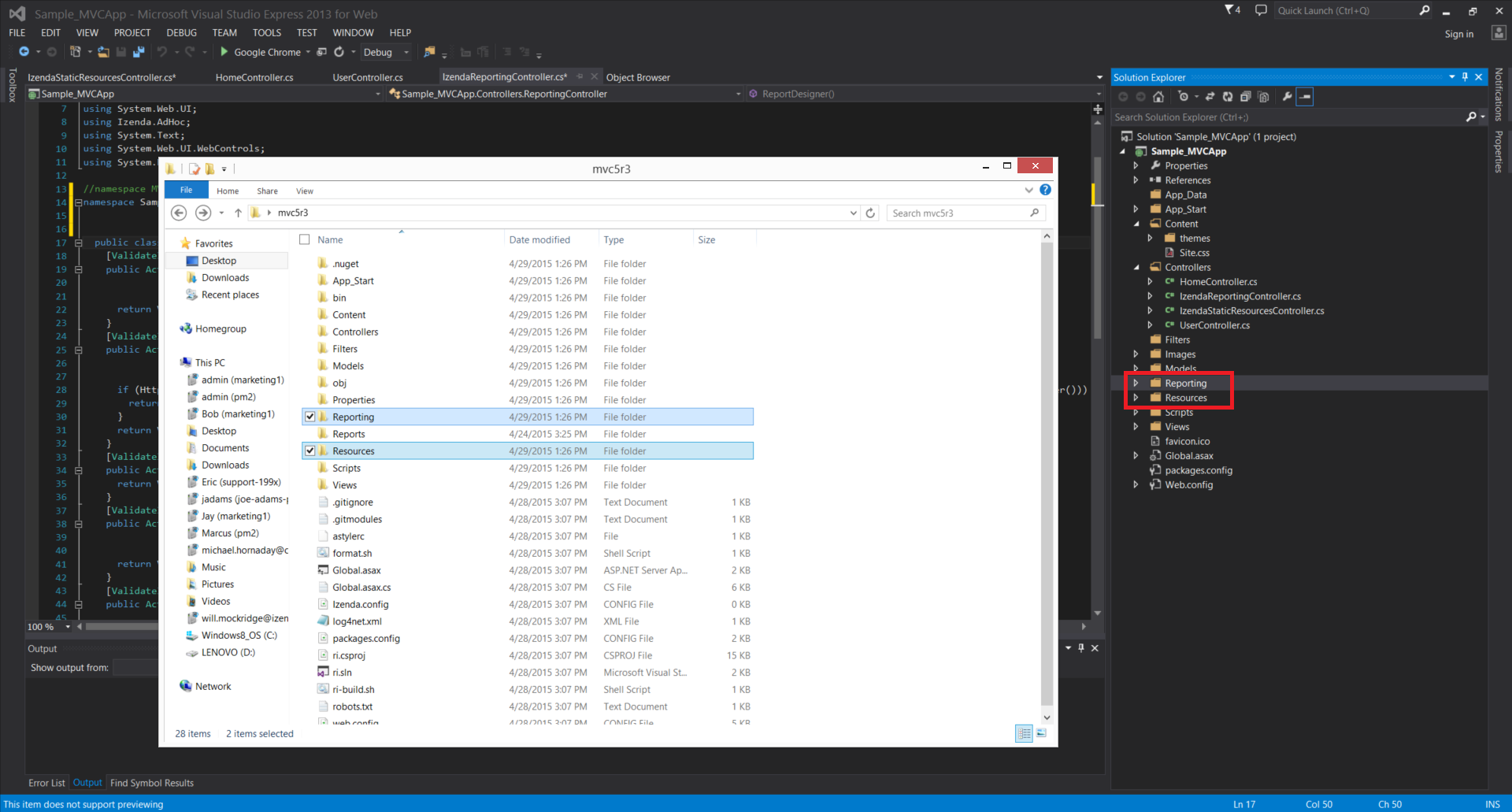
a. Add 'Reporting'and 'Resources'from \mvc5r3 to project by dragging and dropping them in Solution Explorer as below
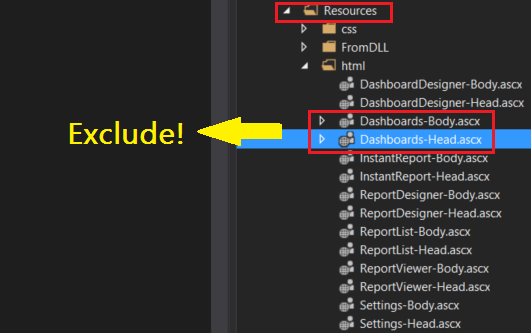
b. In Solution Explorer, exclude Dashboards-Body.ascx and Dashboards-Head.ascx from \Resources\html by right click on them and click 'Exclude From Project'
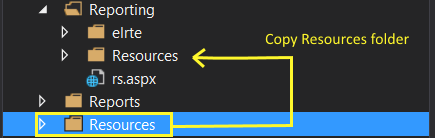
c. Copy /Resources folder from the root of the application into the /Reporting folder. This will create two copies of the Resources folder, one in the root and another under the Reporting folder. (If the folder "/Reporting/Resources" exists, overwrite the existing folder with the new copy.)
d. Copy rs.aspx from /Reporting and paste it in /Resources/html as below
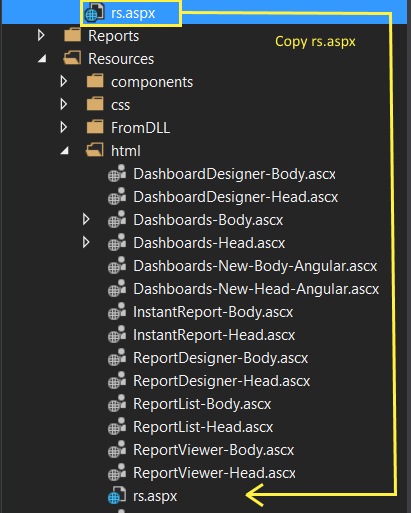
** If Izenda toolbar icons don't appear, check if Reporting folder contains rs.aspx and Resources folder **
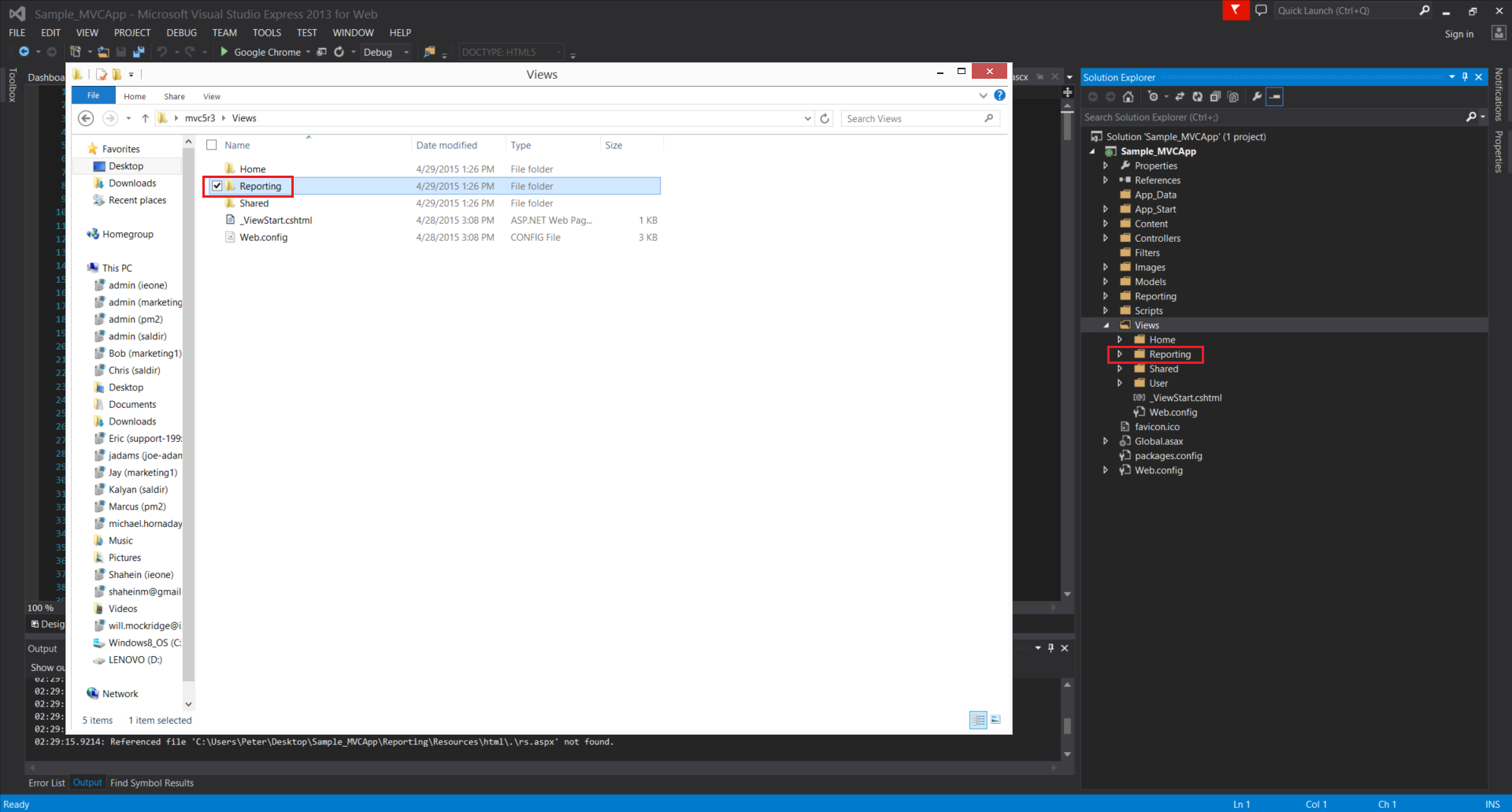
###Step 6. Add mvc5r3\Views\Reporting folder
Add the Reporting folder in mvc5r3\Views to the project's Views
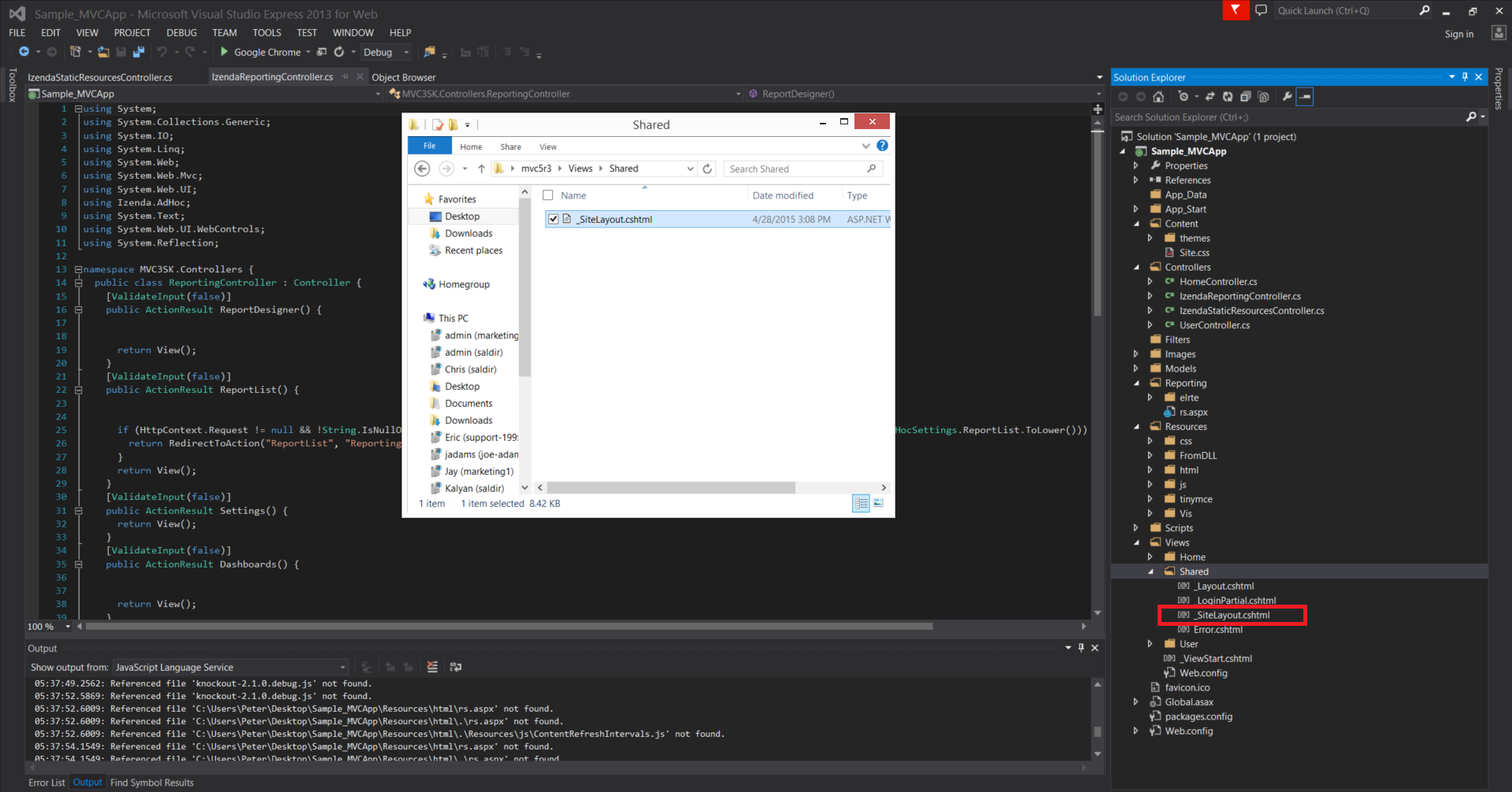
###Step 7. Add _sitelayout to project’s Views\Shared
Add _sitelayout from mvc5r3\Views\Shared to project’s Views\Shared
###Step 8. Copy code from Global.asax except the first line
a. Copy code from Global.asax except the first line
###Global.asax from mvc5r3(C♯)
<%@ Application Codebehind="Global.asax.cs" Inherits="MVC4Razor2.MvcApplication" Language="C#" %> //Copy except this line

<%@ Import Namespace="Izenda.AdHoc"%>
<%@ Import Namespace="System.IO"%>

<script runat="server">
  void Application_AcquireRequestState(object sender, EventArgs e) {
    CustomAdHocConfig.InitializeReporting();
  }

  [Serializable]
  public class CustomAdHocConfig : FileSystemAdHocConfig {
    public static void InitializeReporting() {
      if (HttpContext.Current.Session == null || HttpContext.Current.Session["ReportingInitialized"] != null)
        return;
      AdHocSettings.LicenseKey = "INSERT_LICENSE_KEY_HERE";
      AdHocSettings.SqlServerConnectionString = @"INSERT_CONNECTION_STRING_HERE";
      AdHocSettings.GenerateThumbnails = true;
      AdHocSettings.ShowSimpleModeViewer = true;
      AdHocSettings.IdentifiersRegex = "^.*[iI][Dd]$";
      AdHocSettings.TabsCssUrl = "/Resources/css/tabs.css";
      AdHocSettings.ReportCssUrl = "../Resources/css/Report.css";
      AdHocSettings.ShowBetweenDateCalendar = true;
      AdHocSettings.DashboardViewer = "Dashboards";
      AdHocSettings.ReportViewer = "ReportViewer";
      AdHocSettings.InstantReport = "InstantReport";
      AdHocSettings.ReportDesignerUrl = "ReportDesigner";
      AdHocSettings.DashboardDesignerUrl = "DashboardDesigner";
      AdHocSettings.ReportList = "ReportList";
      AdHocSettings.SettingsPageUrl = "Settings";
      AdHocSettings.ParentSettingsUrl = "Settings";
      AdHocSettings.ResponseServer = "rs.aspx";
      AdHocSettings.ReportsPath = Path.Combine(HttpContext.Current.Server.MapPath("~/"), "Reports");
      AdHocSettings.PrintMode = PrintMode.Html2PdfAndHtml;
      AdHocSettings.ChartingEngine = ChartingEngine.HtmlChart;
      AdHocSettings.AdHocConfig = new CustomAdHocConfig();
      HttpContext.Current.Session["ReportingInitialized"] = true;
    }
  }
</script>
b. Paste it in project’s Global.asax
###Global.asax from Sample_MVCApp(C♯)
<%@ Application Codebehind="Global.asax.cs" Inherits="Sample_MVCApp.MvcApplication" Language="C#" %>

//THE BELOW IS PASTED CODE

<%@ Import Namespace="Izenda.AdHoc"%>
<%@ Import Namespace="System.IO"%>

<script runat="server">
  void Application_AcquireRequestState(object sender, EventArgs e) {
    CustomAdHocConfig.InitializeReporting();
  }

  [Serializable]
  public class CustomAdHocConfig : FileSystemAdHocConfig {
    public static void InitializeReporting() {
      if (HttpContext.Current.Session == null || HttpContext.Current.Session["ReportingInitialized"] != null)
        return;
      AdHocSettings.LicenseKey = "INSERT_LICENSE_KEY_HERE";
      AdHocSettings.SqlServerConnectionString = @"INSERT_CONNECTION_STRING_HERE";
      AdHocSettings.GenerateThumbnails = true;
      AdHocSettings.ShowSimpleModeViewer = true;
      AdHocSettings.IdentifiersRegex = "^.*[iI][Dd]$";
      AdHocSettings.TabsCssUrl = "/Resources/css/tabs.css";
      AdHocSettings.ReportCssUrl = "../Resources/css/Report.css";
      AdHocSettings.ShowBetweenDateCalendar = true;
      AdHocSettings.DashboardViewer = "Dashboards";
      AdHocSettings.ReportViewer = "ReportViewer";
      AdHocSettings.InstantReport = "InstantReport";
      AdHocSettings.ReportDesignerUrl = "ReportDesigner";
      AdHocSettings.DashboardDesignerUrl = "DashboardDesigner";
      AdHocSettings.ReportList = "ReportList";
      AdHocSettings.SettingsPageUrl = "Settings";
      AdHocSettings.ParentSettingsUrl = "Settings";
      AdHocSettings.ResponseServer = "rs.aspx";
      AdHocSettings.ReportsPath = Path.Combine(HttpContext.Current.Server.MapPath("~/"), "Reports");
      AdHocSettings.PrintMode = PrintMode.Html2PdfAndHtml;
      AdHocSettings.ChartingEngine = ChartingEngine.HtmlChart;
      AdHocSettings.AdHocConfig = new CustomAdHocConfig();
      HttpContext.Current.Session["ReportingInitialized"] = true;
    }
  }
</script>
###Step 9. Copy constraints classes from Global.asax.cs
a. Copy below two constraints from Global.asax.cs of mvc5r3
//IRouteConstraint
public class SpecificFileRouterConstraint : IRouteConstraint {
    private string extensionToBeRouted = null;
    private string fileToBeRouted = null;

    public bool Match(HttpContextBase httpContext, Route route, string parameterName, RouteValueDictionary values, RouteDirection routeDirection) {
      return !String.IsNullOrEmpty(extensionToBeRouted) && !String.IsNullOrEmpty(fileToBeRouted) && values[extensionToBeRouted] != null && values[extensionToBeRouted].ToString().ToLower().Contains(fileToBeRouted);
    }

    public SpecificFileRouterConstraint() { }

    public SpecificFileRouterConstraint(string extension, string fileName) {
      extensionToBeRouted = extension.ToLower();
      fileToBeRouted = fileName.ToLower();
    }
  }


//IRouteConstraint
public class IzendaResourceConstraint : IRouteConstraint {
    private string extensionToBeRouted = null;

    public bool Match(HttpContextBase httpContext, Route route, string parameterName, RouteValueDictionary values, RouteDirection routeDirection) {
      if (String.IsNullOrEmpty(extensionToBeRouted) || values[extensionToBeRouted] == null) {
        return false;
      }
      string requestUrl = values[extensionToBeRouted].ToString().ToLower();
      bool result = false;
      if (extensionToBeRouted == "js") {
        result = result || requestUrl.Contains("reportviewerfilters.js");
        result = result || requestUrl.Contains("reportlist.js");
        result = result || requestUrl.Contains("data-sources.js");
        result = result || requestUrl.Contains("data-sources-preview.js");
        result = result || requestUrl.Contains("charts.js");
        result = result || requestUrl.Contains("datasources-search.js");
        result = result || requestUrl.Contains("jquery-1.6.1.min.js");
        result = result || requestUrl.Contains("jquery-ui-1.8.13.custom.min.js");
        result = result || requestUrl.Contains("elrte.full.js");
        result = result || requestUrl.Contains("elrte.ru.js");
        result = result || requestUrl.Contains("fieldproperties.js");
        result = result || requestUrl.Contains("shrinkable-grid.js");
      }
      if (extensionToBeRouted == "css") {
        result = result || requestUrl.Contains("tabs.css");
        result = result || requestUrl.Contains("report.css");
        result = result || requestUrl.Contains("filters.css");
        result = result || requestUrl.Contains("base.css");
        result = result || requestUrl.Contains("report-list-modal.css");
        result = result || requestUrl.Contains("data-sources.css");
        result = result || requestUrl.Contains("charts.css");
        result = result || requestUrl.Contains("jquery-ui-1.8.13.custom.css");
        result = result || requestUrl.Contains("elrte.min.css");
        result = result || requestUrl.Contains("elrte-inner.css");
        result = result || requestUrl.Contains("shrinkable-grid.css");
      }
      if (extensionToBeRouted == "png") {
        result = result || requestUrl.Contains("elrtebg.png");
        result = result || requestUrl.Contains("elrte-toolbar.png");
      }
      if (extensionToBeRouted == "gif") {
        result = result || requestUrl.Contains("elrte/images/pixel.gif");
      }
      return result;
    }

    public IzendaResourceConstraint() { }

    public IzendaResourceConstraint(string extension) {
      extensionToBeRouted = extension.ToLower();
    }
  }
b. Paste it above MVCapplication class in Global.asax.cs of project
namespace Sample_MVCApp
{
    public class SpecificFileRouterConstraint : IRouteConstraint
    {
        private string extensionToBeRouted = null;
        private string fileToBeRouted = null;

        public bool Match(HttpContextBase httpContext, Route route, string parameterName, RouteValueDictionary values, RouteDirection routeDirection)
        {
            return !String.IsNullOrEmpty(extensionToBeRouted) && !String.IsNullOrEmpty(fileToBeRouted) && values[extensionToBeRouted] != null && values[extensionToBeRouted].ToString().ToLower().Contains(fileToBeRouted);
        }

        public SpecificFileRouterConstraint() { }

        public SpecificFileRouterConstraint(string extension, string fileName)
        {
            extensionToBeRouted = extension.ToLower();
            fileToBeRouted = fileName.ToLower();
        }
    }

    public class IzendaResourceConstraint : IRouteConstraint
    {
        private string extensionToBeRouted = null;

        public bool Match(HttpContextBase httpContext, Route route, string parameterName, RouteValueDictionary values, RouteDirection routeDirection)
        {
            if (String.IsNullOrEmpty(extensionToBeRouted) || values[extensionToBeRouted] == null)
            {
                return false;
            }
            string requestUrl = values[extensionToBeRouted].ToString().ToLower();
            bool result = false;
            if (extensionToBeRouted == "js")
            {
                result = result || requestUrl.Contains("reportviewerfilters.js");
                result = result || requestUrl.Contains("reportlist.js");
                result = result || requestUrl.Contains("data-sources.js");
                result = result || requestUrl.Contains("data-sources-preview.js");
                result = result || requestUrl.Contains("charts.js");
                result = result || requestUrl.Contains("datasources-search.js");
                result = result || requestUrl.Contains("jquery-1.6.1.min.js");
                result = result || requestUrl.Contains("jquery-ui-1.8.13.custom.min.js");
                result = result || requestUrl.Contains("elrte.full.js");
                result = result || requestUrl.Contains("elrte.ru.js");
                result = result || requestUrl.Contains("fieldproperties.js");
                result = result || requestUrl.Contains("shrinkable-grid.js");
            }
            if (extensionToBeRouted == "css")
            {
                result = result || requestUrl.Contains("tabs.css");
                result = result || requestUrl.Contains("report.css");
                result = result || requestUrl.Contains("filters.css");
                result = result || requestUrl.Contains("base.css");
                result = result || requestUrl.Contains("report-list-modal.css");
                result = result || requestUrl.Contains("data-sources.css");
                result = result || requestUrl.Contains("charts.css");
                result = result || requestUrl.Contains("jquery-ui-1.8.13.custom.css");
                result = result || requestUrl.Contains("elrte.min.css");
                result = result || requestUrl.Contains("elrte-inner.css");
                result = result || requestUrl.Contains("shrinkable-grid.css");
            }
            if (extensionToBeRouted == "png")
            {
                result = result || requestUrl.Contains("elrtebg.png");
                result = result || requestUrl.Contains("elrte-toolbar.png");
            }
            if (extensionToBeRouted == "gif")
            {
                result = result || requestUrl.Contains("elrte/images/pixel.gif");
            }
            return result;
        }

        public IzendaResourceConstraint() { }

        public IzendaResourceConstraint(string extension)
        {
            extensionToBeRouted = extension.ToLower();
        }
    }


    // Note: For instructions on enabling IIS6 or IIS7 classic mode,
    // visit http://go.microsoft.com/?LinkId=9394801

    public class MvcApplication : System.Web.HttpApplication
    {
        protected void Application_Start()
        {
            AreaRegistration.RegisterAllAreas();

            WebApiConfig.Register(GlobalConfiguration.Configuration);
            FilterConfig.RegisterGlobalFilters(GlobalFilters.Filters);
            RouteConfig.RegisterRoutes(RouteTable.Routes);
            BundleConfig.RegisterBundles(BundleTable.Bundles);
            AuthConfig.RegisterAuth();
        }
    }
}
###Step 10. Copy over RegisterRoutes in MvcApplication
a. Copy the below class from Global.asax.cs of mvc5r3
public static void RegisterRoutes(RouteCollection routes) {
      routes.IgnoreRoute("{resource}.axd/{*pathInfo}");
      routes.MapRoute("IzendaResources", "Reporting/Resources/{*resource}", new { controller = "IzendaStaticResources", action = "Index" });
      routes.MapRoute("IzendaJsResources", "{*js}", new { controller = "IzendaStaticResources", action = "Index" }, new { irc = new IzendaResourceConstraint("js") });
      routes.MapRoute("IzendaCssResources", "{*css}",	new { controller = "IzendaStaticResources", action = "Index" },	new { irc = new IzendaResourceConstraint("css") });
      routes.MapRoute("IzendaPngResources", "{*png}", new { controller = "IzendaStaticResources", action = "Index" }, new { irc = new IzendaResourceConstraint("png") });
      routes.MapRoute("IzendaGifResources", "{*gif}", new { controller = "IzendaStaticResources", action = "Index" }, new { irc = new IzendaResourceConstraint("gif") });
      routes.MapRoute("IzendaReporting", "{controller}/{action}/{id}", new { controller = "Reporting", id = UrlParameter.Optional });
      routes.MapRoute("StarterKitDefault", "{controller}/{action}/{id}", new { controller = "Reporting", action = "ReportList", id = UrlParameter.Optional });
      routes.MapRoute("HomeDefault", "{*pathInfo}", new { controller = "Home", action = "Index", id = UrlParameter.Optional });
    }
b. Paste it inside MvcApplication class of tproject’s Global.asax.cs
public class MvcApplication : System.Web.HttpApplication
    {

        public static void RegisterRoutes(RouteCollection routes)
        {
            routes.IgnoreRoute("{resource}.axd/{*pathInfo}");
            routes.MapRoute("IzendaResources", "Reporting/Resources/{*resource}", new { controller = "IzendaStaticResources", action = "Index" });
            routes.MapRoute("IzendaJsResources", "{*js}", new { controller = "IzendaStaticResources", action = "Index" }, new { irc = new IzendaResourceConstraint("js") });
            routes.MapRoute("IzendaCssResources", "{*css}", new { controller = "IzendaStaticResources", action = "Index" }, new { irc = new IzendaResourceConstraint("css") });
            routes.MapRoute("IzendaPngResources", "{*png}", new { controller = "IzendaStaticResources", action = "Index" }, new { irc = new IzendaResourceConstraint("png") });
            routes.MapRoute("IzendaGifResources", "{*gif}", new { controller = "IzendaStaticResources", action = "Index" }, new { irc = new IzendaResourceConstraint("gif") });
            routes.MapRoute("IzendaReporting", "{controller}/{action}/{id}", new { controller = "Reporting", id = UrlParameter.Optional });
            routes.MapRoute("StarterKitDefault", "{controller}/{action}/{id}", new { controller = "Reporting", action = "ReportList", id = UrlParameter.Optional });
            routes.MapRoute("HomeDefault", "{*pathInfo}", new { controller = "Home", action = "Index", id = UrlParameter.Optional });
        }

        protected void Application_Start()
        {
            AreaRegistration.RegisterAllAreas();

            WebApiConfig.Register(GlobalConfiguration.Configuration);
            FilterConfig.RegisterGlobalFilters(GlobalFilters.Filters);
            RouteConfig.RegisterRoutes(RouteTable.Routes);
            BundleConfig.RegisterBundles(BundleTable.Bundles);
            AuthConfig.RegisterAuth();
        }
    }
###Step 11. Change the LicenseKey and ConnnectionString in Global.asax of project
To get a new trial key, you may contact sales@izenda.com.
AdHocSettings.LicenseKey = "INSERT_LICENSE_KEY_HERE";
AdHocSettings.SqlServerConnectionString = @"INSERT_CONNECTION_STRING_HERE";
###Step 12. Run it!
After Step#11, the Sample_MVCApp should build and work without a problem. To see if Izenda is integrated with this web application,
a. Open _Layout.cshtml in Views\Shared\ in Solution Explorer
b. Add an ActionLink which leads to Izenda as below
<li>@Html.ActionLink("Home", "Index", "Home")</li>
<li>@Html.ActionLink("About", "About", "Home")</li>
<li>@Html.ActionLink("Contact", "Contact", "Home")</li>
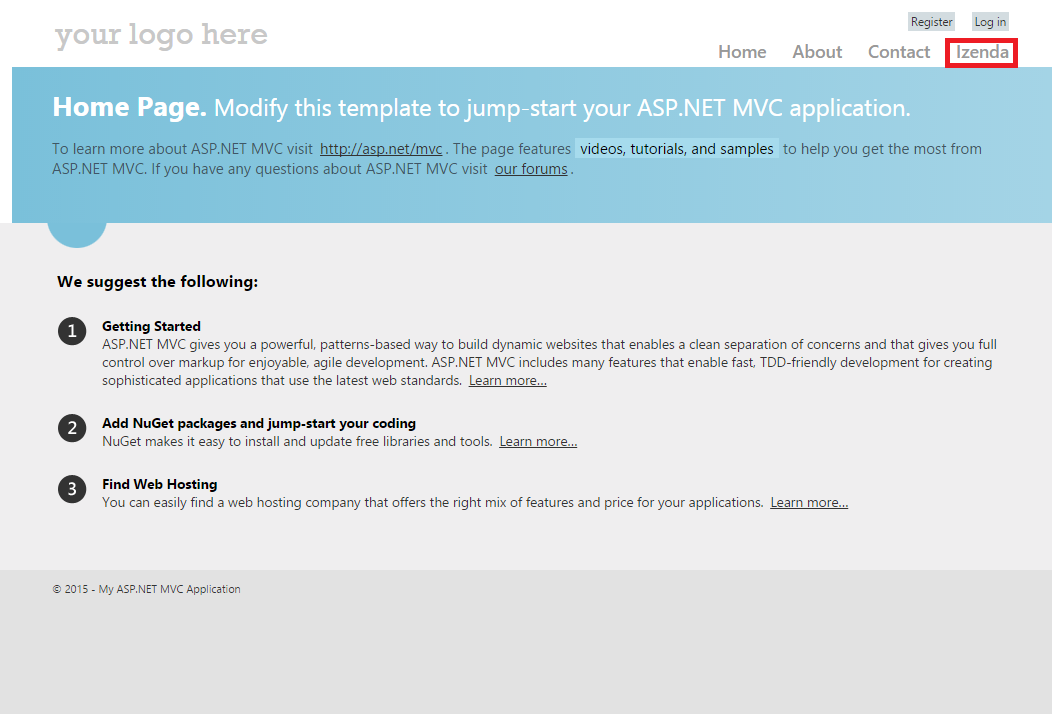
<li>@Html.ActionLink("Izenda", "ReportList", "Reporting")</li>  //Add this line
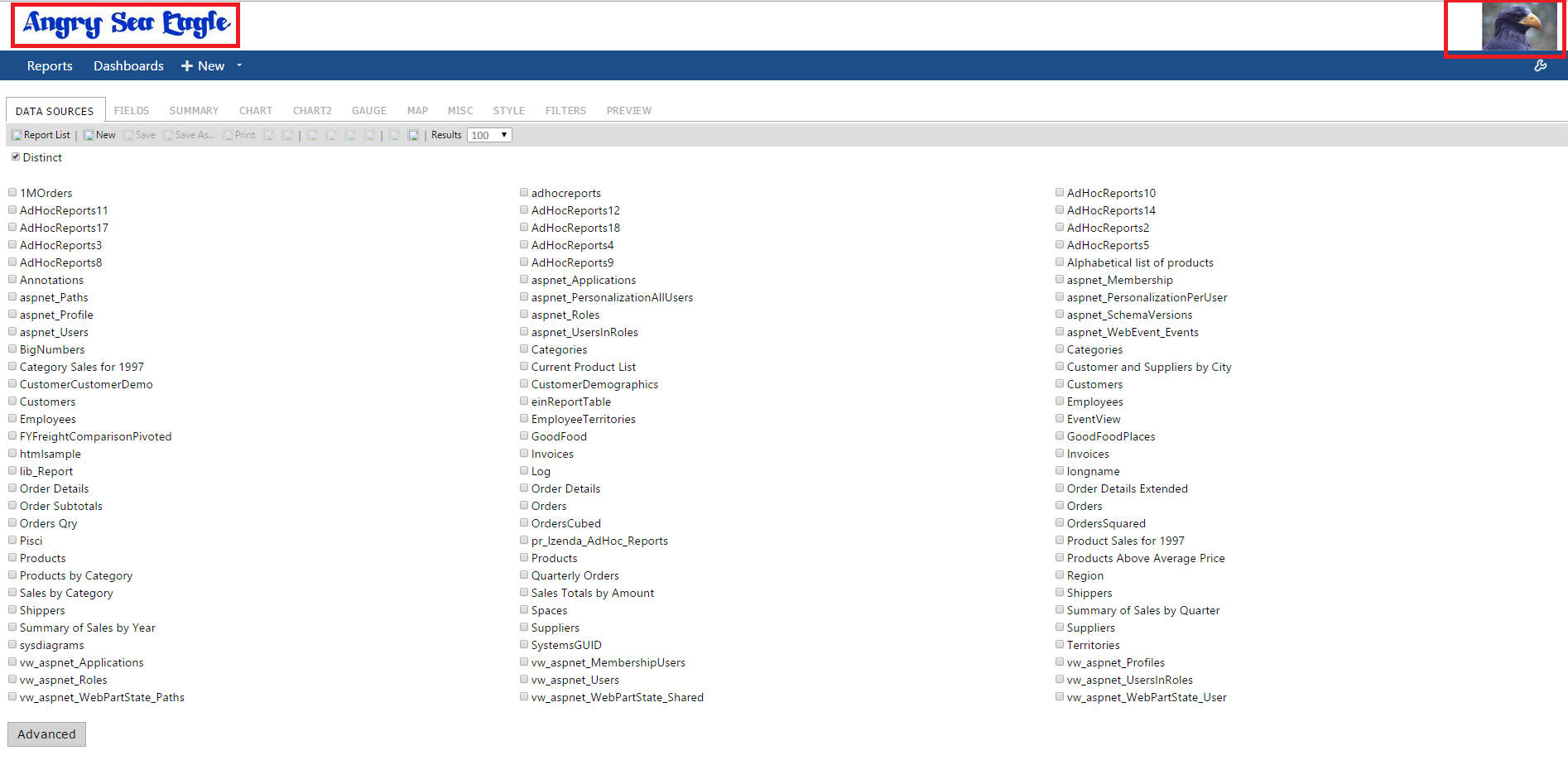
c. Notice 'Izenda' item added to the menu as below. Click it and see if it leads to Izenda ReportList page.
###Step 13. Change the Logo
a. Open _SiteLayout.cshtml in Views\Shared\ in Solution Explorer
b. Find below two lines in the body of the html and edit the source image directory, alt, and the link address for top-right image
<img src="~/Resources/FromDLL/Resources/ModernImages/bi-logo.png" alt="Business intelligence" />  //top-left image

<a href="http://izenda.com" style="position: relative; top: 4px;"><img class="right-logo" src="~/Resources/FromDLL/Resources/ModernImages/IzendaNewLogoBlue.png" alt="Izenda Reports" /></a> //top-right image
In this guide, two images, Logo.png and SeaEagle.png, were put in the project folder, /Sample_MVCApp, and the above two lines were edited as below
<img src="~/Logo.png" alt="Angry Sea Eagle" />  //top-left image

<a href="http://SeaEagle.com" style="position: relative; top: 4px;"><img class="right-logo" src="~/SeaEagle.png" alt="SeaEagle.Com" /></a> //top-right image
Two top logos have changed as below