
#Izenda Webforms Integration Guide (Sub-directory)
##About
This guide is designed to instruct first-time users how to integrate Izenda Webforms kit into a basic ASP.NET website using Visual Studio Express 2013 for Web. In this integration guide, all Izenda files will be placed in a sub-directory called 'Izenda' within the hosting website. This guide will use an Izenda Webforms kit and a basic ASP.NET website, which can be created using Visual Studio Express 2013 for Web.
Izenda Webforms kit download link
Reference: Integrating Izenda into a Web Application
##Instructions
###Step 1. Open the host website in Visual Studio
You can also create a new web site in Visual Studio in ASP.NET Webforms.

###Step 2. Copy contents of /Bin folder in Webforms kit to the Bin folder of host website

###Step 3. Copy contents of Global.asax in Webforms kit to Global.asax of the website
Copy the below code from Global.asax of Webforms kit to Global.asax of website:
 [Serializable]
  public class CustomAdHocConfig : FileSystemAdHocConfig {
    public static void InitializeReporting() {
      //Check to see if we've already initialized.
      if (HttpContext.Current.Session == null || HttpContext.Current.Session["ReportingInitialized"] != null)
        return;
      //Initialize System
      AdHocSettings.LicenseKey = "INSERT_LICENSE_KEY_HERE";
      AdHocSettings.SqlServerConnectionString = @"INSERT_CONNECTION_STRING_HERE";
      AdHocSettings.GenerateThumbnails = true;
      AdHocSettings.ChartingEngine = ChartingEngine.HtmlChart;
      AdHocSettings.ShowSimpleModeViewer = true;
      AdHocSettings.IdentifiersRegex = "^.*[iI][Dd]$";
      AdHocSettings.TabsCssUrl = "Resources/css/tabs.css";
      AdHocSettings.ReportCssUrl = "Resources/css/Report.css";
      AdHocSettings.ShowBetweenDateCalendar = true;
      AdHocSettings.AdHocConfig = new CustomAdHocConfig();
      AdHocSettings.ChartingEngine = ChartingEngine.HtmlChart;
      // AdHocSettings.ShowHtmlButton = true;
      //AdHocSettings.ShowPDFButton = true;
      //Initialize User
      //AdHocSettings.VisibleDataSources=
      //AdHocSettings.CurrentUserName=
      //AdHocSettings.HiddenFilters["Field"] = new string [] {"value1","value2"};
      //Success!
      HttpContext.Current.Session["ReportingInitialized"] = true;

      AdHocSettings.DashboardDateSliderMode = DashboardDateSliderMode.None;

      AdHocSettings.DashboardViewer = "Dash.aspx";
      AdHocSettings.DashboardDesignerUrl = "Dash.aspx";

      //EOPDF uses a DLL that converts HTML
      //AdHocSettings.PdfPrintMode = PdfMode.EOPDF;
      //PhantomJS PDF uses an EXE on the web server that produces the export
      AdHocSettings.PdfPrintMode = PdfMode.PhantomJs;
    }
    public override void ProcessDataSet(System.Data.DataSet ds, string reportPart) {
      base.ProcessDataSet(ds, reportPart);
    }
    public override void PreExecuteReportSet(ReportSet reportSet) {
      base.PreExecuteReportSet(reportSet);
    }
  }
And add Izenda.Adhoc namespace. Now, the global.asax of website should look similar to the below:
<%@ Application Language="C#" %>
<%@ Import Namespace="_Sub_Final" %>
<%@ Import Namespace="System.Web.Optimization" %>
<%@ Import Namespace="System.Web.Routing" %>
<%@ Import Namespace="Izenda.AdHoc" %>


<script runat="server">

    void Application_Start(object sender, EventArgs e)
    {
        RouteConfig.RegisterRoutes(RouteTable.Routes);
        BundleConfig.RegisterBundles(BundleTable.Bundles);
    }


    [Serializable]
    public class CustomAdHocConfig : FileSystemAdHocConfig {
      public static void InitializeReporting() {
        //Check to see if we've already initialized.
        if (HttpContext.Current.Session == null || HttpContext.Current.Session["ReportingInitialized"] != null)
          return;
        //Initialize System
        AdHocSettings.LicenseKey = "INSERT_LICENSE_KEY_HERE";
      AdHocSettings.SqlServerConnectionString = @"INSERT_CONNECTION_STRING_HERE";
        AdHocSettings.GenerateThumbnails = true;
        AdHocSettings.ChartingEngine = ChartingEngine.HtmlChart;
        AdHocSettings.ShowSimpleModeViewer = true;
        AdHocSettings.IdentifiersRegex = "^.*[iI][Dd]$";
        AdHocSettings.TabsCssUrl = "Resources/css/tabs.css";
        AdHocSettings.ReportCssUrl = "Resources/css/Report.css";
        AdHocSettings.ShowBetweenDateCalendar = true;
        AdHocSettings.AdHocConfig = new CustomAdHocConfig();
        AdHocSettings.ChartingEngine = ChartingEngine.HtmlChart;
        // AdHocSettings.ShowHtmlButton = true;
        //AdHocSettings.ShowPDFButton = true;
        //Initialize User
        //AdHocSettings.VisibleDataSources=
        //AdHocSettings.CurrentUserName=
        //AdHocSettings.HiddenFilters["Field"] = new string [] {"value1","value2"};
        //Success!
        HttpContext.Current.Session["ReportingInitialized"] = true;

        AdHocSettings.DashboardDateSliderMode = DashboardDateSliderMode.None;

        AdHocSettings.DashboardViewer = "Dash.aspx";
        AdHocSettings.DashboardDesignerUrl = "Dash.aspx";

        //EOPDF uses a DLL that converts HTML
        //AdHocSettings.PdfPrintMode = PdfMode.EOPDF;
        //PhantomJS PDF uses an EXE on the web server that produces the export
        AdHocSettings.PdfPrintMode = PdfMode.PhantomJs;
      }
      public override void ProcessDataSet(System.Data.DataSet ds, string reportPart) {
        base.ProcessDataSet(ds, reportPart);
      }
      public override void PreExecuteReportSet(ReportSet reportSet) {
        base.PreExecuteReportSet(reportSet);
      }
    }

</script>
Create a folder named 'Izenda' in the website's root folder. Copy everything from Webforms kit except for global.asax, web.config and the bin folder to your sub-folder. In this integration guide, the sub folder is named 'Izenda'.

###Step 5. Copy OnInit method from Default.master.cs from Webforms kit to corresponding file/method of website master page
Copy the below method from Default.master.cs of Webforms kit to Site.master.cs of the website, and add Izenda.AdHoc namespace to Site.master.cs.
protected override void OnInit(EventArgs e) {

    if (!String.IsNullOrEmpty(AdHocSettings.ApplicationHeaderImageUrl)) {
      rightLogo.Src = AdHocSettings.ApplicationHeaderImageUrl;
    }
    if (!AdHocSettings.ShowDesignLinks) {
      string script = "<script type=\"text/javascript\" language=\"javascript\">";
      script += "try { $(document).ready(function() {$('.designer-only').hide(); });}catch(e){}";
      script += " try{ jq$(document).ready(function() {jq$('.designer-only').hide(); });}catch(e){} ";
      script += "</script>";
      Page.Header.Controls.Add(new LiteralControl(script));
    }
    AdHocSettings.ShowSettingsButtonForNonAdmins = false;
  }
###Step 6. Copy 'Head' Section from Default.master
a. Copy the below code from < Head > section from Default.master of Webforms kit to the < Head > section of Site.master:
 <meta http-equiv="Content-Type" content="text/html; charset=UTF-8" />
  <meta http-equiv="X-UA-Compatible" content="IE=edge" />
  <meta http-equiv="Expires" content="0" />
  <meta http-equiv="Pragma" content="no-cache" />
  <meta name="robots" content="noindex, follow" />
  <meta name="viewport" content="width=device-width, initial-scale=1.0">
  <link rel="alternate" href="" title="Team Blog - RSS" type="application/rss+xml" />
  <link rel="shortcut icon" href="Resources/FromDLL/Resources/ModernImages/report-icon.png" type='image/png' />
  <link rel="stylesheet" href="Resources/css/reset2.css" type="text/css" />
  <link rel="stylesheet" href="Resources/css/print.css" type="text/css" media="print" />
  <link rel="stylesheet" href="Resources/css/fun.css" type="text/css" />

  <asp:ContentPlaceHolder ID="ChangeableHeader" runat="server">
    <link href="./rs.aspx?css=ModernStyles.bootstrap-responsive" rel="stylesheet" />
    <link href="./rs.aspx?css=ModernStyles.bootstrap" rel="stylesheet" />
    <link href="./rs.aspx?css=ModernStyles.bootstrap-modals" rel="stylesheet" />
    <link href="./rs.aspx?css=ModernStyles.bootstrap-override" rel="stylesheet" />
    <script type="text/javascript" src="//cdnjs.cloudflare.com/ajax/libs/jquery/2.1.1/jquery.min.js"></script>
    <script type="text/javascript" src="./rs.aspx?js=ModernScripts.jquery-1.7.2.min"></script>
  </asp:ContentPlaceHolder>

  <link rel="stylesheet" href="Resources/css/main.css" type="text/css" />
  <script type="text/javascript" src="./rs.aspx?js=ModernScripts.bootstrap-dropdown"></script>
  <script type="text/javascript" src="./rs.aspx?js=ModernScripts.bootstrap-tab"></script>
  <script type="text/javascript" src="./rs.aspx?js=ModernScripts.bootstrap-transition"></script>
  <script type="text/javascript" src="./rs.aspx?js=ModernScripts.bootstrap-modal"></script>
  <script type="text/javascript" src="Resources/js/main.js"></script>
  <script type="text/javascript">
    //htmlChartColors = ['#ff0000', '#00ff00', '#0000ff', '#910000', '#1aadce', '#492970', '#f28f43', '#77a1e5', '#c42525', '#a6c96a'];
  </script>
  <!-- Page header injection -->
  <asp:ContentPlaceHolder ID="HeadPlaceHolder" runat="server"></asp:ContentPlaceHolder>
b. In contents copied at previous step, locate five < link > tags which have the following href attribute :
href="Resources/…." and change them to href="Izenda/Resources/…."
c. At the end < Head > section, insert the below code snippet. If the sub folder has a different name, replace the index of 'Izenda' below with that name. This Javascript snippet will hide Izenda's navbar unless you are on an Izenda page.
<!-- The below code hides Izenda from the main page -->

 <script type="text/javascript">
     $(document).ready(function HideHeader() {
       if (window.location.href.indexOf('Izenda') === -1) {
         document.getElementById('whiteHeader').style.display = 'none';
         document.getElementById('blueHeader').style.display = 'none';
       }
     });
  </script>
d. Now < Head > section of Site.master should look like the below:
<head runat="server">
    <meta charset="utf-8" />
    <meta name="viewport" content="width=device-width, initial-scale=1.0" />
    <title><%: Page.Title %> - My ASP.NET Application</title>

    <asp:PlaceHolder runat="server">
        <%: Scripts.Render("~/bundles/modernizr") %>
    </asp:PlaceHolder>
    <webopt:bundlereference runat="server" path="~/Content/css" />
    <link href="~/favicon.ico" rel="shortcut icon" type="image/x-icon" />

<!-- Copied code from Default.master -->

  <meta http-equiv="Content-Type" content="text/html; charset=UTF-8" />
  <meta http-equiv="X-UA-Compatible" content="IE=edge" />
  <meta http-equiv="Expires" content="0" />
  <meta http-equiv="Pragma" content="no-cache" />
  <meta name="robots" content="noindex, follow" />
  <meta name="viewport" content="width=device-width, initial-scale=1.0">
  <link rel="alternate" href="" title="Team Blog - RSS" type="application/rss+xml" />
  <link rel="shortcut icon" href="Izenda/Resources/FromDLL/Resources/ModernImages/report-icon.png" type='image/png' />
  <link rel="stylesheet" href="Izenda/Resources/css/reset2.css" type="text/css" />
  <link rel="stylesheet" href="Izenda/Resources/css/print.css" type="text/css" media="print" />
  <link rel="stylesheet" href="Izenda/Resources/css/fun.css" type="text/css" />

  <asp:ContentPlaceHolder ID="ChangeableHeader" runat="server">
    <link href="./rs.aspx?css=ModernStyles.bootstrap-responsive" rel="stylesheet" />
    <link href="./rs.aspx?css=ModernStyles.bootstrap" rel="stylesheet" />
    <link href="./rs.aspx?css=ModernStyles.bootstrap-modals" rel="stylesheet" />
    <link href="./rs.aspx?css=ModernStyles.bootstrap-override" rel="stylesheet" />
    <script type="text/javascript" src="//cdnjs.cloudflare.com/ajax/libs/jquery/2.1.1/jquery.min.js"></script>
    <script type="text/javascript" src="./rs.aspx?js=ModernScripts.jquery-1.7.2.min"></script>
  </asp:ContentPlaceHolder>

  <link rel="stylesheet" href="Izenda/Resources/css/main.css" type="text/css" />
  <script type="text/javascript" src="./rs.aspx?js=ModernScripts.bootstrap-dropdown"></script>
  <script type="text/javascript" src="./rs.aspx?js=ModernScripts.bootstrap-tab"></script>
  <script type="text/javascript" src="./rs.aspx?js=ModernScripts.bootstrap-transition"></script>
  <script type="text/javascript" src="./rs.aspx?js=ModernScripts.bootstrap-modal"></script>
  <script type="text/javascript" src="Resources/js/main.js"></script>
  <script type="text/javascript">
    //htmlChartColors = ['#ff0000', '#00ff00', '#0000ff', '#910000', '#1aadce', '#492970', '#f28f43', '#77a1e5', '#c42525', '#a6c96a'];
  </script>
  <!-- Page header injection -->
  <asp:ContentPlaceHolder ID="HeadPlaceHolder" runat="server"></asp:ContentPlaceHolder>

<!-- Copied code ends -->


<!-- The below code makes Izenda's navbar hidden only until sub-folder named 'Izenda' is reached -->
   <script type="text/javascript">
     $(document).ready(function HideHeader() {
       if (window.location.href.indexOf('Izenda') === -1) {
         document.getElementById('whiteHeader').style.display = 'none';
         document.getElementById('blueHeader').style.display = 'none';
       }
     });
  </script>


</head>
###Step 7. Copy 'Body' Section from Default.master
a. Copy the below code from < Body > section from Default.master of Webforms kit into the < Body > section of Site.master. Place the copied code between < hr / > and < footer >
 <div class="layout container-fluid" style="margin: 0px; padding: 0px;">
    <div class="header applyStyles" id="whiteHeader">
      <div class="page" style="font-family: Segoe UI,Tahoma,Verdana,Arial,Helvetica,sans-serif">
        <div class="left-logo">
          <img src="Resources/FromDLL/Resources/ModernImages/bi-logo.png" alt="Business intelligence" />
        </div>
        <div class="right-logo">
          <a href="http://izenda.com" style="position: relative; top: 4px;">
            <img runat="server" class="right-logo" ID="rightLogo" src="Resources/FromDLL/Resources/ModernImages/IzendaNewLogoBlue.png" alt="Izenda Reports" /></a>
        </div>
        <div class="clearfix"></div>
      </div>
    </div>

    <script type="text/javascript">
        function insertParam(key, value) {
            key = escape(key); value = escape(value);
            var kvp = document.location.search.substr(1).split('&');
            if (kvp.length == 1 && kvp[0] == '')
                kvp.length = 0;
            var i = kvp.length; var x; while (i--) {
                x = kvp[i].split('=');
                if (x[0] == key) {
                    x[1] = value;
                    kvp[i] = x.join('=');
                    break;
                }
            }
            if (i < 0) { kvp[kvp.length] = [key, value].join('='); }
            document.location.search = kvp.join('&');
        }

        function ShowRlToDbLoading() {
            document.getElementById('mainContentDiv').style.display = 'none';
            var dld = document.getElementById('dashLoadingVg');
            dld.style.height = document.body.scrollHeight + 'px';
            dld.style.display = '';
            var limg = document.getElementById('limgDb');
            var lw = document.getElementById('loadingWordDb');
            var vSize = document.body.offsetHeight;
            lw.style.paddingTop = (3 + vSize / 3) + 'px';
        }
    </script>


    <div class="top-nav applyStyles" id="blueHeader">
      <div class="page">
        <ul id="topnav" style="margin: 0px; padding: 0px;">
          <li class="top-nav-item" style="vertical-align: top;"><a href="ReportList.aspx">Reports</a></li>
          <li class="top-nav-item" style="vertical-align: top;"><a href="Dashboards.aspx?clear=1" onclick="ShowRlToDbLoading();">Dashboards</a></li>
          <li class="top-nav-item designer-only btn-group">
            <a href="ReportDesigner.aspx?clear=1&tab=Data+Sources" style="padding-right: 8px!important;"><span class="plus">+</span> New</a>
            <button type="button" class="btn dropdown-toggle" style="float: none; vertical-align: top; line-height: 20px; background-color: transparent; border: none !important;" data-toggle="dropdown">
              <span class="caret" style="margin-top: 8px; vertical-align: top;"></span>
            </button>
            <ul class="dropdown-menu">
              <li><a href="ReportDesigner.aspx?clear=1&tab=Data+Sources">Report</a></li>
              <li runat="server" id="irItem"><a href="InstantReport.aspx">Instant Report</a></li>
              <li><a href="<%=Izenda.AdHoc.AdHocSettings.DashboardDesignerUrl%>?clear=1">Dashboard</a></li>
            </ul>
          </li>
          <% if (Izenda.AdHoc.AdHocSettings.ShowSettingsButton)
             {
          %>
            <li class="top-nav-item" style="float: right;">
              <a href="Settings.aspx" title="Settings">
                <img class="icon" src="Resources/FromDLL/Resources/ModernImages/settings.png" alt="Settings" />
              </a>
            </li>
          <% } %>
        </ul>
        <div class="clearfix"></div>
      </div>
    </div>

    <div id="dashLoadingVg" style="text-align: center; width: 100%; height: 100%; top: 130px; left: 0px; background-color: #FFFFFF; z-index: 8000; display: none;">
      <div id="loadingWordDb" style="font-size: 20px; margin-left: 70px; font-size: 20px; color: #1D5987; font-family: Verdana,Arial,Helvetica,sans-serif; font-weight: normal !important; font-size: 20px; font-style: normal;">Loading...</div>
      <img id="limgDb" style="margin-left: 70px; margin-top: 40px;" src="Resources/FromDLL/Resources/loading.gif" alt="" />
    </div>
    <div class="main-content" id="mainContentDiv">
      <asp:ContentPlaceHolder ID="PlaceHolder" runat="server"></asp:ContentPlaceHolder>
    </div>
<!-- This portion is not needed
<div class="footer applyStyles">
      <div class="line"></div>
      <div class="page">
        <p>
          Copyright 2015 Izenda, Inc.
        </p>
      </div>
    </div>
-->


  </div>

  <!-- For Google analytics -->
  <asp:ContentPlaceHolder ID="TrackerPlaceHolder" runat="server">
  </asp:ContentPlaceHolder>
b. In the first part of the copied code, to make the right logo and left logo appear correctly, add the sub folder name to src path and runat="server" attribute after 'img' as below:
<!-- logos can be customized, or removed entirely -->

        <div class="left-logo">
          <img runat="server" src="Izenda/Resources/FromDLL/Resources/ModernImages/bi-logo.png" alt="Business intelligence" />
        </div>
        <div class="right-logo">
          <a href="http://izenda.com" style="position: relative; top: 4px;">
            <img runat="server" class="right-logo" ID="rightLogo" src="Izenda/Resources/FromDLL/Resources/ModernImages/IzendaNewLogoBlue.png" alt="Izenda Reports" /></a>
        </div>
c. In order to launch Izenda, add a link to Izenda report list page in the < body > of Site.master as below:
<ul class="nav navbar-nav">
                        <li><a runat="server" href="~/">Home</a></li>
                        <li><a runat="server" href="~/About">About</a></li>
                        <li><a runat="server" href="~/Contact">Contact</a></li>
<!-- link to Izenda -->
                     <li><a runat="server" href="~/Izenda/ReportList.aspx">Izenda</a></li>
###Step 8. Change MasterPageFile="~/Default.master" to MasterPageFile="~/Site.master"
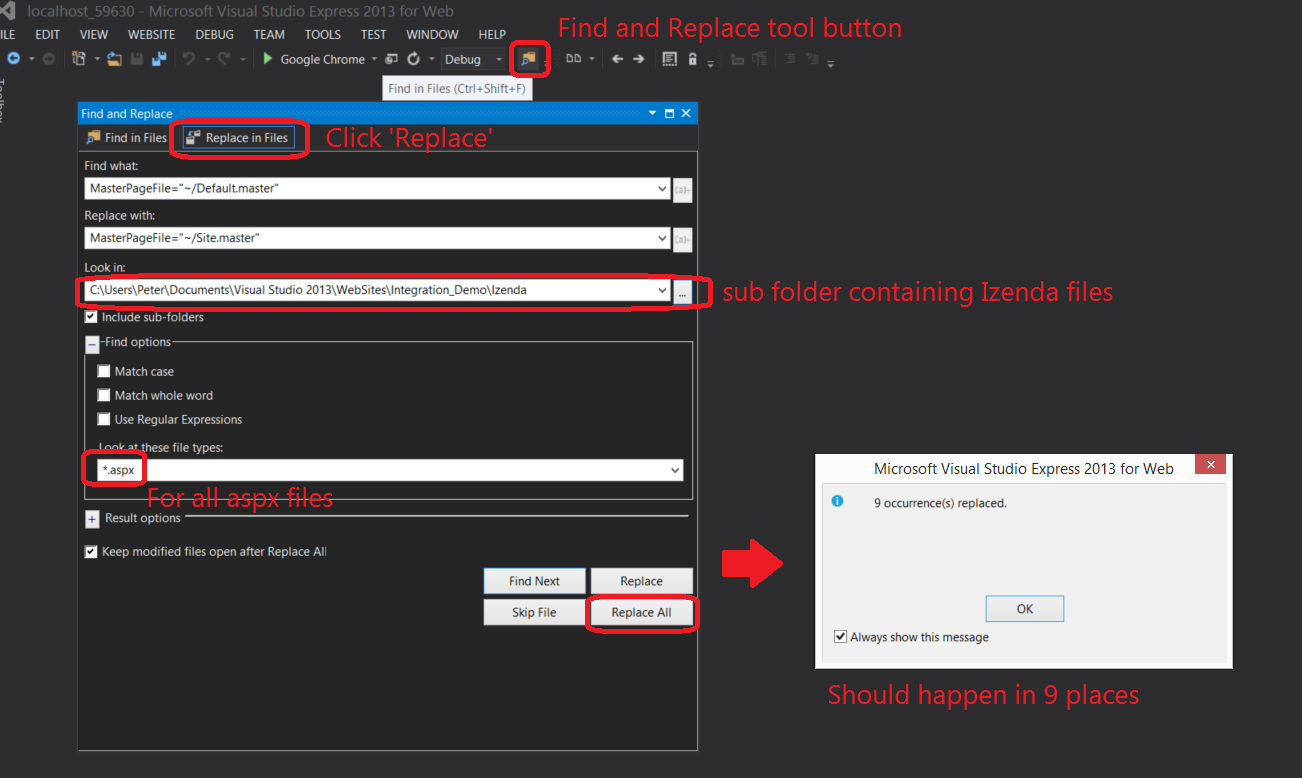
Change MasterPageFile="~/Default.master" to MasterPageFile="~/Site.master" in all Izenda .aspx pages. This can be done easily using Visual Studio's 'Find and Replace' tool as below.
###Step 9. In all Izenda .aspx pages, update paths to Izenda .ascx controls
For example:
<%@ Register Src="~/Resources/html/ReportViewer-Head.ascx" TagName="ccn1" TagPrefix="ccp1" %>
should be changed to
<%@ Register Src="~/Izenda/Resources/html/ReportViewer-Head.ascx" TagName="ccn1" TagPrefix="ccp1" %>
As we did in the previous step, use 'Find and Replace' tool again as below

###Step 10. Copy rs.aspx and rs.aspx.cs from Webforms kit to website root folder
###Step 11. Comment out form tag from ReportDesginer.aspx in Izenda to avoid a form tag conflict
<!-- comment out form tag from ReportDesginer.aspx as below -->

<%--<form id="form1" runat="server">--%>

      <div id="repHeader"></div>
      <cc1:adhocreportdesigner id="Adhocreportdesigner1" runat="server">
      </cc1:adhocreportdesigner>

     <%--</form>  --%>
###Step 12. Change the LicenseKey and ConnnectionString in Global.asax of project
To get a new trial key, you may contact sales@izenda.com.
AdHocSettings.LicenseKey = "INSERT_LICENSE_KEY_HERE";
AdHocSettings.SqlServerConnectionString = @"INSERT_CONNECTION_STRING_HERE";
###Step 13. Launch the website
