
Table of Contents
#Introduction
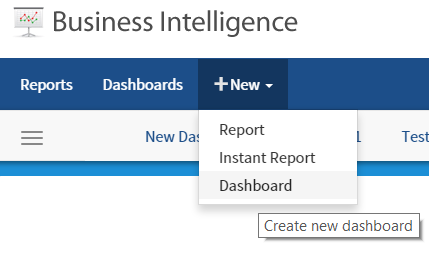
#Guide ##Creating a New Dashboard
Step 1. Click on the arrow to expose the drop down menu under New
#Features
#Installation
##Webforms
- Update as normal by downloading and replacing the bin and resources folder
- Download the Webforms Kit and take the Dash.aspx file and copying it to your project.
- In the global, update the dashboard viewer setting to AdHocSettings.DashboardViewer = "Dash.aspx";
##MVC
- Update as normal by downloading and replacing the bin and resources folder
- Download the MVC kit for 6.9 and add the new view to your project
-
Update the IzendaReportingController.cs to include public ActionResult Dash() {
return View(); }
- In the global, update the dashboard viewer setting to AdHocSettings.DashboardViewer = "Dash";