#Custom Aggregate Functions
##Question
Can I define my own grouping and aggregate functions in Izenda? If so, how?
##Answer
Yes, you can use as many custom aggregate functions as you like. Within the AdHocSettings class exists a collection called AggregateFunctions that can be used to implement your own custom aggregate functions. For a detailed description of this item, click the above link. We will demonstrate other techniques of adding a custom function to this list below.
###Method 1: SimpleAggregateFunction
The SimpleAggregateFunction class in the AdHoc namespace has multiple overloads that allow for various implicitly named aggregate functions. The parameters are as follows:
-
Overload 1:
- Function - This is the name of the aggregate function to use. This can get applied to a SELECTed field or to a field in the GROUP BY clause. The corresponding database function must only take a single parameter to operate correctly.
-
Overload 2:
- Function - As above.
- Caption - This is the text that will appear in the function dropdown menu on the Fields tab.
-
Overload 3:
- Function - As above.
- Caption - As above.
- isGroup - A boolean value specifying whether this is a grouping function.
- isExtraFunction - A boolean value specifying whether this is
-
Overload 4:
- Function - As above.
- Caption - As above.
- allowedTypeGroups - A list of SqlTypeGroups that use the associated enumeration to determine for which data types this function is valid.
- isGroup - As above.
- isExtraFunction - As above.
-
Overload 5:
- Function - As above.
- Caption - As above.
- allowedTypeGroups - A list of SqlTypeGroups that use the associated enumeration to determine for which data types this function is valid.
- disallowedTypeGroups - A list of SqlTypeGroups that use the associated enumeration to determine for which data types this function is not valid. If allowedTypeGroups is used (not null), this setting has no effect.
- isGroup - As above.
- isExtraFunction - As above.
And below is what the resulting function could look like.
AdHocSettings.AggregateFunctions["Group By Absolute Value"] = new SimpleAggregateFunction("ABS", "Group (Absolute Value)", new SqlTypeGroup[] { SqlTypeGroup.Numeric, SqlTypeGroup.Real }, true, true);###Method 2: New class
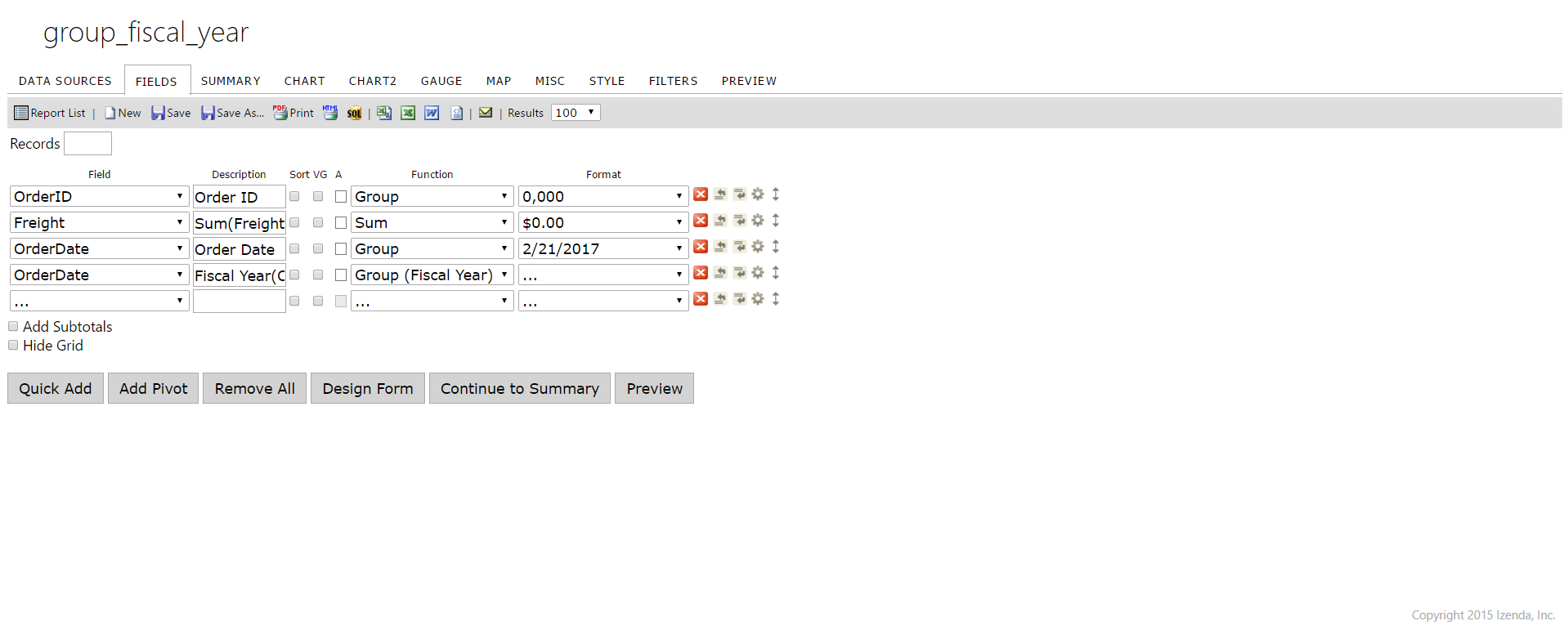
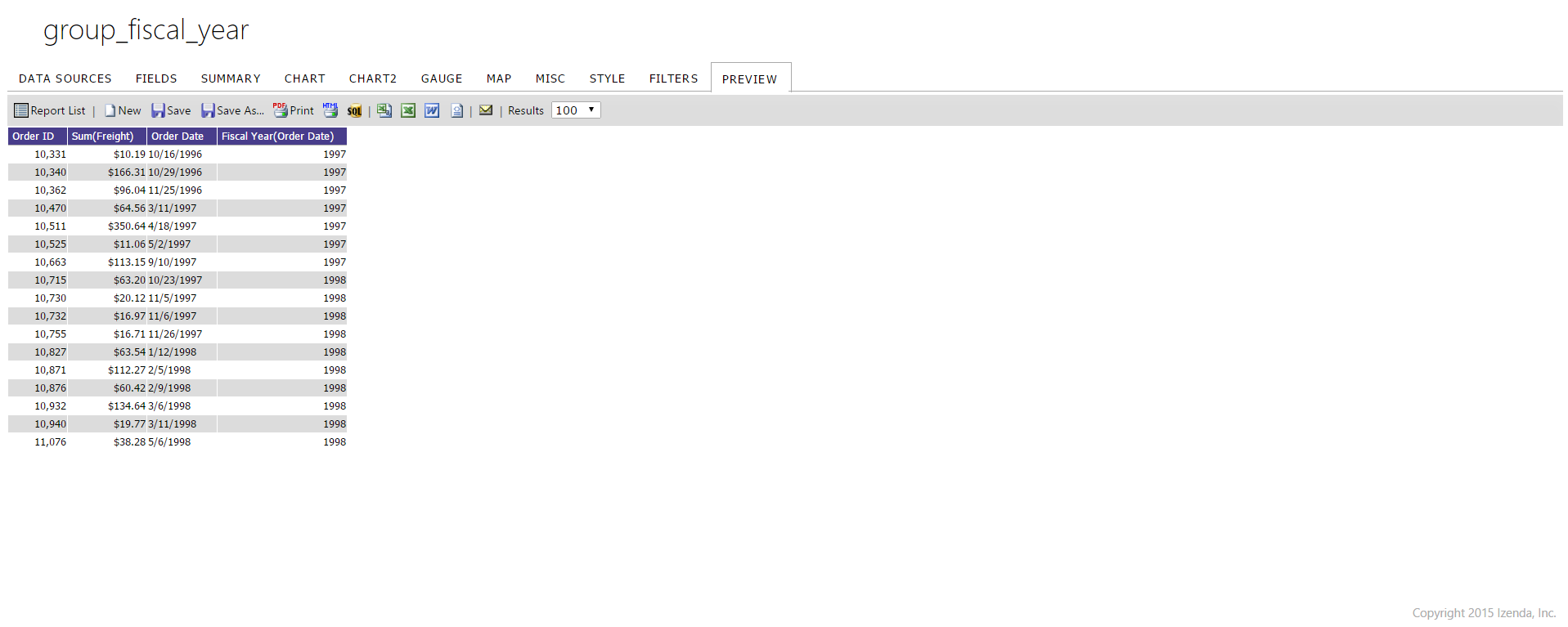
You may introduce your own custom class to contain your aggregate function. A custom class is useful for when you are using more complex expressions that require specific conditional formatting of the parameters. This class simply inherits the IAggregateFunction interface, overriding each of the interface's methods. See the example below for what this could look like.
NOTE: When you use SimpleAggregateFunction constructor you can't specify the function as a format string, you can only specify a function to call and then those string will be generated automatically as ().
So the correct way to specify such function would be this:
public class GroupByFiscalYearFunction : IAggregateFunction {
    public string GetSQL(string innerExpression, SqlType type) {
      //returns the portion of the GROUP BY clause just after the GROUP BY keyword and wraps around the respective field selected in the fields dropdown list.
      return string.Format("DATEPART(yyyy, DATEADD(mm, 3, {0}))", innerExpression);
    }

    private string caption;
    public string Caption { get { return caption; } }

    private Hashtable allowedTypeGroups = null;
    public Hashtable AllowedTypeGroups {
      get { return allowedTypeGroups; }
    }

    private Hashtable disallowedTypeGroups = null;
    public Hashtable DisallowedTypeGroups {
      get { return disallowedTypeGroups; }
    }

    private bool _isScalar;
    public bool IsScalar {
      get {
        return _isScalar;
      }
      set {
        _isScalar = value;
      }
    }

    private bool isGroup;
    public bool IsGroup {
      get { return isGroup; }
    }

    public bool CompatibilityWithFunction(bool isExtraFunction) {
      return true;
    }

    private SqlType outputType = SqlType.Unknown;
    public SqlType OutputType {
      get { return outputType; }
      set { outputType = value; }
    }

    private bool isExtraFunction = false;
    public bool IsExtraFunction {
      get { return isExtraFunction; }
    }

    public IFormatter[] Formatters {
      get { return new IFormatter[0]; }
    }

    public GroupByFiscalYearFunction() {
      this.caption = "Group (Fiscal Year)";

      this.allowedTypeGroups = new Hashtable(2);
      this.allowedTypeGroups.Add(SqlTypeGroup.DateTime, true);
      this.allowedTypeGroups.Add(SqlTypeGroup.Date, true);

      this.isGroup = true;
    }
  }
Public Class GroupByFiscalYearFunction
Implements IAggregateFunction
Public Function GetSQL(ByVal innerExpression As String, ByVal type As SqlType) As String Implements IAggregateFunction.GetSQL
'returns the portion of the GROUP BY clause just after the GROUP BY keyword And wraps around the respective field selected in the fields dropdown list.
Return String.Format("DATEPART(yyyy, DATEADD(mm, 3, {0}))", innerExpression)
End Function
Private _caption As String
Public ReadOnly Property Caption As String Implements IAggregateFunction.Caption
Get
Return _caption
End Get
End Property
Private _allowedTypeGroups As Hashtable = Nothing
Public ReadOnly Property AllowedTypeGroups As Hashtable Implements IAggregateFunction.AllowedTypeGroups
Get
Return _allowedTypeGroups
End Get
End Property
Private _disallowedTypeGroups As Hashtable = Nothing
Public ReadOnly Property DisallowedTypeGroups As Hashtable Implements IAggregateFunction.DisallowedTypeGroups
Get
Return _disallowedTypeGroups
End Get
End Property
Private _isScalar As Boolean
Public Property IsScalar As Boolean Implements IAggregateFunction.IsScalar
Get
Return _isScalar
End Get
Set
_isScalar = Value
End Set
End Property
Private _isGroup As Boolean
Public ReadOnly Property IsGroup As Boolean Implements IAggregateFunction.IsGroup
Get
Return _isGroup
End Get
End Property
Public Function CompatibilityWithFunction(ByVal isExtraFunction As Boolean) As Boolean Implements IAggregateFunction.CompatibilityWithFunction
Return True
End Function
Private _outputType As SqlType = SqlType.Unknown
Public Property OutputType As SqlType Implements IAggregateFunction.OutputType
Get
Return _outputType
End Get
Set
_outputType = Value
End Set
End Property
Private _isExtraFunction As Boolean = False
Public ReadOnly Property IsExtraFunction As Boolean Implements IAggregateFunction.IsExtraFunction
Get
Return _isExtraFunction
End Get
End Property
Public ReadOnly Property Formatters() As IFormatter() Implements IAggregateFunction.Formatters
Get
Return New IFormatter() {}
End Get
End Property
Public Sub New()
Me._caption = "Group (Fiscal Year)"
Me._allowedTypeGroups = New Hashtable(2)
Me._allowedTypeGroups.Add(SqlTypeGroup.DateTime, True)
Me._allowedTypeGroups.Add(SqlTypeGroup.Date, True)
Me._isGroup = True
End Sub
End Class##Screenshots