#DataSourceCategories
##About
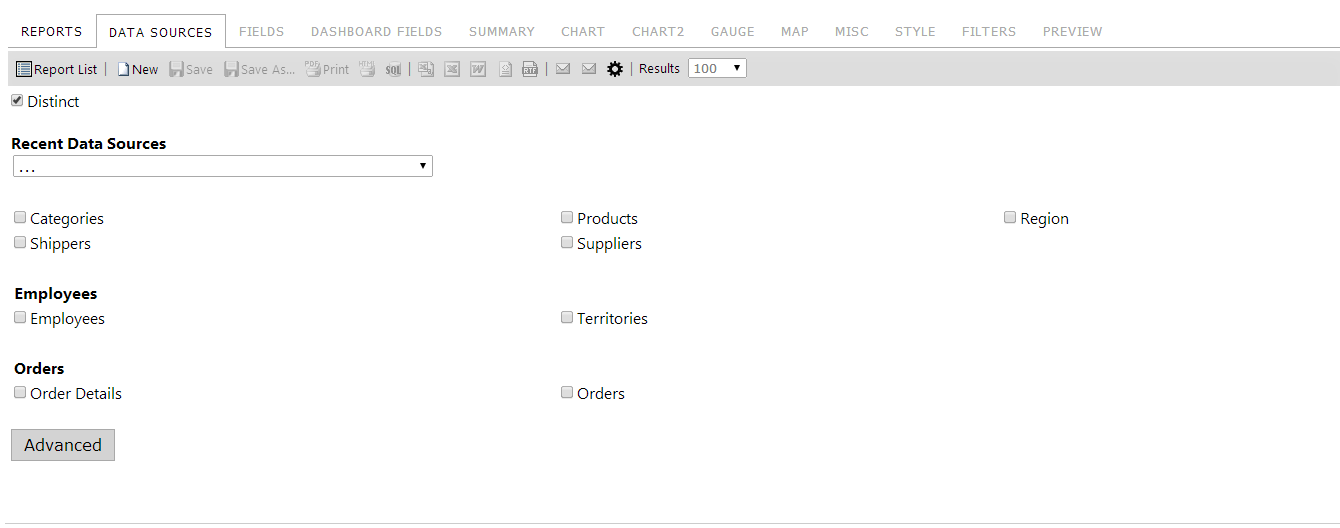
This allows you to assign sets of data sources to different categories. When ShowDataSourcesAsCheckBoxes is enabled, the Data Sources tab will display each category in bold below the Recent Data Sources dropdown and all data sources contained in that category will be displayed under that category. Otherwise, this setting has no effect.
Default Value: Empty list
##Global.asax (C♯)
//main class: inherits DatabaseAdHocConfig or FileSystemAdHocConfig
public class CustomAdHocConfig : Izenda.AdHoc.DatabaseAdHocConfig
{
  // Configure settings
  // Add custom settings after setting the license key and connection string by overriding the ConfigureSettings() method
  public static void InitializeReporting() {
    //Check to see if we've already initialized.
    if (HttpContext.Current.Session == null || HttpContext.Current.Session["ReportingInitialized"] != null)
      return;
    AdHocSettings.LicenseKey = "INSERT_LICENSE_KEY_HERE";
    //Creates a connection to Microsoft SQL Server
    AdHocSettings.SqlServerConnectionString = "INSERT_CONNECTION_STRING_HERE";
    Izenda.AdHoc.AdHocSettings.AdHocConfig = new CustomAdHocConfig();
    AdHocSettings.DataSourceCategories = new string[] {"Employees", "Territories"}; //The relevant setting
    HttpContext.Current.Session["ReportingInitialized"] = true;
  }
}
##Global.asax (VB.NET)
'main class: inherits DatabaseAdHocConfig or FileSystemAdHocConfig
Public Class CustomAdHocConfig
    Inherits Izenda.AdHoc.DatabaseAdHocConfig

    Shared Sub InitializeReporting()
        'Check to see if we've already initialized
        If HttpContext.Current.Session Is Nothing OrElse HttpContext.Current.Session("ReportingInitialized") IsNot Nothing Then
            Return
        'Initialize System
        AdHocSettings.LicenseKey = "INSERT_LICENSE_KEY_HERE"
        AdHocSettings.SqlServerConnectionString = "INSERT_CONNECTION_STRING_HERE"
        Izenda.AdHoc.AdHocSettings.AdHocConfig = New CustomAdHocConfig()
        AdHocSettings.DataSourceCategories = New String() {"Employees", "Territories"} 'The relevant setting
        HttpContext.Current.Session("ReportingInitialized") = True
    End Sub
End Class
##Screenshots
AdHocSettings.DataSourceCategories["Employees"] = new string[] { "Employees", "Territories" };
AdHocSettings.DataSourceCategories["Orders"] = new string[] { "Orders", "Order Details" };